Playing back DSD audio using foobar2000
2
1 Download the latest stable version of foobar2000 at the following website.
http://www.foobar2000.org/download
2 Double-click the downloaded file “foobar2000_v*.*.*.exe” to start installation.
3 Follow the on-screen instructions to install the software.
1 Download “Yamaha Steinberg USB Driver” at the
following Yamaha website.
http://download.yamaha.com/
2 Install “Yamaha Steinberg USB Driver” on your
computer, connect the unit to your computer,
then open its control panel.
For details on the installation and how to open the
control panel of the driver, refer to the Installation Guide
supplied with the driver software.
For details on the connection, refer to the Owner’s
Manual of the unit.
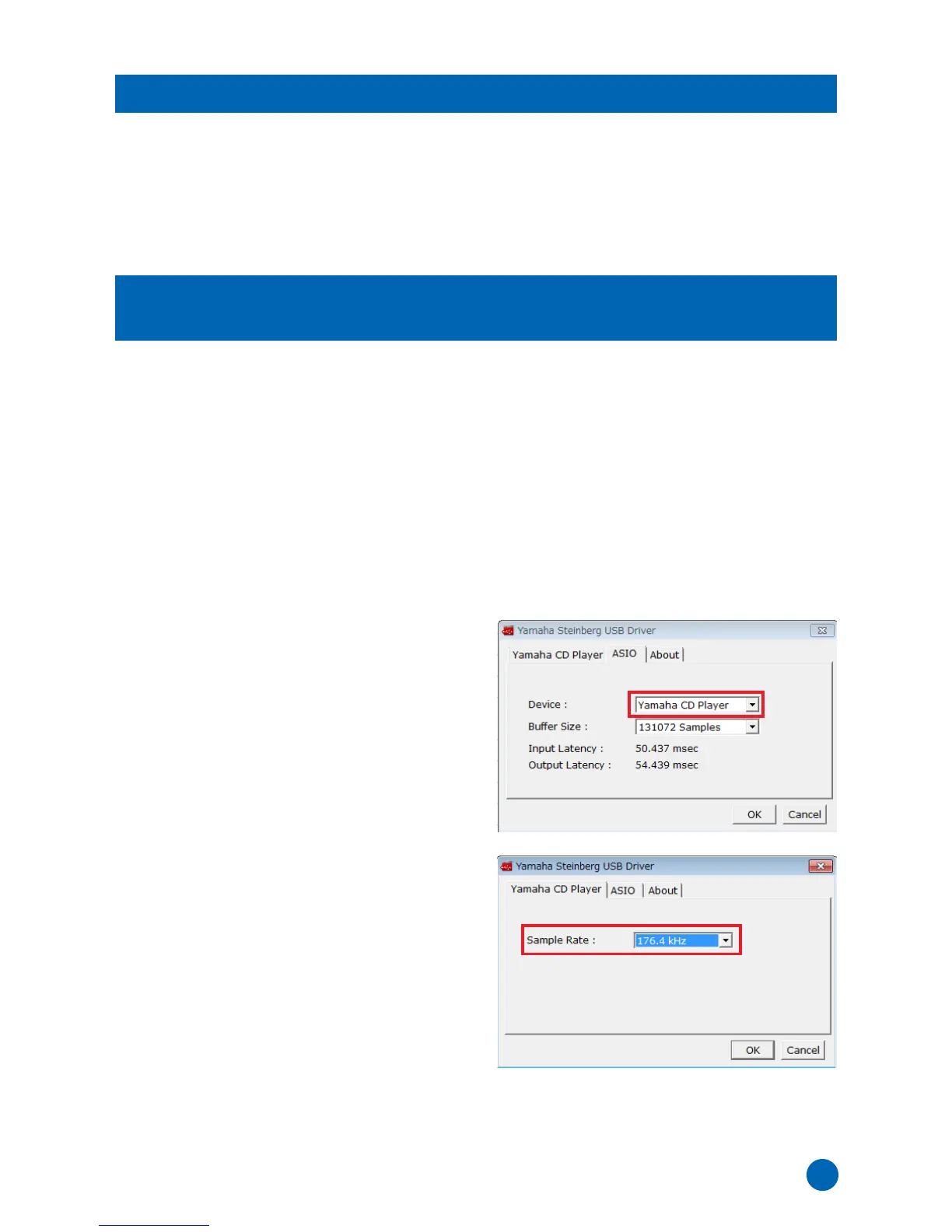
3 Configure the following control panel settings.
• “ASIO” setting
Device: Yamaha CD player
• “Yamaha CD Player” setting
Sample Rate: 176.4 kHz
4 Click [OK].
Installation and settings of “Yamaha Steinberg USB
Driver” is now completed.
Installing foobar2000
Installing Yamaha Steinberg USB Driver and
configuring its settings



 To Next Page