© 2013 Yamaha Corporation AVHIFI_PBDSDC_EN00
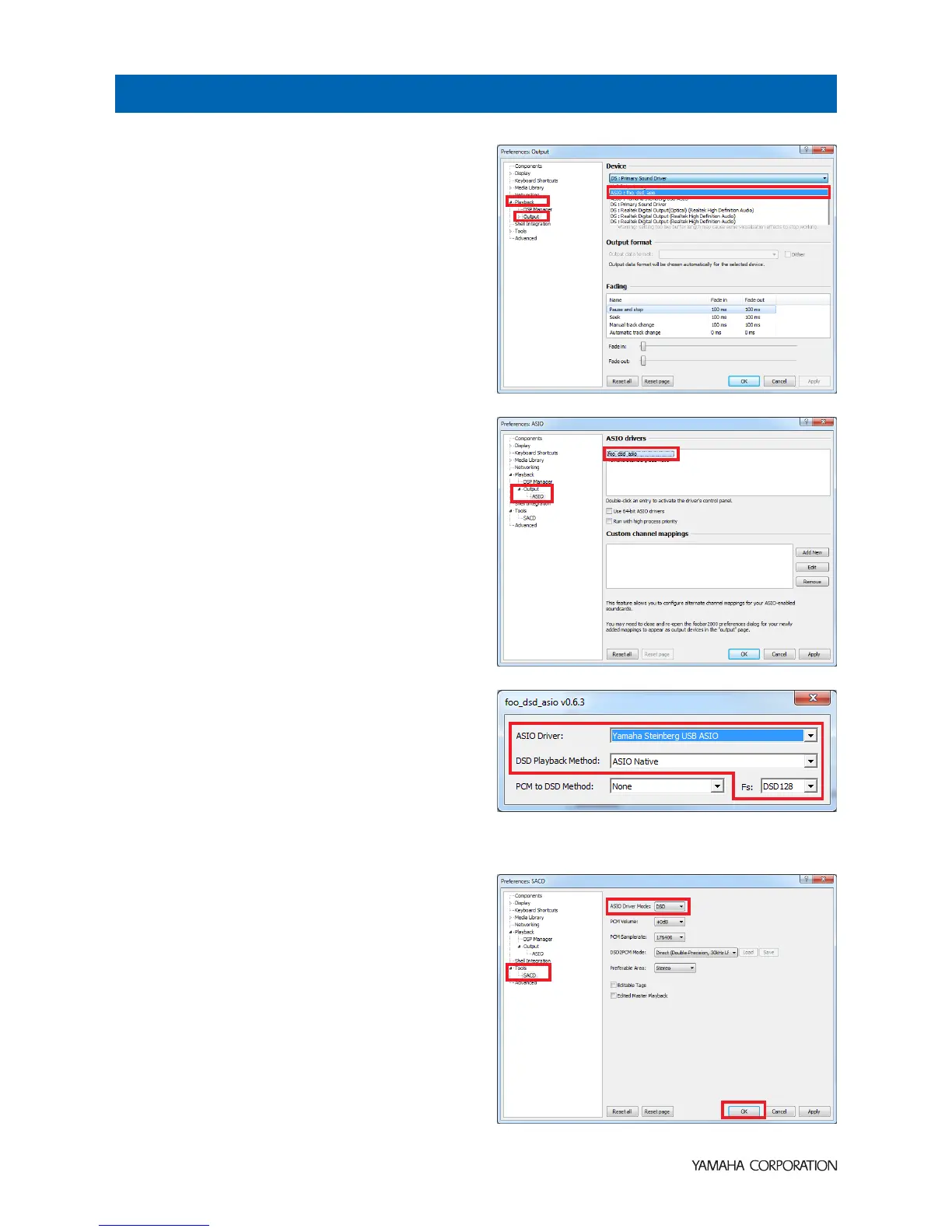
1 Click [File] [Preferences] [Playback]
[Output], then select “ASIO:foo_dsd_asio” from
the “Device” pull-down list.
2 Click [Output] [ASIO], then double-click
“foo_dsd_asio” in “ASIO drivers”.
3 Configure the following settings.
ASIO Driver: Yamaha Steinberg USB ASIO
DSD Playback Method: ASIO Native
Fs: DSD64 (normal speed playback) or DSD128
(double speed playback)
4 Click [X] (close button) to close the window.
5 Click [Tools] [SACD], configure the following
setting.
ASIO Driver Mode: DSD
6 Click [OK].
DSD playback settings of foobar2000 is now
completed.
You are ready to enjoy DSD audio playback on the unit.
Configuring DSD playback settings of foobar2000



 To Next Page