MX-100B
Test program
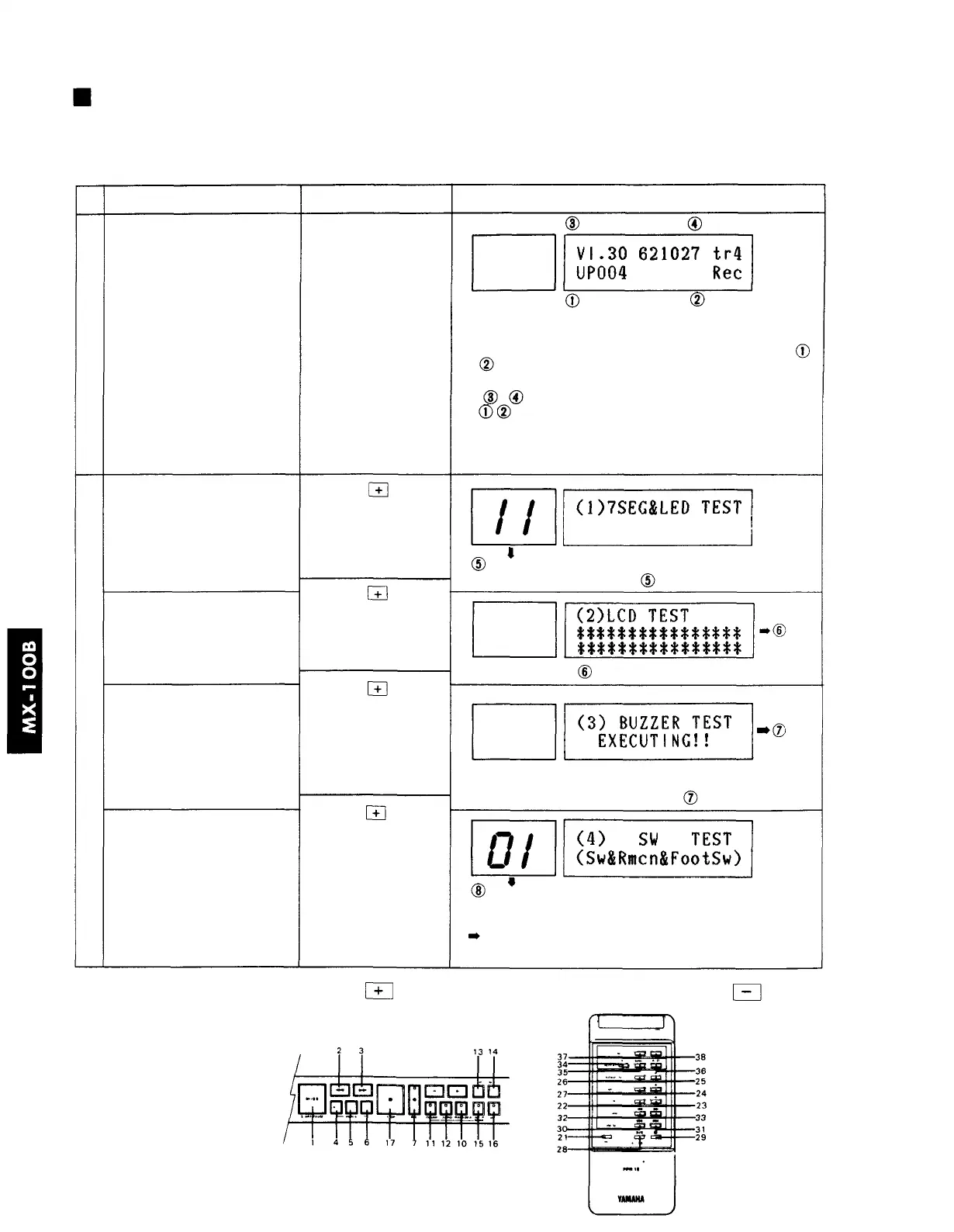
This tests the control functions and the playback and recording systems of the disklavier.
11
A
B
Item
Start the test program
Contents of each test
1. 7 segment LED test
2. LCD test
3. Buzzer test
4. Switch test
Operation
• Remove the disk
• While pressing the
L/R button,
• turn the power ON.
press the key
press the key
press the key
press the key
to the next test
Display / contents of test
Version no. Trimmer value
Piano type Controller type
UP or GP Rec or Ply
upright grand record playback
• Check that the piano type and controller type match ( ,
)
• The ROM version and trimmer value will be displayed
( - )
* can be switched using the DIP switch on the CPU
board.
00,
11~99
• Check that the LED lights (00, 11~99), each switch
• Check the LCD The checkered pattern blinks
• Check the metronome buzzer. The buzzer sounds in
synchronization with the blinking EXECUTING!!
01~40 (8, 9, 18, 20, and 39 omitted)
• Check the switch no. for each button on the control panel
and remote control, and the foot switches.
When the buttons in the diagram below are pressed,
the LED will display the corresponding number.
To advance to the next test press the
button. To return to the previous test press
button.
Switch no.
Foot sw. no. = 40







 To Next Page