13
,,,,
@
@@@@AAAA
BBBB
CCCCCDDDDDEEEE
FFFFFGGGGGHHHH
À
ÀÀÀÀÁÁÁÁ
ÂÂÂÂ
ÃÃÃÃÃÄÄÄÄÄÅÅÅÅ
ÆÆÆÆÆÇÇÇÇÇÈÈÈÈ
,
,,,,
@
@@@@AAAA
BBBB
CCCCCDDDDDEEEE
FFFFFGGGGGHHHH
À
ÀÀÀÀÁÁÁÁ
ÂÂÂÂ
ÃÃÃÃÃÄÄÄÄÄÅÅÅÅ
ÆÆÆÆÆÇÇÇÇÇÈÈÈÈ
,
,,,,
@
@@@@AAAA
BBBB
CCCCCDDDDDEEEE
FFFFFGGGGGHHHH
À
ÀÀÀÀÁÁÁÁ
ÂÂÂÂ
ÃÃÃÃÃÄÄÄÄÄÅÅÅÅ
ÆÆÆÆÆÇÇÇÇÇÈÈÈÈ
,
,,,,
Step 2
Using the Keyboard
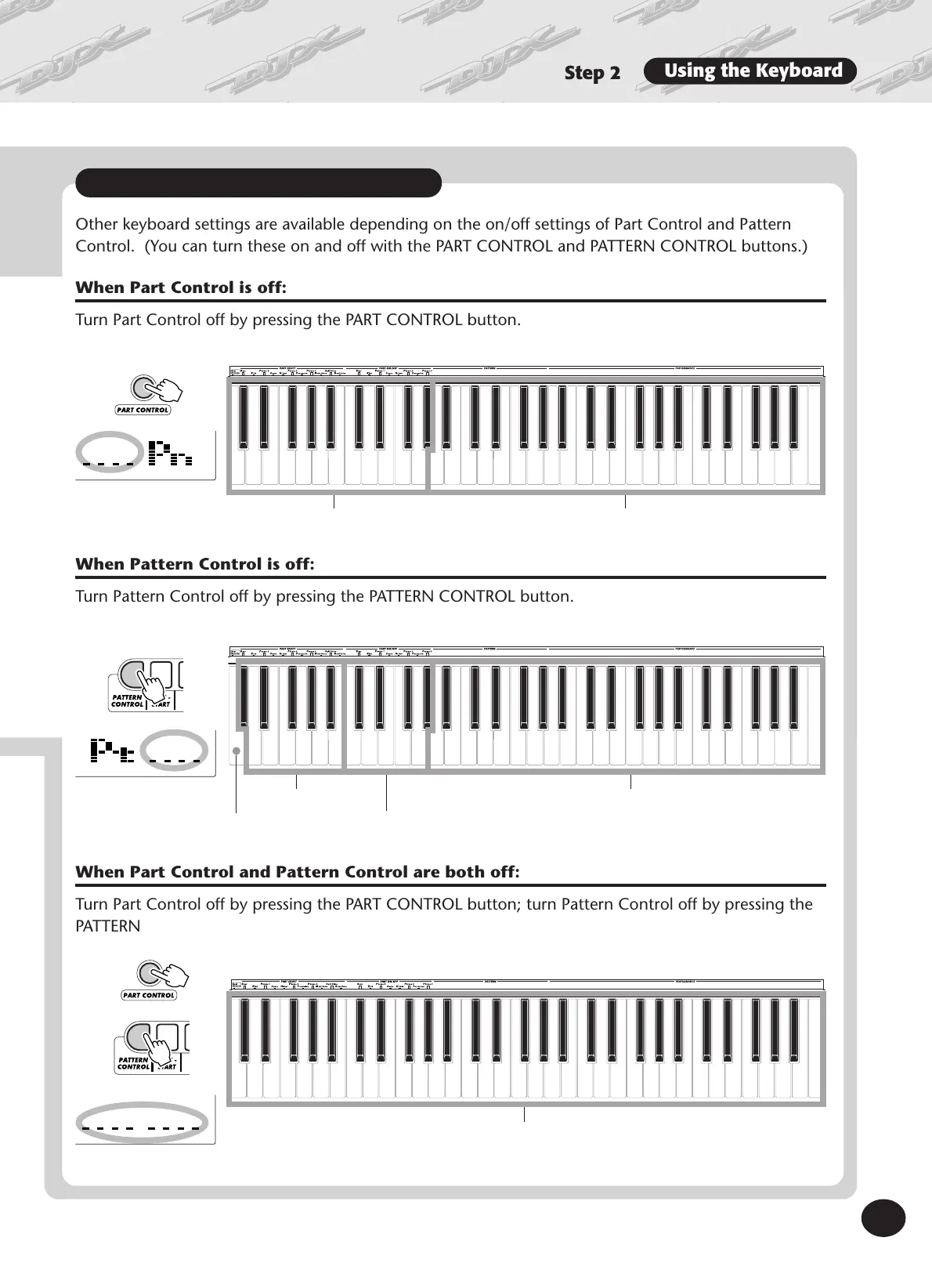
Other keyboard settings are available depending on the on/off settings of Part Control and Pattern
Control. (You can turn these on and off with the PART CONTROL and PATTERN CONTROL buttons.)
When Part Control is off:
Turn Part Control off by pressing the PART CONTROL button.
When Pattern Control is off:
Turn Pattern Control off by pressing the PATTERN CONTROL button.
When Part Control and Pattern Control are both off:
Turn Part Control off by pressing the PART CONTROL button; turn Pattern Control off by pressing the
PATTERN CONTROL button. In this condition, you can play the entire keyboard normally.
C1 — Ab2 A2 — C6
Pattern Keys Performance Keys
C1 — B1 C2 — Ab2 A2 — C6
Part Select Keys
Part On/Off Keys
Performance Keys
Entire keyboard (C1 — C6) is used for Performance.
More keyboard settings
Beat Reverse Key
(See page 52)





 To Next Page