16
,,,,
@@@@
AAAA
BBBB
CCCCCDDDDEEEEE
FFFFFGGGGHHHHH
ÀÀÀÀ
ÁÁÁÁ
ÂÂÂÂ
ÃÃÃÃÃÄÄÄÄÅÅÅÅÅ
ÆÆÆÆÆÇÇÇÇÈÈÈÈÈ
,,,,
@@@@
AAAA
BBBB
CCCCCDDDDEEEEE
FFFFFGGGGHHHHH
ÀÀÀÀ
ÁÁÁÁ
ÂÂÂÂ
ÃÃÃÃÃÄÄÄÄÅÅÅÅÅ
ÆÆÆÆÆÇÇÇÇÈÈÈÈÈ
,,,,
@@@@
AAAA
BBBB
CCCCCDDDDEEEEE
FFFFFGGGGHHHHH
ÀÀÀÀ
ÁÁÁÁ
ÂÂÂÂ
ÃÃÃÃÃÄÄÄÄÅÅÅÅÅ
ÆÆÆÆÆÇÇÇÇÈÈÈÈÈ
,,,,
Step 4 Digital Sampling
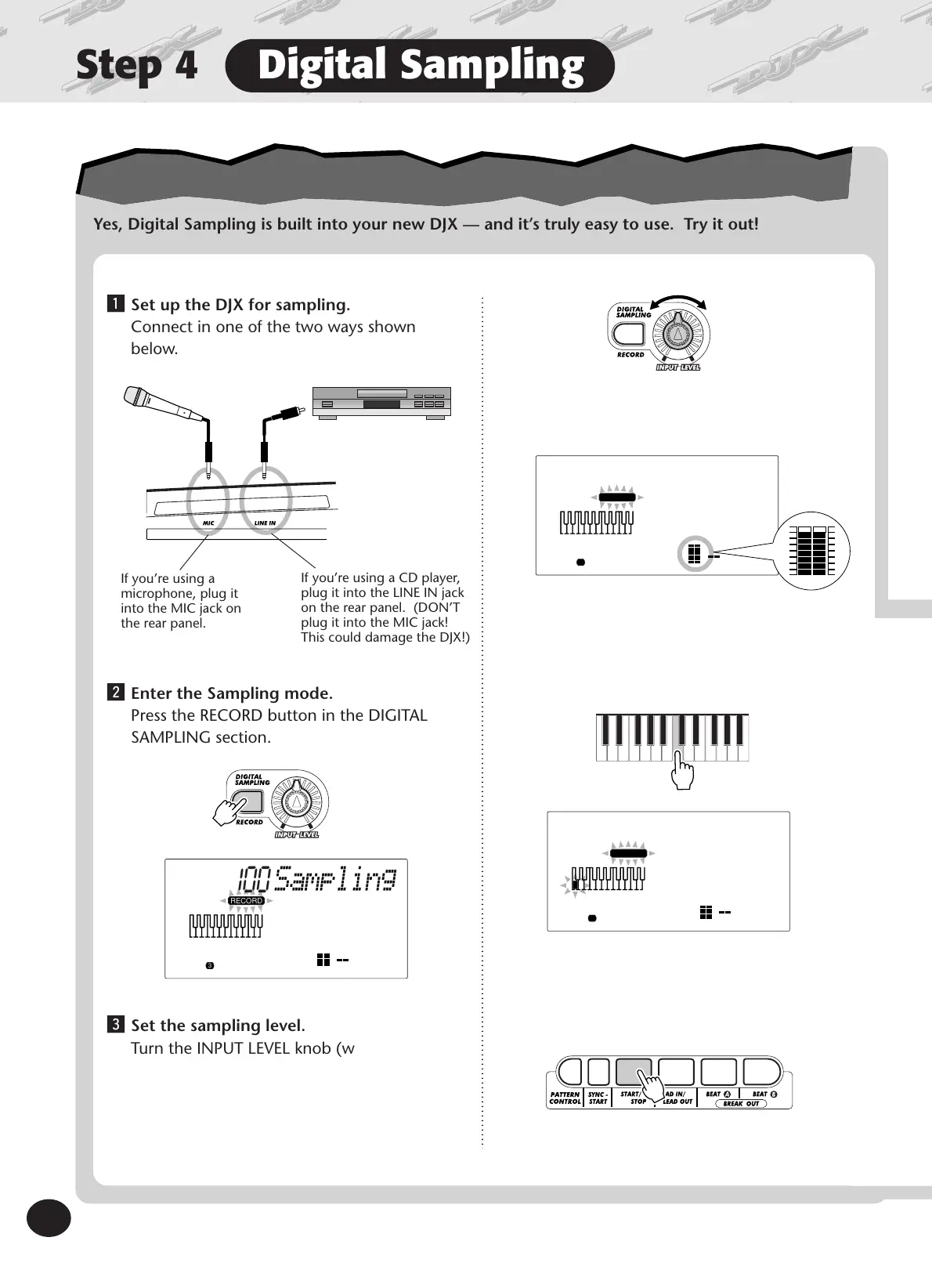
Yes, Digital Sampling is built into your new DJX — and it’s truly easy to use. Try it out!
z Set up the DJX for sampling.
Connect in one of the two ways shown
below.
x Enter the Sampling mode.
Press the RECORD button in the DIGITAL
SAMPLING section.
If you’re using a
microphone, plug it
into the MIC jack on
the rear panel.
If you’re using a CD player,
plug it into the LINE IN jack
on the rear panel. (DON’T
plug it into the MIC jack!
This could damage the DJX!)
100
RECORD
3
Sampling
c Set the sampling level.
Turn the INPUT LEVEL knob (while singing
into the microphone or playing the CD).
b Set sampling to standby.
Press the START/STOP button.
100
RECORD
3
Sampling
v Press a key on the keyboard.
Press middle C (C3) for this example. The
sound you record will be assigned to this key.
100
RECORD
3
Sampling
Join the sampling revolution!
Join the sampling revolution!
Make sure the “level meter” in the display
doesn’t go above this level:









 To Next Page