87
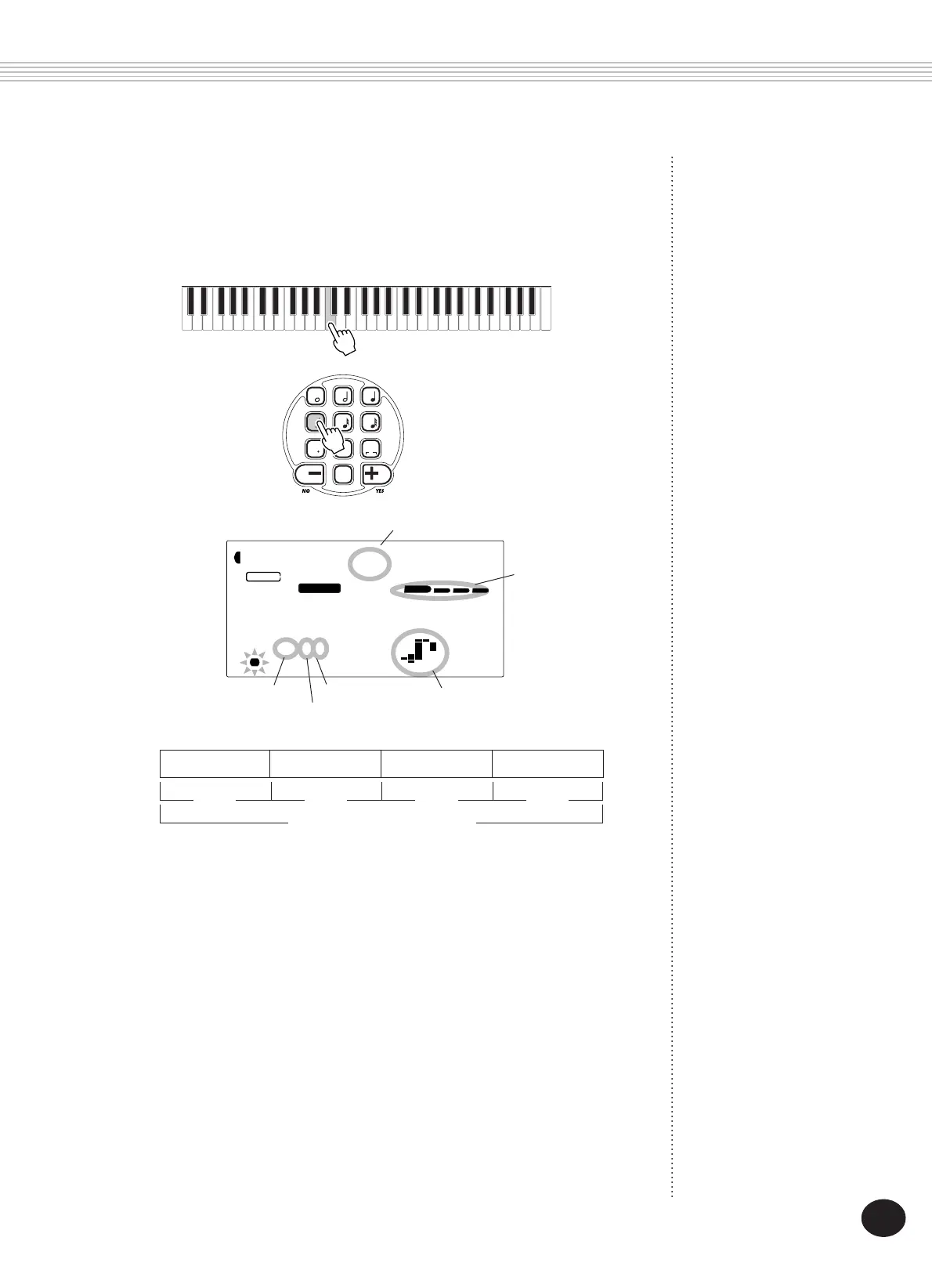
The beat bars also indicate the current recording position (as the beat
of the measure).
The note is automatically entered and Step recording moves to the
next available position. For example, if a whole note is entered at the
beginning of measure 1, the next position is the beginning of mea-
sure 2.
As mentioned above, you can use the +/- keys to move backward and
forward in the track. When material has been recorded, this steps
through and sounds each note in succession.
BWD
0
velocity
7 8
rest
9
3
4 56
123
FWD
SONG RECORDING
q(96 Clicks) q(96 Clicks) q(96 Clicks) q(96 Clicks)
Measure (384 Clicks)
Beat Beat Beat Beat
Note value
Note name
Measure number Clicks
004
001 201-
MEASURE
RECORD
SONG
1
C3
Beat bars
Beat number
3) Select the note (time) value with the numeric keypad. (The
note value is shown as an icon in the display.)
For example, play middle C (C3), then press the “4” button (1/8
note).









 To Next Page