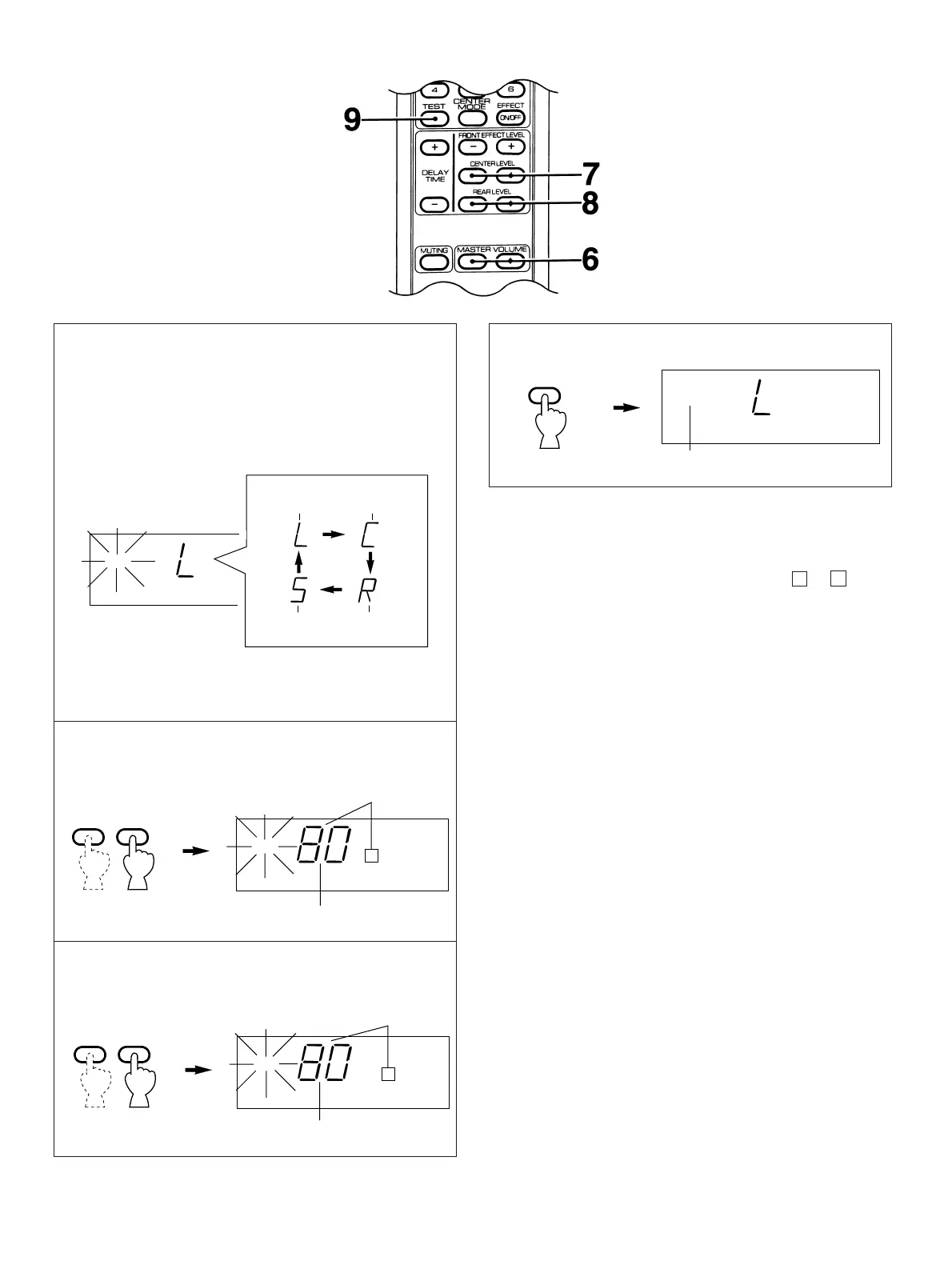
6 Turn up the volume by using the remote control
transmitter. You will hear a test tone (like pink noise)
from the left front speaker, then the center speaker,
then the right front speaker, then the rear speakers, for
about two seconds each. The display illumination
changes as shown below.
*
The test tone from the left rear speaker and the right rear
speaker will be heard at the same time.
7 Make the sound output level of the center speaker the
same as that of the front speakers.
8 Make the sound output level of the rear speakers the
same as that of the front speakers.
12
9
Notes
●
Once you have completed these adjustments, use only this
unit’s VOLUME control to adjust listening volume. Do not
change any other volume settings in this unit.
●
If the connecting way of your components is B or C
shown on pages 7–8, also adjust the volume control(s) on
the integrated amplifier or power amplifier to achieve proper
balance.
●
In step 7, if the center mode is in the “PHANTOM”, the
sound output level of the center speaker can not be
adjusted. Because in this mode, the center sound is
automatically output from the left and right front speakers.





 To Next Page