9
DVD-E600
DVD-E600
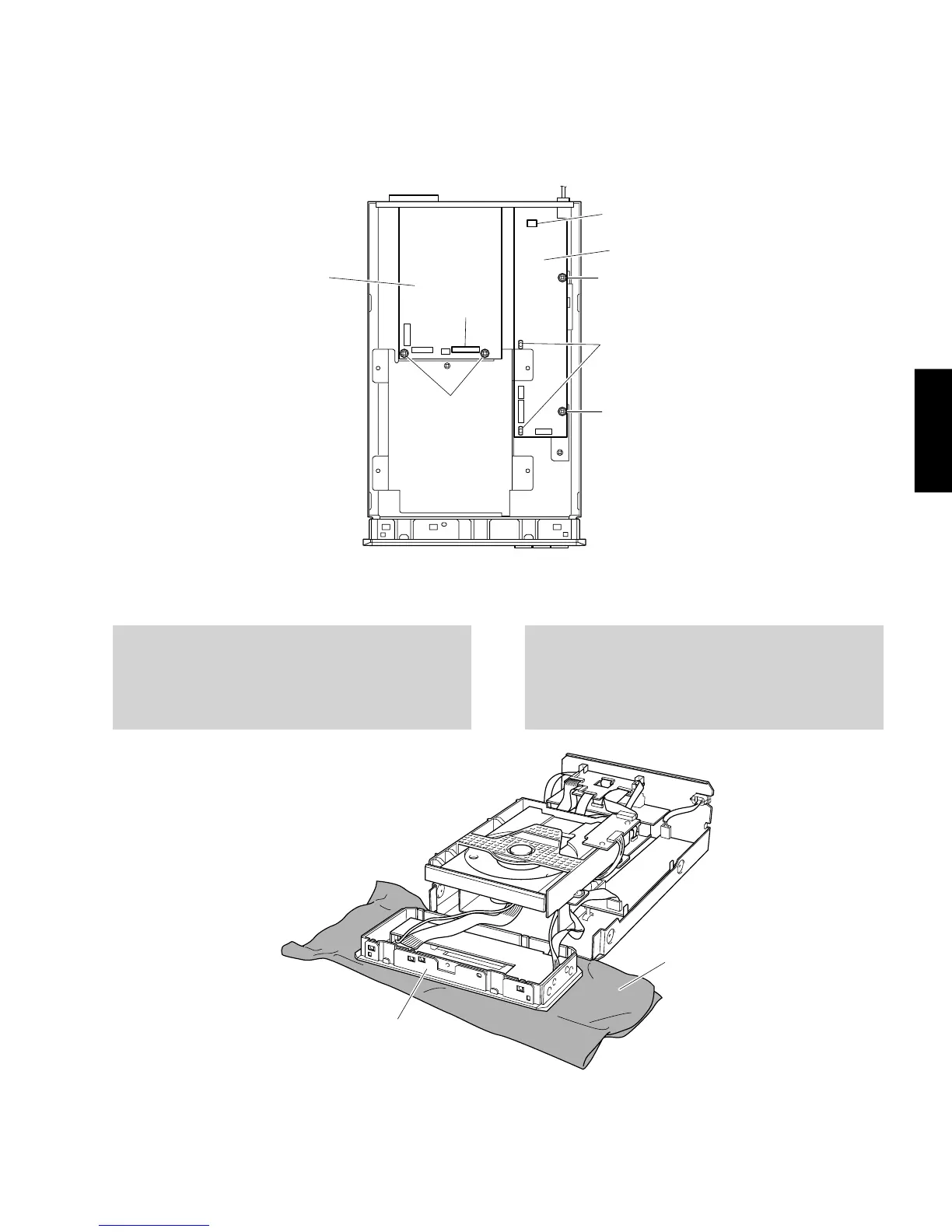
7. Removal of POWER SUPPLY UNIT
a. Remove 2 screws (A) in Fig. 5.
b. Loosen 2 spacers in Fig. 5.
c. Remove a connector (0100) in Fig. 5.
d. Remove the POWER SUPPLY UNIT.
7. POWERSUPPLYUNITの外し方
a. ⑪のネジ2本を外します。(Fig.5)
b. スペーサー2個をゆるめます。(Fig.5)
c. コネクター
0100
を外します。(Fig.5)
d. POWERSUPPLYUNITを取り外します。
MONO P.C.B.
1601
0100
POWER SUPPLY UNIT
Spacer / スペーサー
0
A
A
Fig. 5
P.C.B.チェックをする場合には
・
外したケーブル(コネクター)をすべて接続してください。
・
フラットケーブルを接続する際、極性に注意してくださ
い。
When checking the P.C.B.
• Reconnect all cables (connectors) that have been
disconnected.
• When connecting the flat cable, use care for the
polarity.
F
ro
n
t P
a
n
e
l U
n
it
布/Cloth
Fig. 6


 To Next Page