Names and Functions of Parts
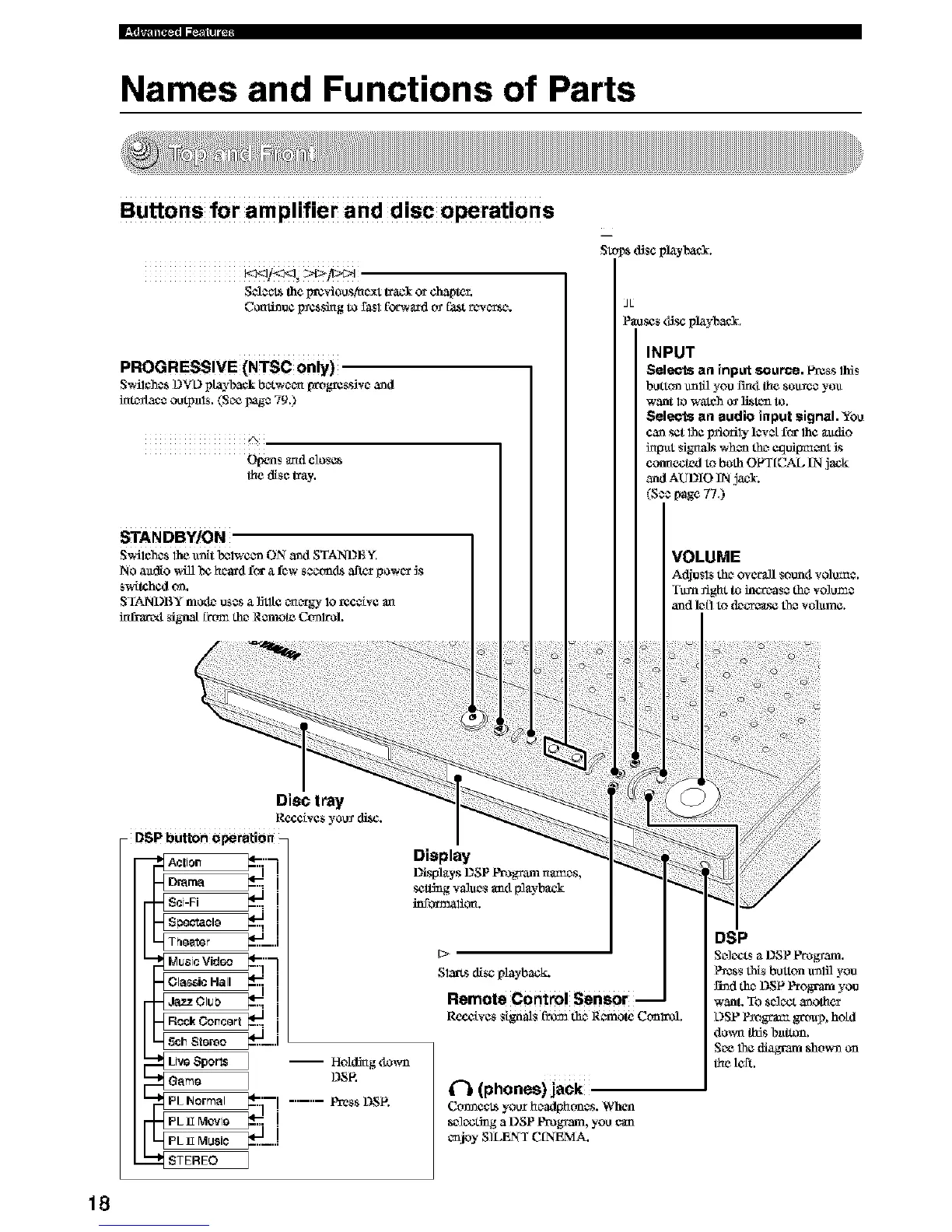
Buttons for amplifier and disc operations
S_*_ the prcviou s,tac_xttrack or chapter.
Cccati_u¢ Izcssing to fasl fbrwfu_dtv f_t rcwc_tsc_.
PROGRESSIVE (NTSC only)
S_i_hcsL)_L)playback bc_twc_c_[wog_css_vc_and
im_/acc outpals. (Soe _ag_ 79.)
A
Opens and close*
the disc tray.
Stops d_scplayl'axcL
JL
P_oscs ¢fi_ playback.
INPUT
Selects an input source. P_ss this
button u_lfl you I'm4 the sou_c_ yo_
w_nt Iowatch o_ li_tcn to.
Selects an audio input signal. You
cansetthe _odly ]cvctf_ the _dio
h_l_t signals whoa th_ Ctldipt_c_t _s
connected toboth OFT[CAL IN jack
and AUDIO IN jacl.
(S** page 77.)
18





 To Next Page