Storing Manufacturer Codes in the Remote
Control
If you set the manufacturer code (a unique code assigned to each
manufacturer) in the CinemaStation Remote Control, you can operate a
connected television, VCR, CD or MD recorder with the Remote Control
• Depem_g on the mt_dct, Lh¢R_aol* Cona_ot may not wor_q or only work wit_ a ]iraile<t
nu_ab¢_ or f_¢tto_s, ha 1NS c_tse, use the _mote conh_o[ I_aIcame _-ilhlh¢ l_[¢vision, VCR,
CD or MD reorder.
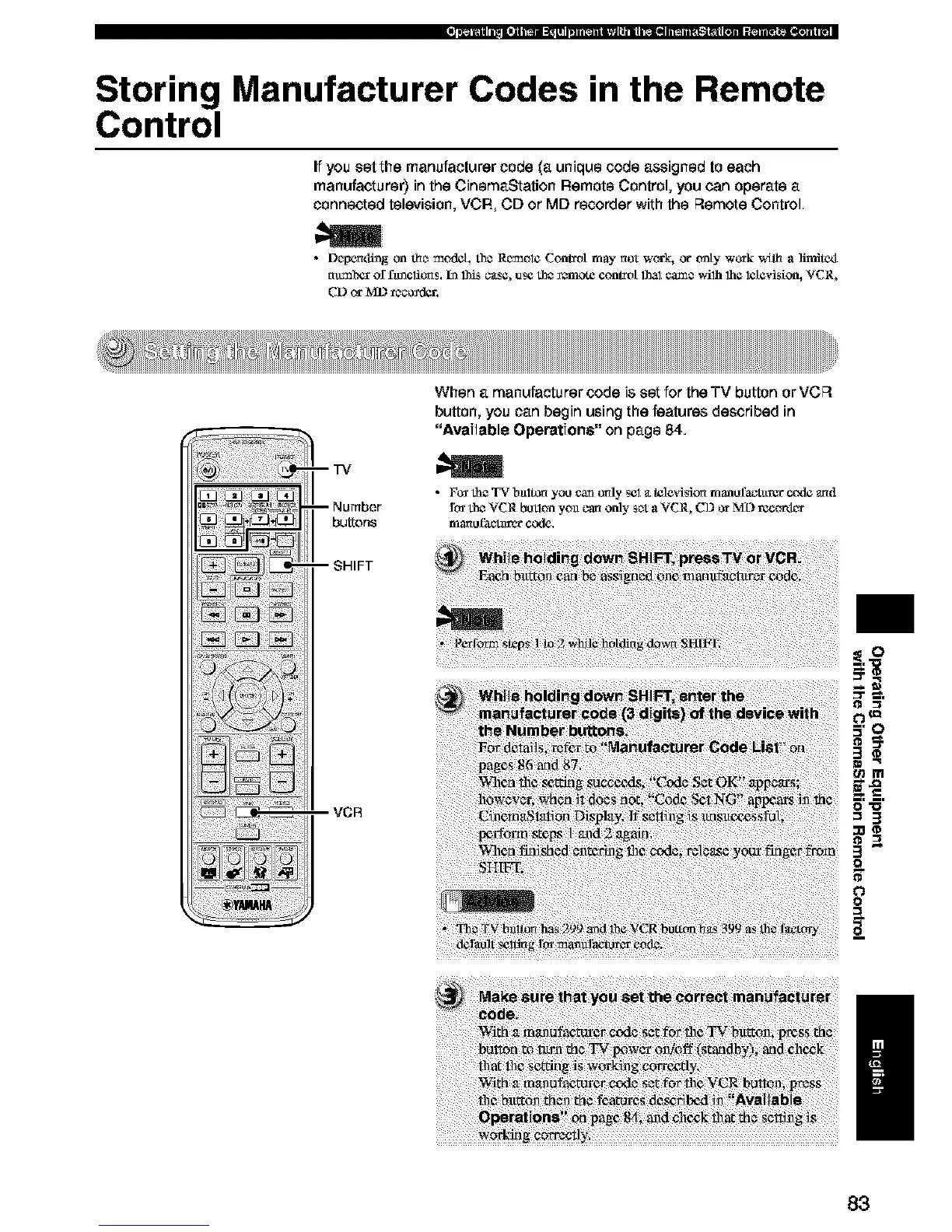
--TV
--Number
buttons
-- SHIFT
VCR
When a manufacturer code is set for the TV button or VCR
button, you can begin using the features described in
"Available Operations" on page 84.
• F_ the TV bnltO_ you can _aly eel _ttelevision n'Janofa_-t_rgr c_l¢ and
ft_ the VCR button yoa can only set a VCR, CD or M:D recort_
ITjaral _tct_l_r c_e.
ii_!i!_ b_! _ _i_! _d! _ _@_t_e_t__ri_!i ¸ii i?
_i iii!i!iiillii!i%!!!iii!!iiiiii!ii!!iilliiiiiiiliIii!_!ii!i!iiiiiii!ii!!!/iiiiiiiliif!i!ii!!ilii_!ii!ii!iill!if!!ii!iiiiii!!!i!iill_ili!_'i!i!iii!ili!il!iili!iii!iii!iiii!!iiiliiii!!!iiii!ii!iiiii!i!
t_m
O=l_l
=3
3"
o
0
I
83





 To Next Page