6
EAD10 Owner’s Manual
Quick Guide
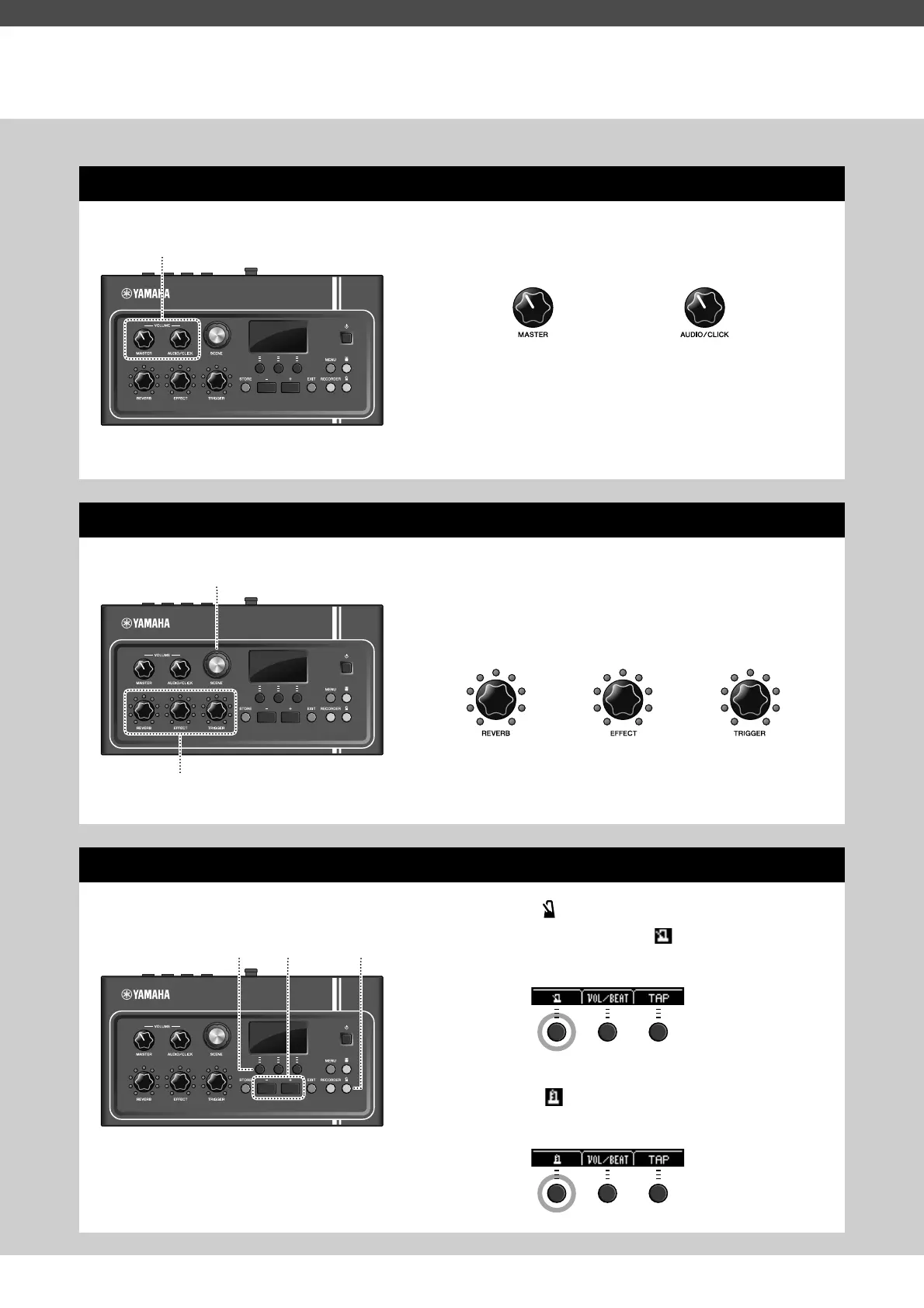
Adjusting Volume and Sound Balance (page 13)
1.
Turn the [MASTER VOLUME] knob or [AUDIO/
CLICK VOLUME] knob.
Hit all drums and cymbals in the drum set to make sure
that the EAD10 is picking up the sound.
Changing Sounds (page 33)
1.
Turn the [SCENE] knob to select different
sounds (Scenes).
2.
Adjust the levels with the [REVERB],
[EFFECT], and [TRIGGER] knobs.
Practicing with the Metronome (Click) (page 39)
1.
Press the [ ] (Click) button.
2.
Press the button below “ ” to the start the
Metronome.
3.
Use the [+] or [–] buttons to adjust the tempo.
4.
Press the “ ” button again to stop the Metro-
nome.
Overall volume Volume control for the AUX
IN (auxiliary input) and Met-
ronome (click)—sounds
other than what you play
Adjusts the
Reverb depth
Adjusts the Trigger Sound
volume (with the default
setting, the Trigger sound is
added to the bass drum)
Adjusts the
Effect depth


 To Next Page