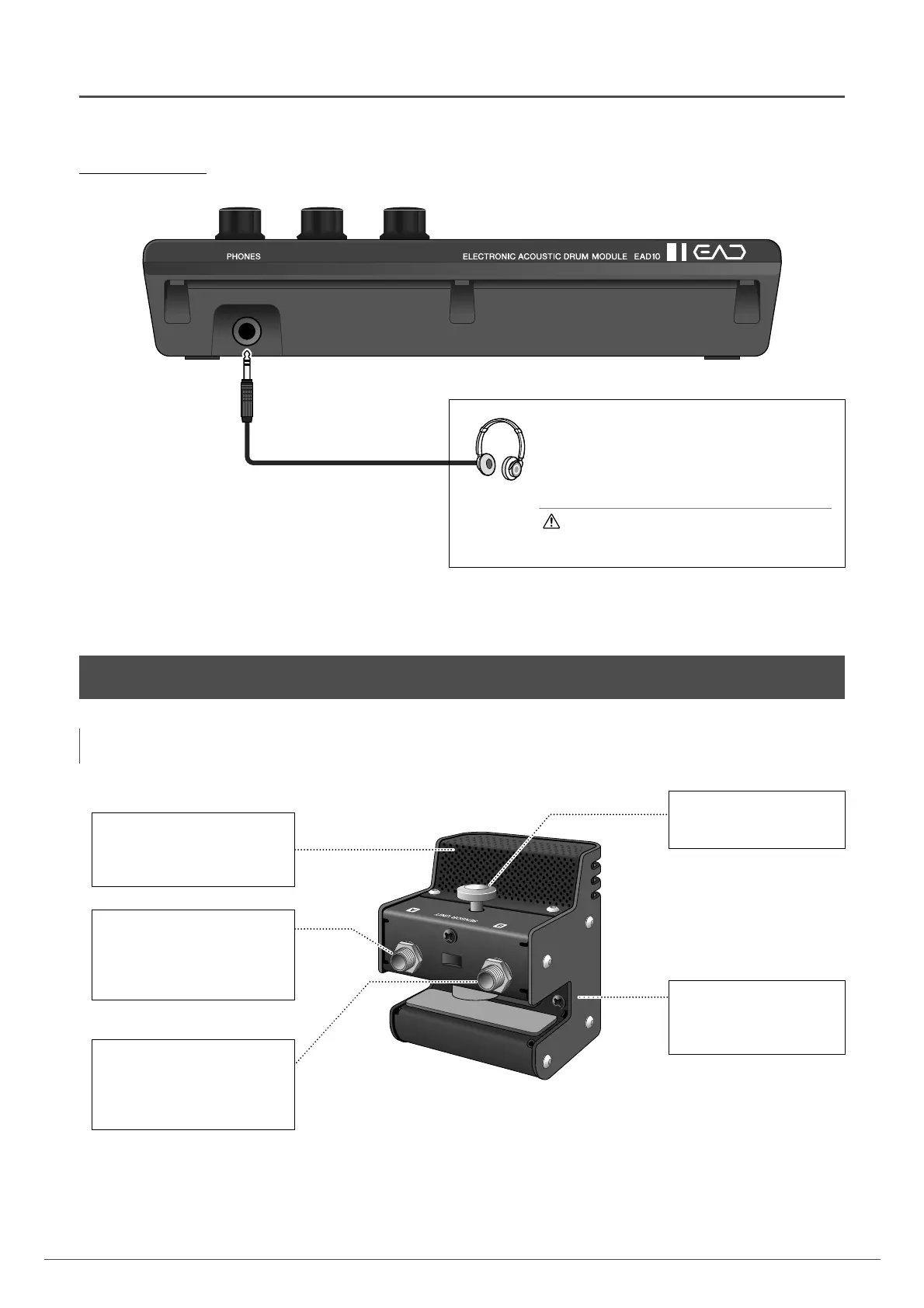
Standard stereo phone plug
(6.3 mm)
[PHONES] jack
Connects headphones. This output jack is a standard
stereo phone plug (6.3 mm). Use a 3.5 mm stereo
mini to (6.3 mm) stereo adaptor to connect head-
phones or earphones with a stereo mini plug (3.5 mm)
to the [PHONES] jack.
CAUTION
Do not use headphones for a long period of time at
high volume. Doing so can cause loss of hearing.
Mic Sensor
Captures the whole drum set’s
acoustic sound converting it into
an audio signal.
[A] jack
Connect to the TO SENSOR UNIT
[A] jack on the rear panel using
the connector cable (included).
Sends the trigger sensor signal.
[B] jack
Connect to the TO SENSOR UNIT
[B] jack on the rear panel using
the connector cable (included).
Sends the mic sensor signal.
Clamp screw (page 17)
Secures the Sensor Unit to
the bass drum hoop.
Trigger sensor
Converts vibrations produced
when the bass drum is hit
into a trigger signal.



 To Next Page