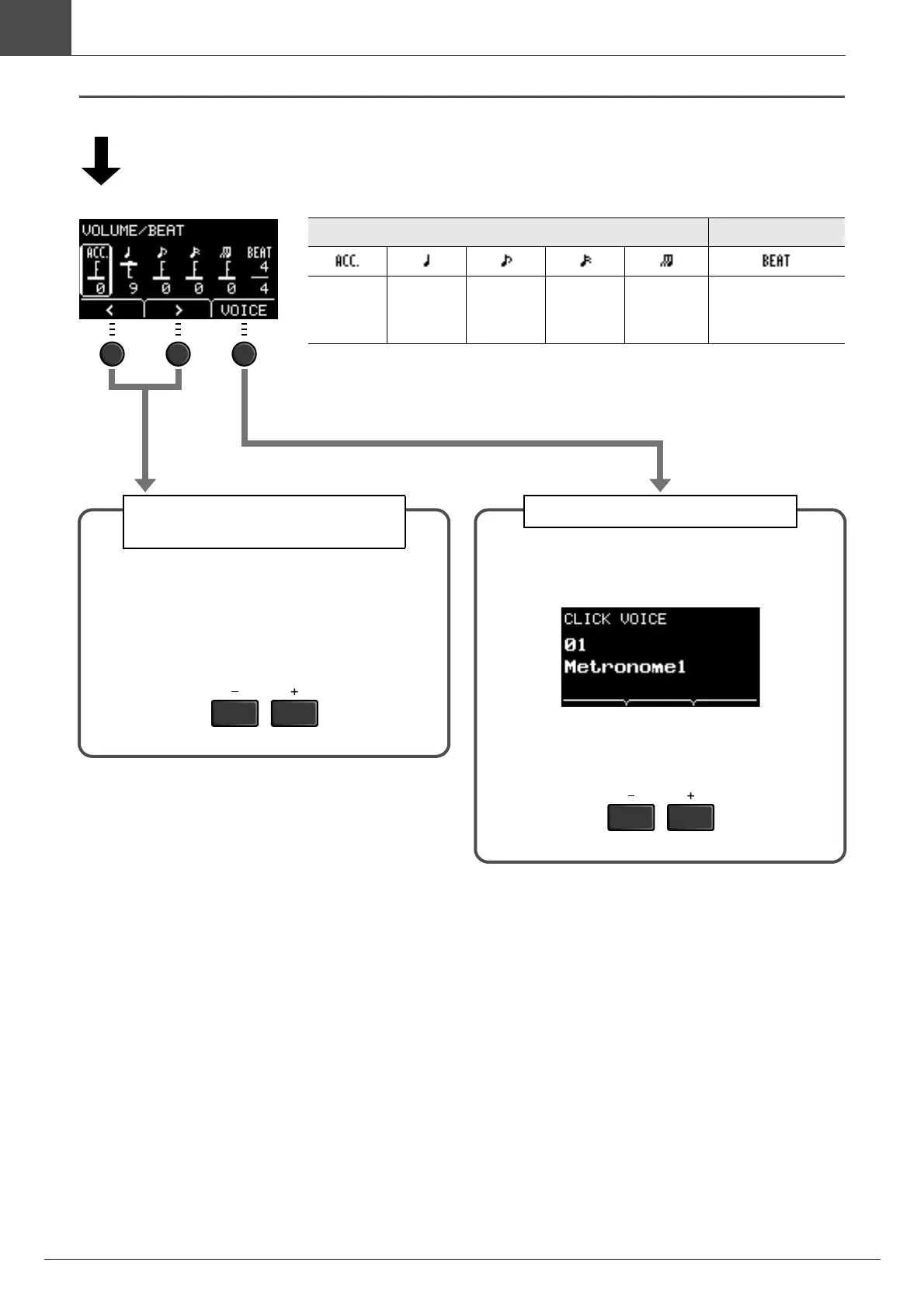
VOLUME/BEAT screen
3/8, 6/8, 9/8, 12/8, 15/8 beats only have settings for Acc, dotted quarter, eighth, and sixteenth
notes.
Set the volume
Set the time signature
Accents Quarter
notes
Eighth
notes
Sixteenth
notes
Eighth note
triplets
Beats
(1/4−16/4, 1/8−16/8,
1/16−16/16)
Setting Individual Click Beat
Volumes
3.
Use the buttons below “<” or ”>” ([F1]
or [F2]) to move the cursor.
4.
Use the [–] or [+] buttons to adjust the
volume.
Changing the Click Sounds
3.
Press the button below “VOICE” ([F3]).
The CLICK VOICE screen opens.
4.
Use the [–] or [+] buttons to change
the Click Sound.



 To Next Page