54
EAD10 Owner’s Manual
Enhance Your Drum Set with Separately Sold Add-Ons
Application Guide
Using a Pedal to Play Sounds or Control Functions (with a Foot
Pedal or a Foot Controller)
You can connect a foot pedal to the [FOOT SW] jack for a variety of uses.
Procedure:
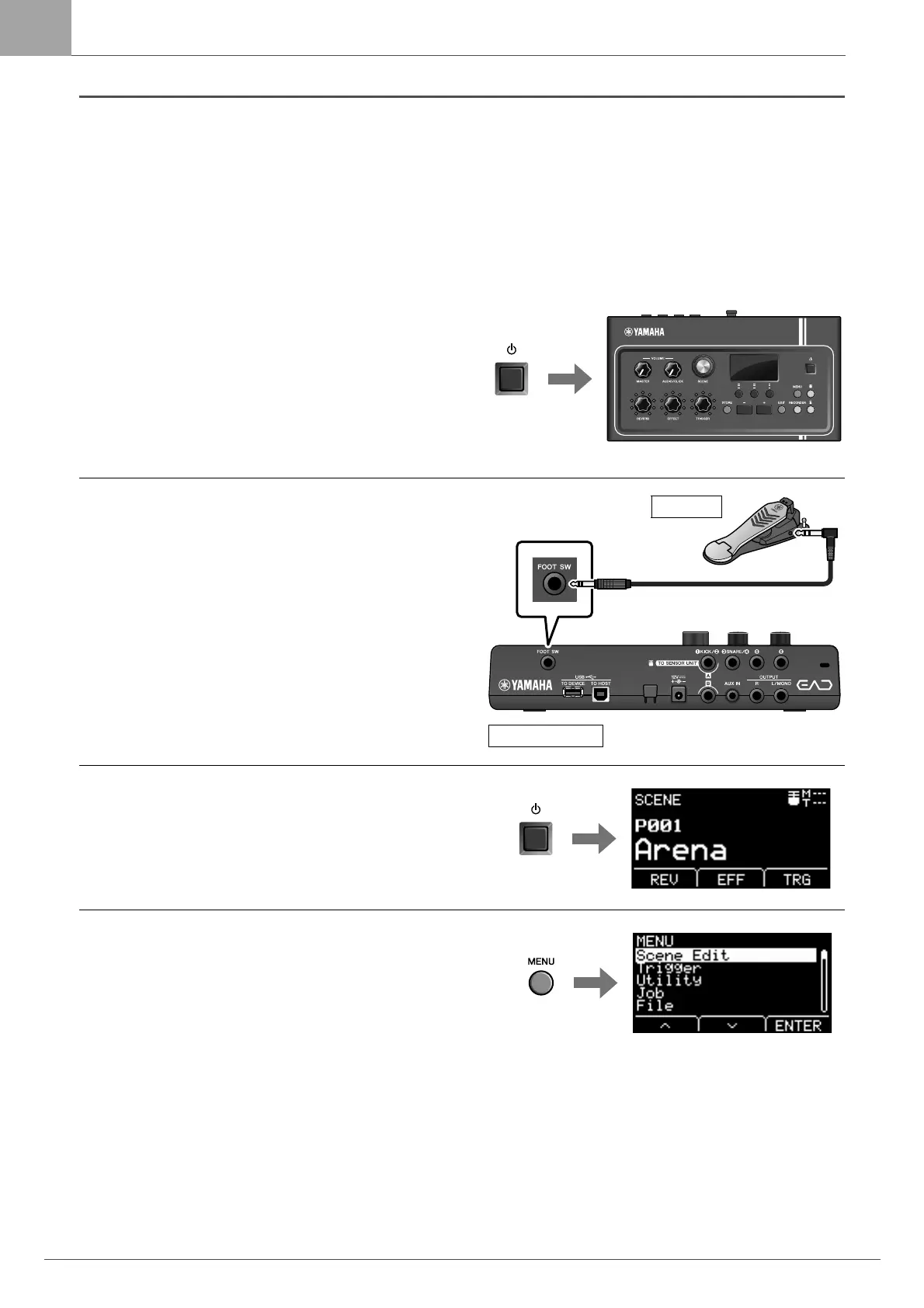
Example) Connecting an HH65
1.
Turn off the Main Unit.
Make sure the Main Unit is turned off before connecting.
2.
Connect the pedal’s plug to the [FOOT SW]
jack on the Main Unit rear panel.
Plug the other end of the cable that came with the HH65
into the [OUTPUT] jack on the HH65.
3.
Turn the Main Unit on.
4.
Press the [MENU] button to carry out the initial
setting.
When the HH65 is connected, settings can be used as they
are without having to make any changes. Perform the fol-
lowing settings when connecting any other pedal.
• Specify the type of pedal that is connected
Select the pedal you connected from MENU/Trigger/
FootSwSelect
• Specify the function of the connected pedal
• Specify the function of the connected pedal (MENU/
Utility/PadFunction)
• Select the Trigger Sound (to play sounds) (page 35)
This completes set up.



 To Next Page