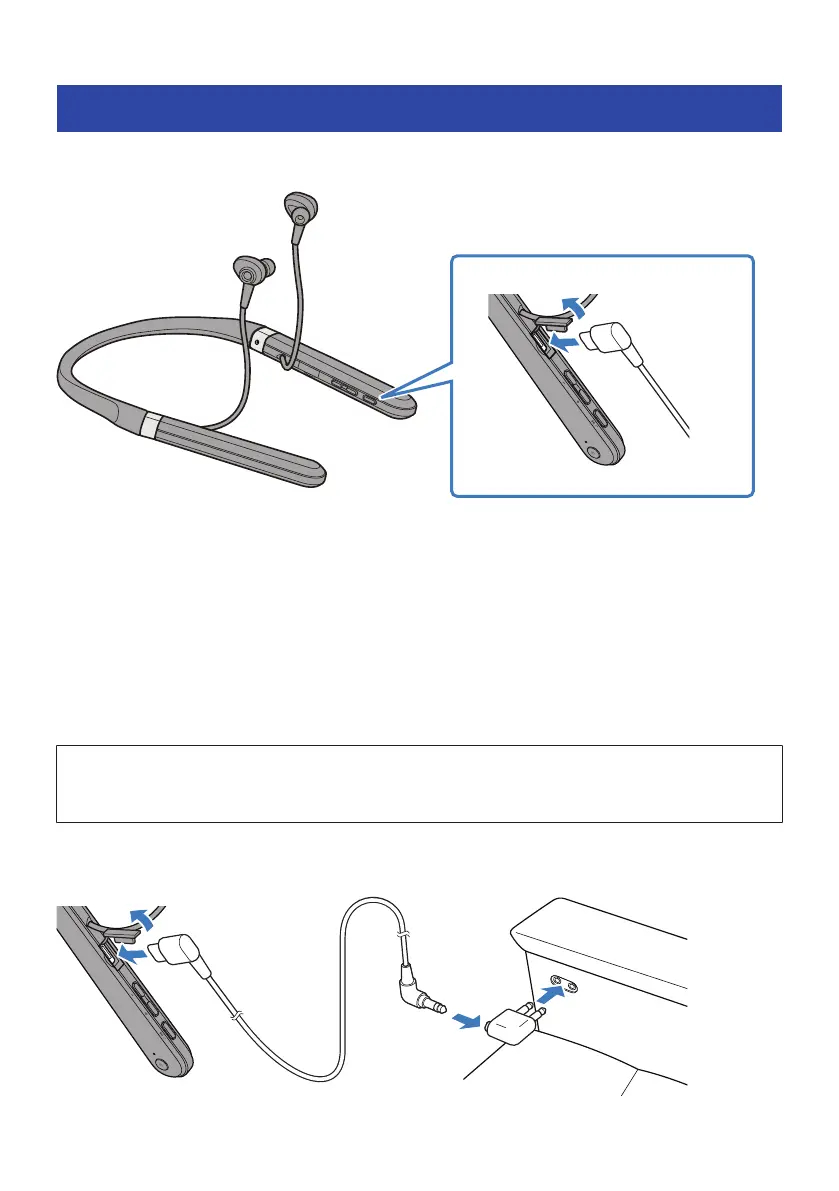
Connecting using the cable
You can connect this product to the headphone output jack of an external device by using the 3.5 mm stereo
mini-plug cable (included).
(
The following functions will not be available when connecting via cable.
(
Connecting to a Bluetooth device
(
Phone calls
(
Operating this product using the Headphones Controller
(
Using the keys on this product (except for the power and ANC keys)
(
When this product is on, you can switch between AMBIENT SOUND and NOISE CANCELLING by using the
ANC key, even when the cable is connected.
(
When using this product with the cable connected, you can use it as a regular pair of earphones even when
the power is off.
(
Unplugging the cable will turn off the power.
NOTICE
(
Do not use any other cable besides the one supplied with this product. Using an aftermarket cable or adaptor may cause a
malfunction.
NOTE
Use the included in-flight plug adaptor to connect this product to the headphones jack on an airplane seat.
20
Connections > Connecting using the cable



 To Next Page