E
4-24
EMU00976
Removing the Propeller
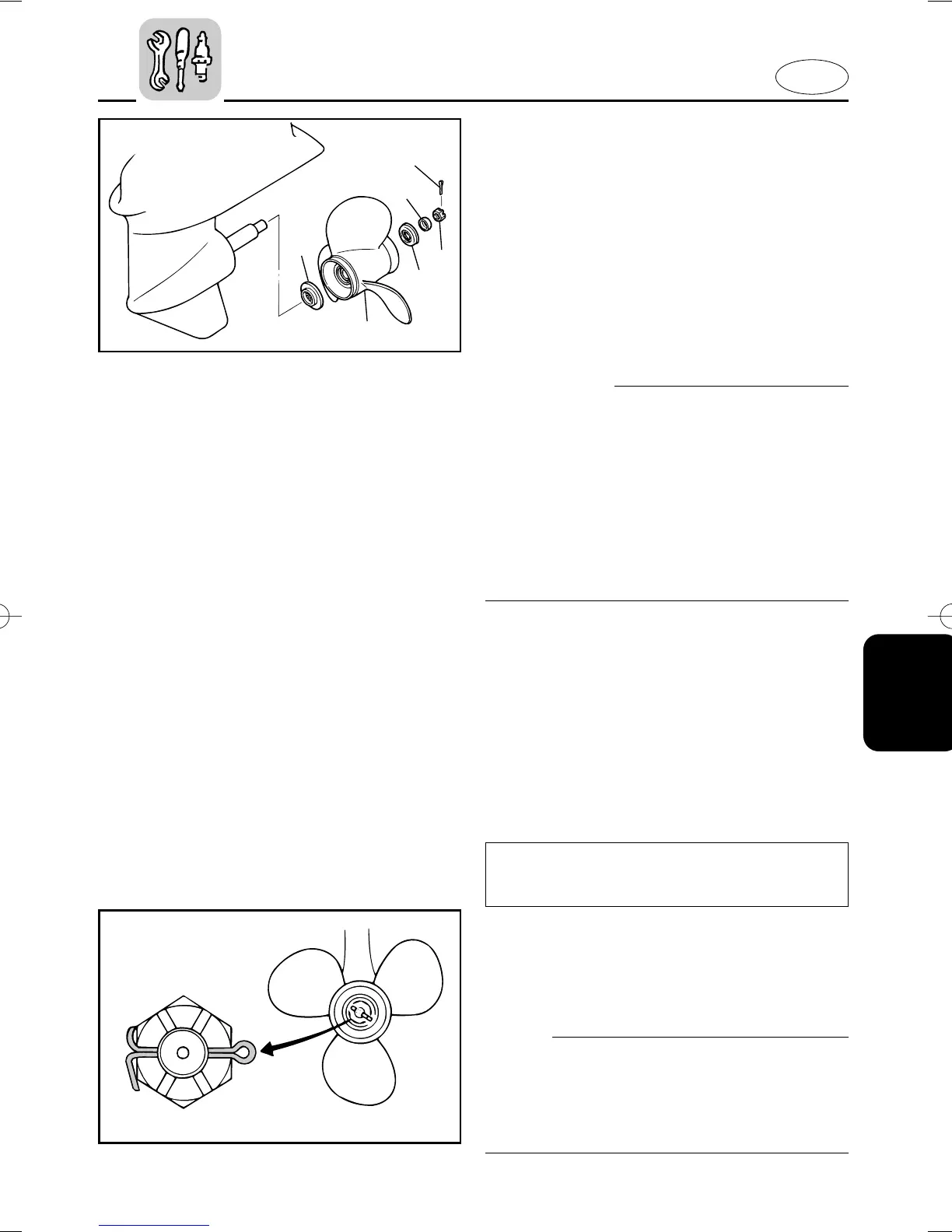
1) Straighten the cotter-pin 1 and pull it
out using a pair of pliers.
2) Remove the propeller nut 2, washer
3 and spacer 4.
3) Remove the propeller 5 and thrust
washer 6.
EMU00397
Installing the Propeller
cC
8 Be sure to install the thrust washer
before installing propeller, otherwise,
lower case and propeller boss may be
damaged.
8 Be sure to use a new cotter pin and
bend the ends over securely. Other-
wise, the propeller could come off dur-
ing operation and be lost.
1) Apply Yamaha Marine grease or Cor-
rosion resistant grease to the pro-
peller-shaft.
2) Install the thrust washer and propeller
on the propeller-shaft.
3) Install the spacer and washer. Tighten
the propeller nut to the specified
torque.
4) Align the propeller nut with the pro-
peller shaft hole. Insert a new cotter
pin in the hole and bend the cotter pin
ends.
NOTE:
If the propeller nut does not align with the
propeller shaft hole after tightening to the
specified torque, then tighten the nut fur-
ther to align it with the hole.
Tightening torque:
Refer to “SPECIFICATIONS” page 4-1.
602053
602073
q
w
e
r
t
y
67F-9-17-4 3/28/03 16:56 Page 25


 To Next Page