Maintenance
68
CAUTION:
ECM01501
● Make sure the main switch (on applica-
ble models) is “” (off) before working
on the battery.
● Reversal of the battery cables will dam-
age the electrical parts.
● If you connect the battery cables in the
reverse order, consult a Yamaha dealer
immediately.
● Connect the red battery cable first when
installing the battery and disconnect the
black battery cable first when removing
it.
● The electrical contacts of the battery
and cables must be clean and properly
connected, or the battery will not start
the engine.
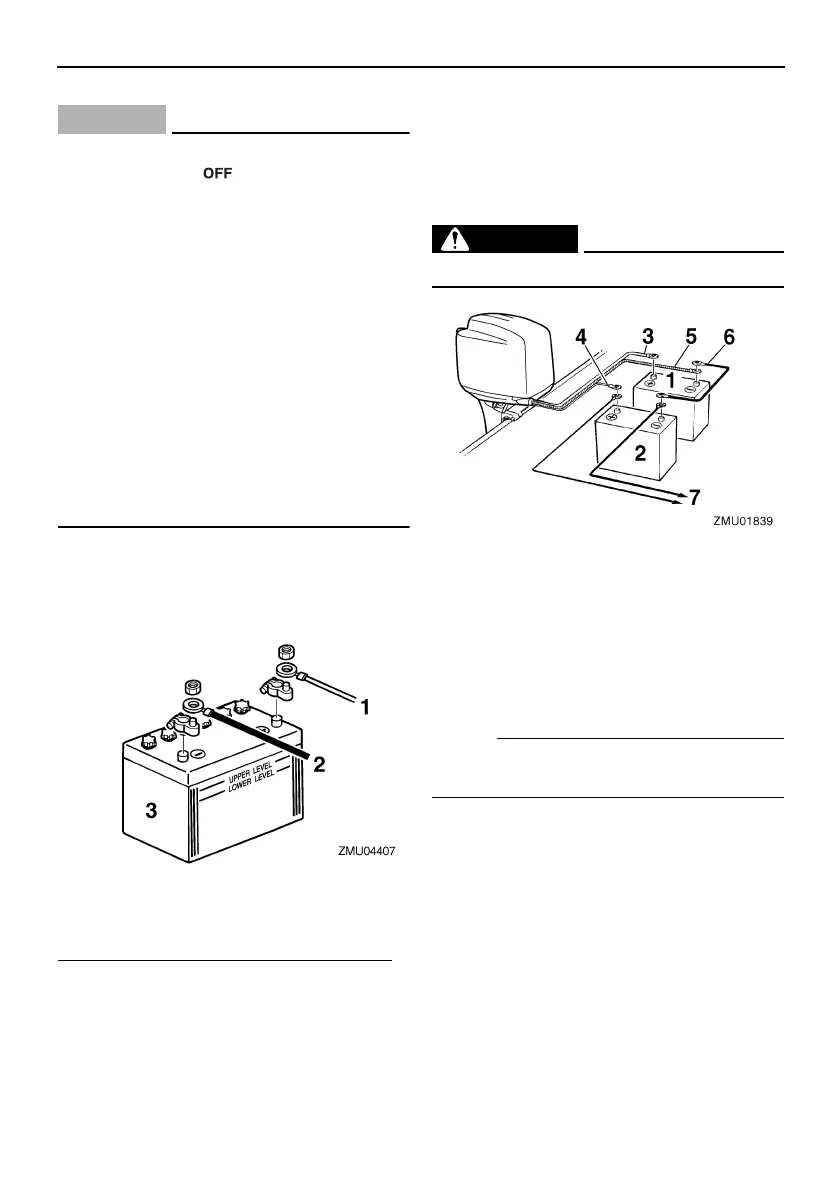
Connect the RED battery cable to the POSI-
TIVE (+) terminal first. Then connect the
BLACK battery cable to the NEGATIVE (-) ter-
minal.
Connecting an accessory battery (optional)
1. Remove the accessory battery coupler
cover from the outboard motor.
2. Connect the accessory battery coupler to
the coupler of the accessory battery ca-
ble (optional). Use a connecting cable be-
tween the (-) terminals of the starting
battery and accessory battery. See the il-
lustrations of the wiring connections. This
cable must be made from wire thicker
than the starting battery cable.
WARNING
EWM00600
Use of smaller wire could lead to a fire.
NOTE:
If connecting an accessory battery, consult
your Yamaha dealer about correct wiring.
EMU29370
Disconnecting the battery
Disconnect the BLACK cable from the NEGA-
TIVE (-) terminal first. Then disconnect the
RED cable from the POSITIVE (+) terminal.
1. Red cable
2. Black cable
3. Battery
1. Battery for starting
2. Battery for accessories
3. Large red lead for starting battery
4. Small red lead for accessory battery charg-
ing (optional part)
5. Large black lead
6. Negative connecting cable
7. Power for accessories
U6P272E0.book Page 68 Friday, March 16, 2007 1:22 PM



 To Next Page