Set List Organizer Owner’s Manual 5
Main display
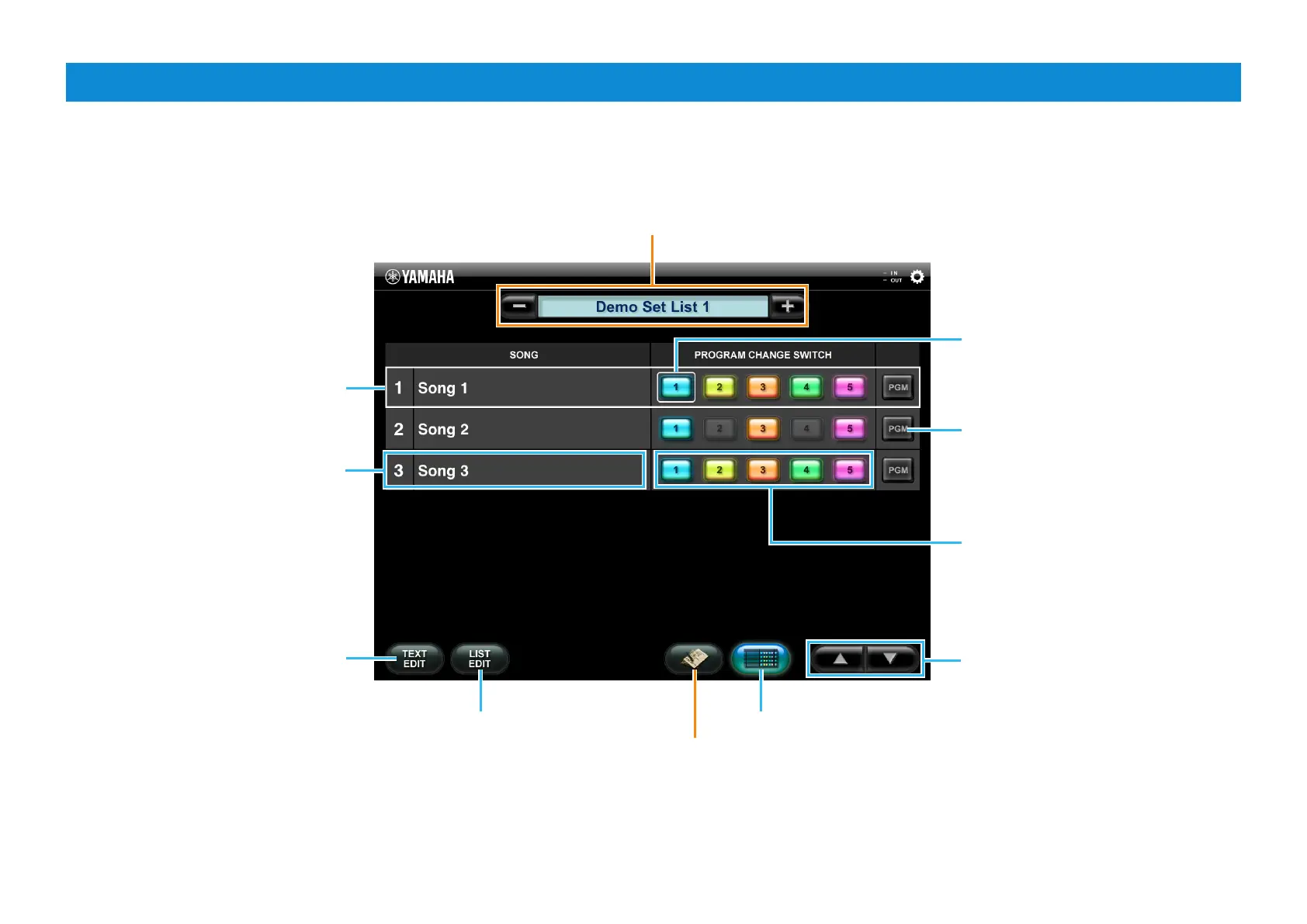
The Main display lets you control the Program Change settings of the MIDI instrument. This display features two view types: Song List view and Song Text view.
Tapping [-] or [+] selects the Set List.
Tapping the Set List name calls up the Set List
table described on the next page.
Song List view
Indicates that this number is selected.
You can change the Song by tapping
any number.
Calls up the Text Edit display which
lets you input or edit text for the
currently selected Song.
Song Number and Song Name
Calls up the Set List Edit window
which lets you change the Song
name and order, as well as add/
delete Songs to/from the current
Set List.
Song List view
Calls up the Song Text view of
the currently selected Song.
Indicates that this button was the last
one tapped.
Tapping one of the Program Change
buttons transmits the memorized
Program Change number to the
instrument. Tapping the gray colored
button transmits nothing.
Calls up the Program Change Edit
window of the corresponding Song.
On that window, you can assign the
desired Program Change number to
each number button.
Changes the Song.






 To Next Page