23
Chapter 5
Effects
The effects of the DX200 are more than just icing on the cake — they’re pow-
erful tools you can use to completely transform the sound, and put your tracks
over the top.
15 What is an Effect?
The Effects are the last element in the sound chain — they are the last bit of processing done to the sound
before you hear it.
These real-time Effects — Delay, Flanger, Phaser, Overdrive/Amp — let you mangle the sound in wild and
exciting ways. Although it’s not in the Effect section, there’s also a Distortion effect that lets you add any-
thing from a warm grunge to a full-on metallic assault.
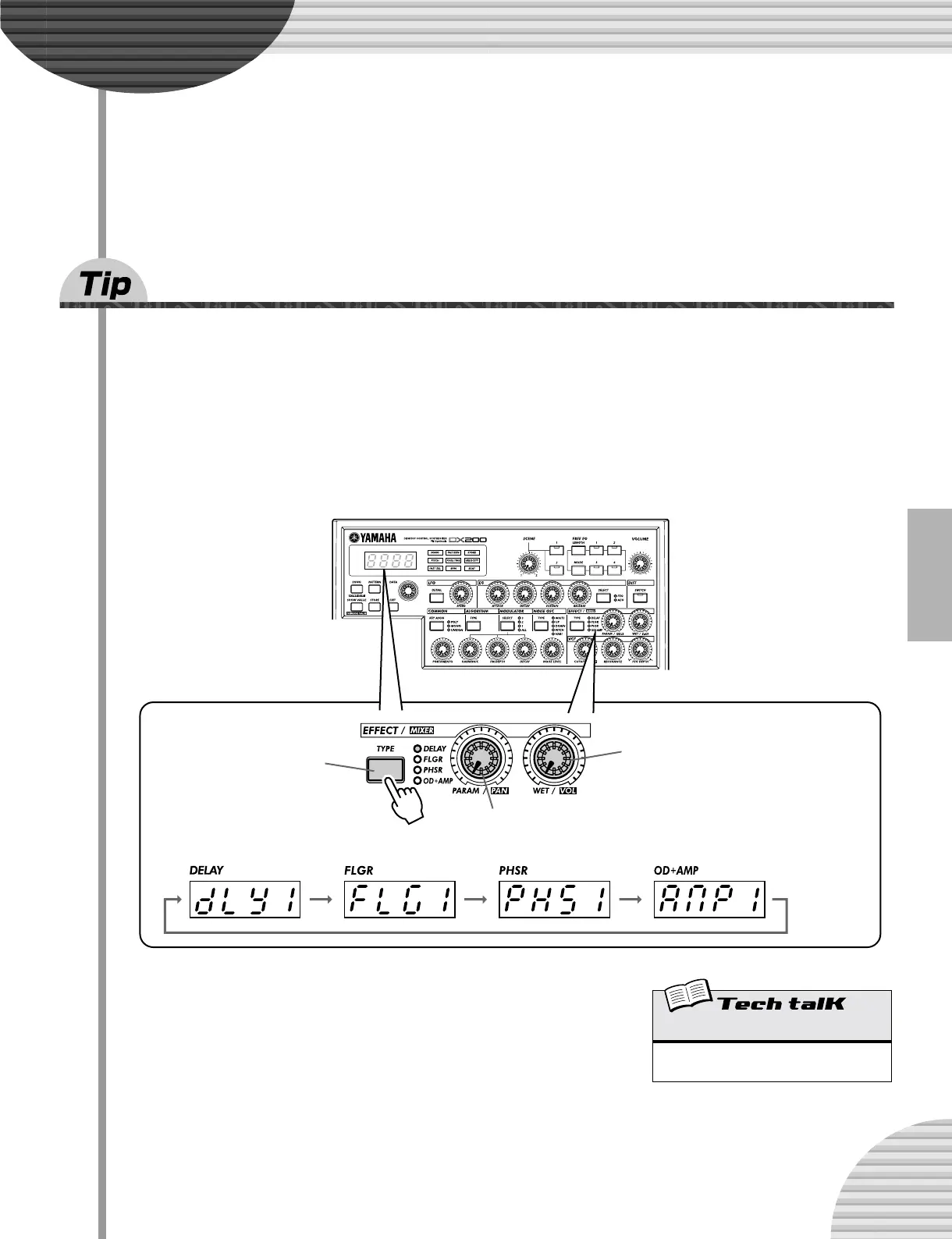
The Effect controls are exceptionally simple and easy to use. Pressing the [TYPE] button changes the Effect
type, while the [PARAM] and [WET] knobs let you adjust the sound and depth of the Effect.
Changes the Effect
type (Delay, Flanger,
Phaser, Overdrive/
Amp).
Changes the sound of the Effect. (Each
effect lets you control a different key
parameter.)
Changes the depth or degree of the Effect.
When set to the minimum (all the way left),
the Effect sound cannot be heard.
[WET] knob
Range
0 — 127 (Same for all Effect types.)



 To Next Page