Instrument and control functions
5-18
1
2
3
4
5
6
7
8
9
10
11
12
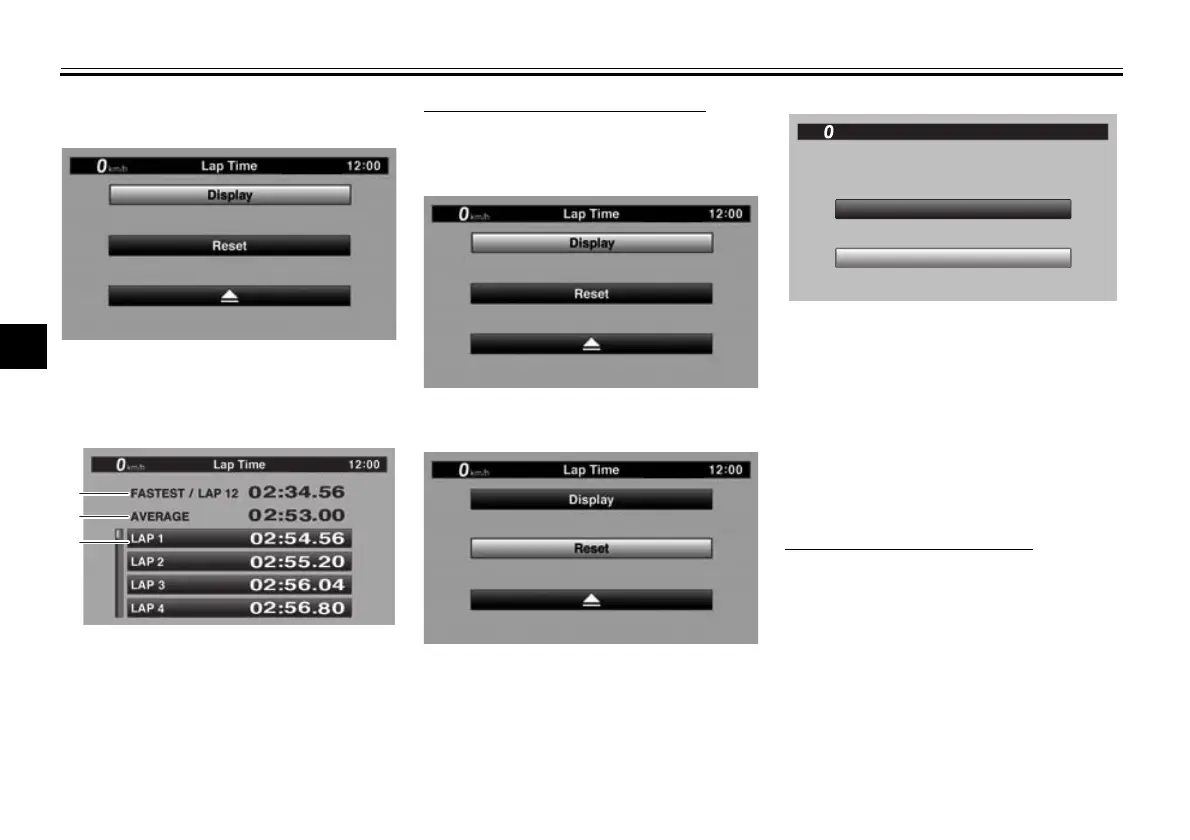
“Reset” allows you to delete the lap
time record data.
Use the wheel switch to select “Display”
and view the lap record.
To reset the lap time record data
1. When “Lap Time” is selected, both
“Display” and “Reset” are dis-
played.
2. Select “Reset”.
3. Select YES to delete all lap time
data. (Select NO to exit and return
to the previous screen without re-
setting the lap record.)
“Maintenance”
This module allows you to record dis-
tance traveled between engine oil
changes (use the OIL item), and for two
other items of your choice (use INTER-
VAL 1 and INTERVAL 2).
To reset a maintenance item
1. From the MENU screen, select
“Maintenance”.
1. Fastest lap
2. Average lap time
3. Lap time record
NO
Reset ?
Lap Time
YES
km/h
GP
12
:
00
BW8-9-20_1.book 18 ページ 2016年12月13日 火曜日 午前11時18分











 To Next Page