Instrument and control functions
5-19
1
2
3
4
5
6
7
8
9
10
11
12
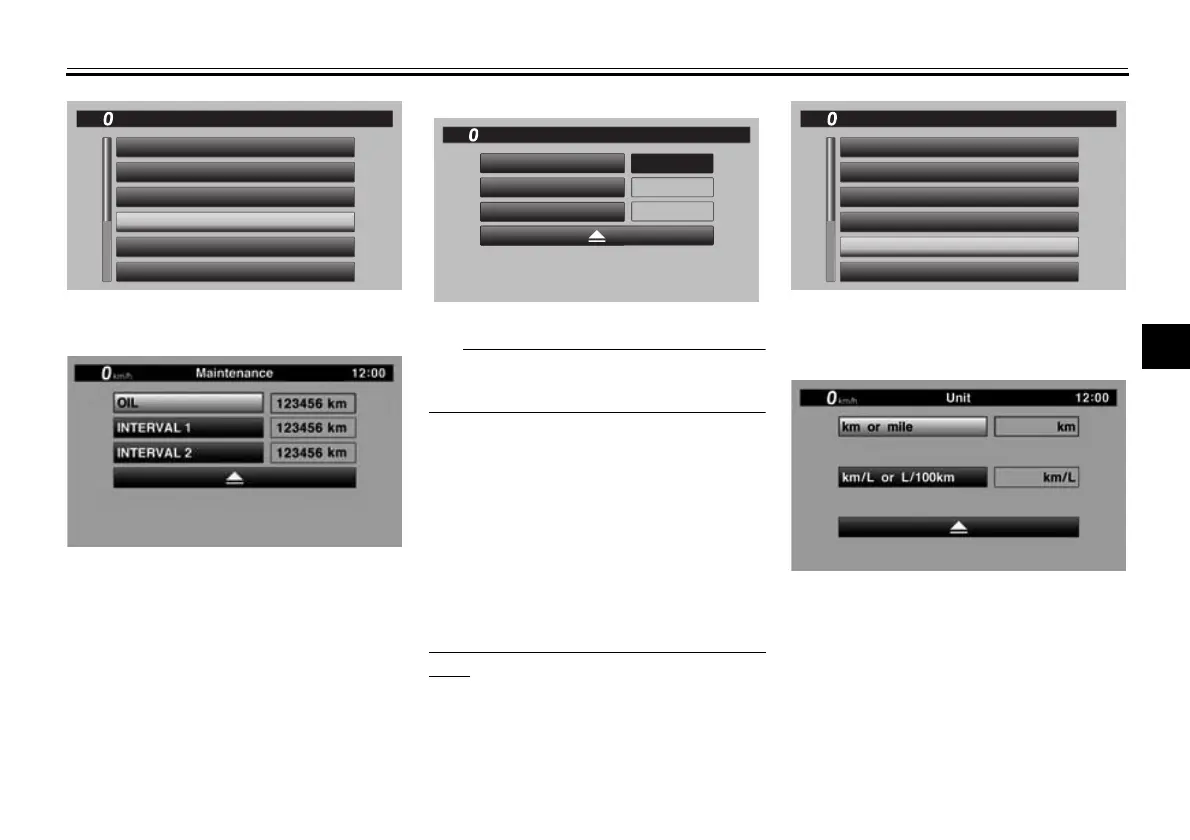
2. Select the item you want to reset.
3. Long push the wheel switch to re-
set the item.
Maintenance item names cannot be
changed.
“Unit”
This module allows you switch the dis-
play between kilometers and miles.
When using kilometers, the fuel con-
sumption units can be changed be-
tween km/L or L/100km. When using
miles, MPG will be available.
To set the distance or fuel consumption
units
1. From the MENU screen, select
“Unit”.
2. “km or mile” and “km/L or L/100km”
are displayed.
3. Select the distance or consump-
tion unit item you want to adjust.
12
:
00
MENU
km/h
Wallpaper
Unit
Maintenance
LapTime
YRC Setting
Display Mode
INTERVAL 2
OIL
INTERVAL 1
0 km
123456 km
123456 km
Maintenance
km/h
GPS
12
:
00
12
:
00
MENU
km/h
Wallpaper
Unit
Maintenance
LapTime
YRC Setting
Display Mode
BW8-9-20_1.book 19 ページ 2016年12月13日 火曜日 午前11時18分



 To Next Page