Instrument and control functions
5-22
1
2
3
4
5
6
7
8
9
10
11
12
range is 5500–13000 r/min.
The blue area on the tachometer indi-
cates the currently set operational
range of the shift indicator light.
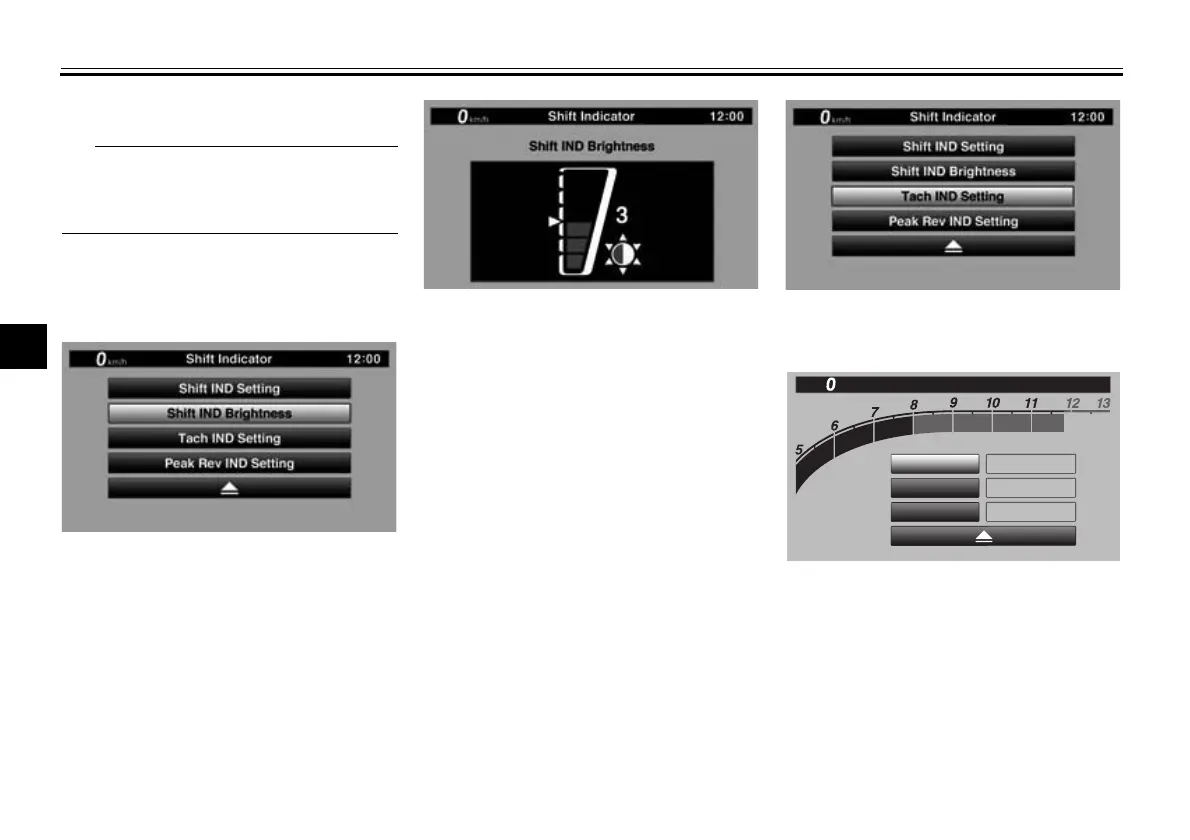
“Shift IND Brightness”
The shift timing indicator light has six
brightness levels.
Select “Shift IND Brightness”, then use
the wheel switch to adjust the setting.
Short push the wheel switch to confirm
the setting and exit.
“Tach IND Setting”
This module allows you to turn the ta-
chometer color display on or off. When
turned off, the tachometer will display
all r/min levels below the red zone in
black or white (depending on wallpaper
settings). When turned on, the mid and
mid-to-high r/min zones can be set to
come on in green and then orange col-
ors.
1. Select “Tach IND Setting”.
2. Select “IND Mode”.
×
1000 r/min
12
:
00
km/h
Shift Indicator
Tach IND Setting
IND Mode
ON
5000
r/min
8000
r/min
Tach IND 1st
Tach IND 2nd
BW8-9-20_1.book 22 ページ 2016年12月13日 火曜日 午前11時18分




 To Next Page