Instrument and control functions
5-24
1
2
3
4
5
6
7
8
9
10
11
12
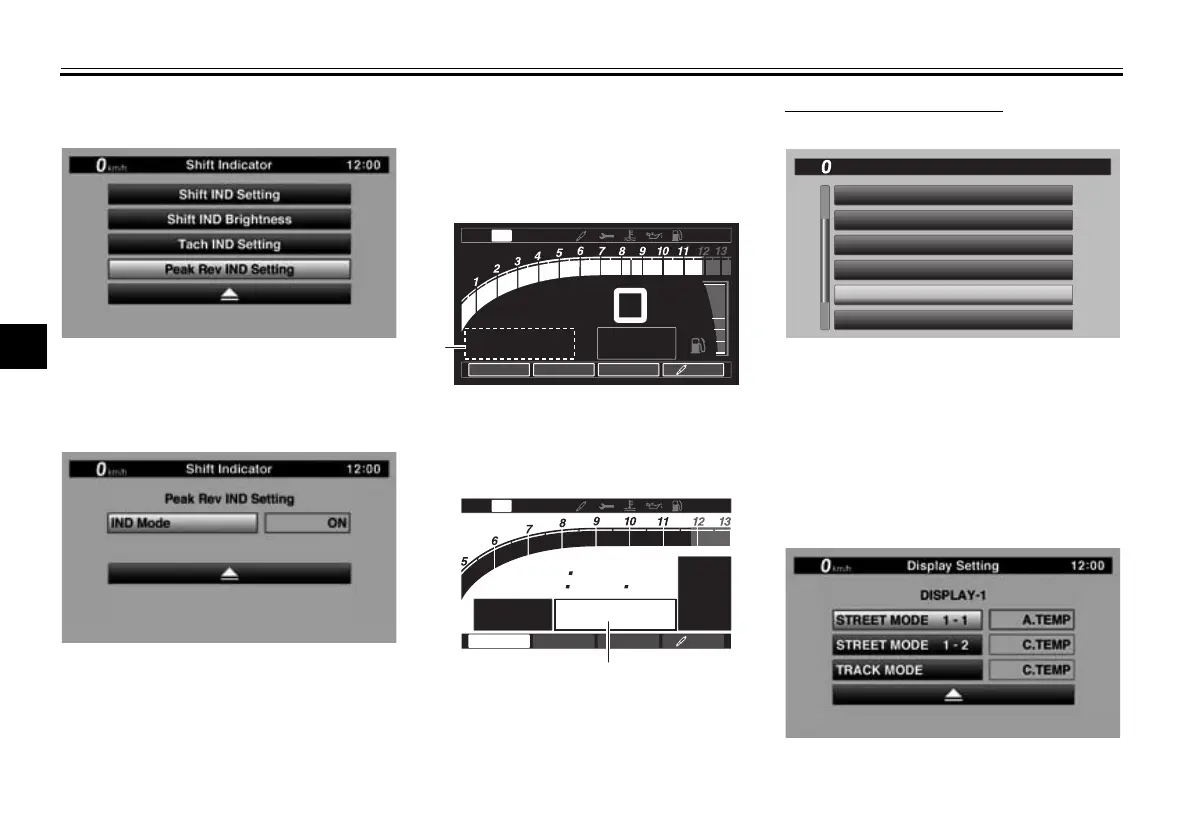
olution peak hold indicator on or off.
1. Select “Peak Rev IND Setting”.
2. Select “IND Mode” and then select
ON (to turn on the indicator) or
OFF (to turn off the indicator).
3. Select the triangle symbol to exit.
“Display Setting”
This module allows you to set how the
information display items (like TRIP-1,
ODO, C. TEMP, etc.) are grouped on
the main screen. There are four display
groups.
To set the display groups
1. Select “Display Setting”.
2. DISPLAY-1, DISPLAY-2, DIS-
PLAY-3 and DISPLAY-4 are dis-
played.
3. For example, let’s select DIS-
PLAY-1. STREET MODE 1-1,
STREET MODE 1-2, and TRACK
MODE are displayed.
1. Information display item (STREET MODE)
1. Information display item (TRACK MODE)
12345
km
TRIP-2
TRIP-1
1234.5
km
1
N
2
km/h
×
1000 r/min
MODE
-
A
PWR
1
TCS
2
A-
1
QS
12
:
00
E
F
2
/
1
1
MODE
-
A
km/h
123
ODO
km
123456
GEAR
N
LAP
09
LATEST
12
56 78
×
1000 r/min
QS
12
:
00
PWR
1
TCS
2
A-
1
1
12
:
00
MENU
km/h
Shift Indicator
Display Setting
Brightness
Wallpaper
Unit
Maintenance
BW8-9-20_1.book 24 ページ 2016年12月13日 火曜日 午前11時18分



 To Next Page