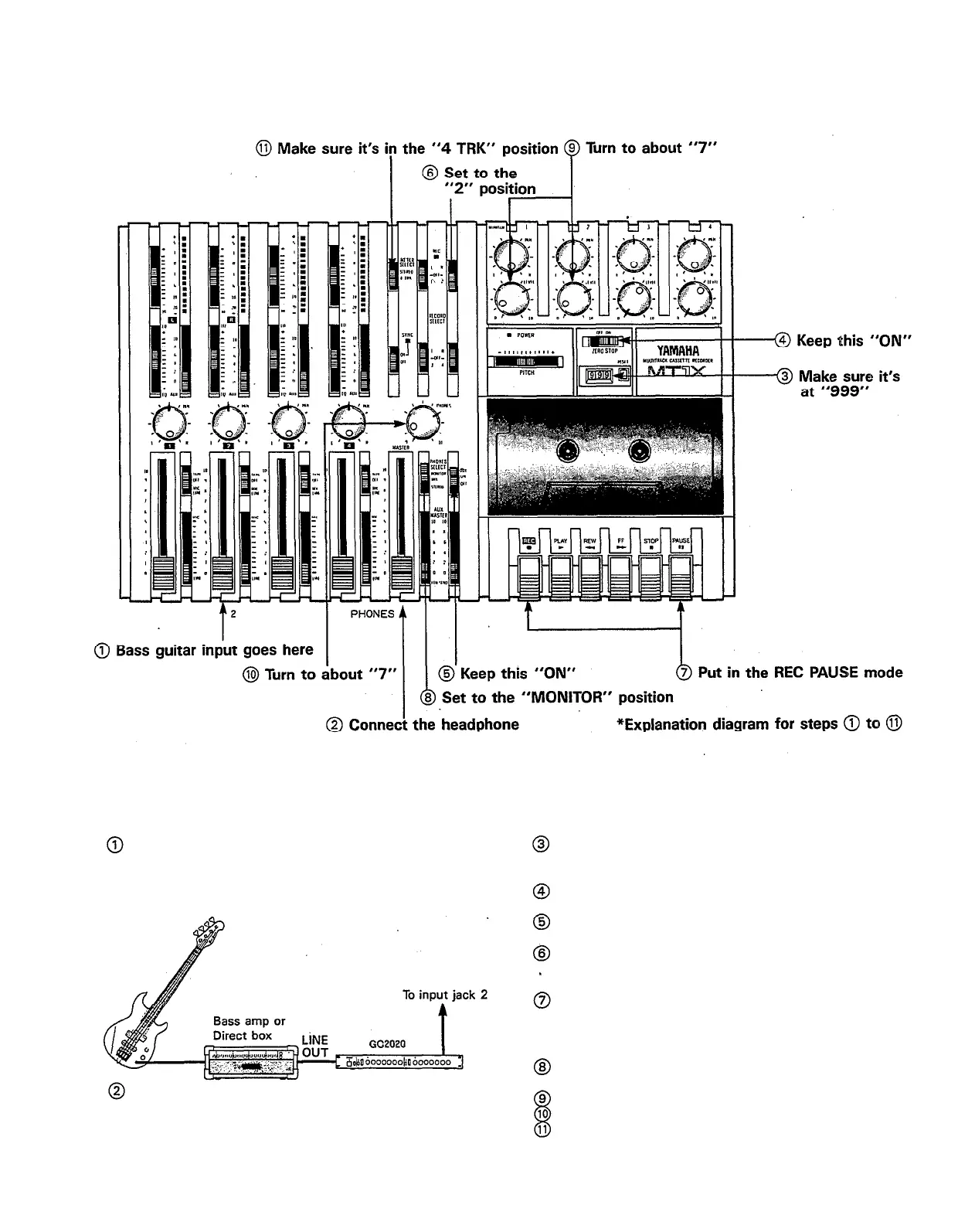
— Bass guitar recording procedure —
1. Connections
Connect everything through input jack 2 as follows.
If the GC2020 is being used, connect it between
the amplifier and input jack 2.
When not using a bass amp, the use of a direct box
is recommended.
Connect the monitor headphones. Until the mix-
down process, only use headphones and avoid
using monitor speakers. (This also goes for the rest
of the steps.)
2. Setting the recorder
Make sure the tape has been rewound to the “999”
point on the counter. (This also goes for the rest
of the steps.)
Keep the ZERO STOP switch “ON” until mixdown.
(This also goes for the rest of the steps.)
Keep the dbx switch “ON” until mixdown. (This also
goes for the rest of the steps)
Set the RECORD SELECT position to “2”, the REC
indicator will flash to show that the bass guitar con-
nected to input jack 2 will be recorded on track 2.
Press the pause switch to start the recording. The
REC indicator will light up completely.
3. Setting the monitor and meter sections
Set the PHONES SELECT switch to the “MONITOR”
position.
Turn MONITOR LEVEL controls 1 and 2 to about “7’:
Set the PHONES volume level to about “7”.
Make sure the METER SELECT switch is in the “4
TRK” position.
23



 To Next Page