—
Punch-in/Punch-out Procedure —
1. Connections
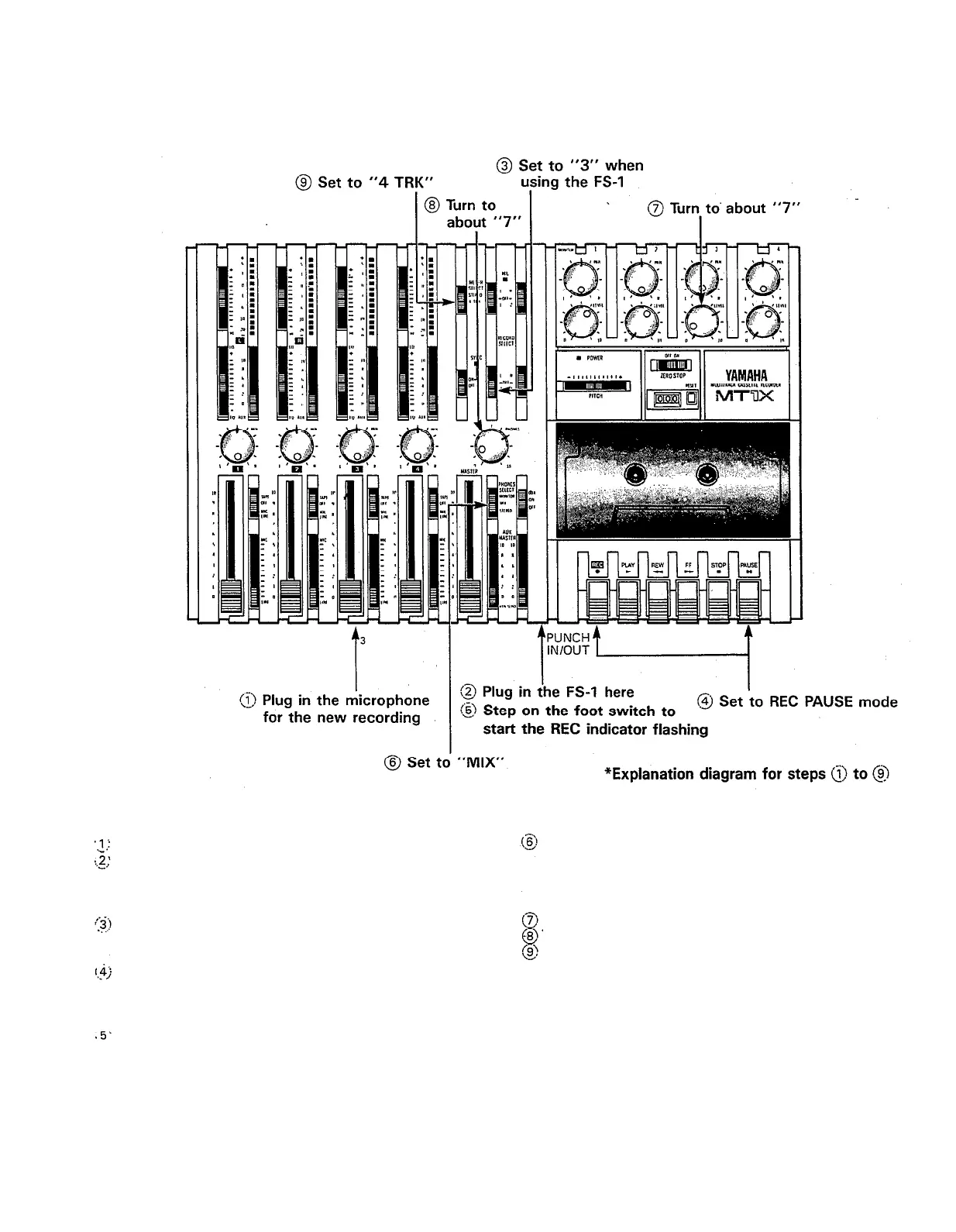
Connect the vocal microphone through input jack 3.
If the FS-1 Foot Switch is being used, connect it
to the PUNCH IN/OUT jack.
2. Setting the recorder
If the FS-1 Foot Switch is connected, set RECORD
SELECT switch 3 to the “3” position. The REC in-
dicator will flash.
After pressing the PAUSE switch, press the REC
switch. (If the FS-1 is being used, the unit is put
into the REC PAUSE mode, and the REC indicator
lights.)
If the FS-1 is connected, set its foot switch so that
the REC indicator flashes.
29
3. Setting the monitor and meter sections
Set the PHONES SELECT switch to “MIX”. (If it’s
not set to this position, you won’t be able to monitor
the new recording sound and the playback sound
of tracks 1
— 4 during punch-in/punch-out
operation.)
Turn the MONITOR LEVEL control to about “7”.
Turn the PHONES volume to about “7”.
Set the METER SELECT switch to “4 TRK”.



 To Next Page