EasyManua.ls Logo

Yamaha MT3X - RECORDING THE FIRST TRACK; Step 1: Channel-to-Track Assignment

Yamaha MT3X
92 pages
Print Icon
To Next Page IconTo Next Page
To Previous Page IconTo Previous Page
Loading...
RECORDING
THE
FIRST
TRACK
STEP
1:
CHANNEL-TO-TRACK
ASSIGNMENT
The
first
step
in
making
any
recording
is
to
assign
the
channel
to
which
your
instrument
or
other
source
is
connected
to
one
of
the
recorder's
tracks.
Depending
on
what
you
are
recording,
you
might
want
to
record
a
single
instrument
or
other
source
to
a
single
track
on
the
recorder,
or
you
might
want
to
combine
several
instruments
or
other
sources
and
record
them
on
a
single
track.
The
MT3X
offers
two
“channel-to-track
assignment”
methods
that
can
be
used
individually
or
combined
to
give
you
the
track
assignments
that
you
need.
Direct
Channe!-to-Track
Assignment
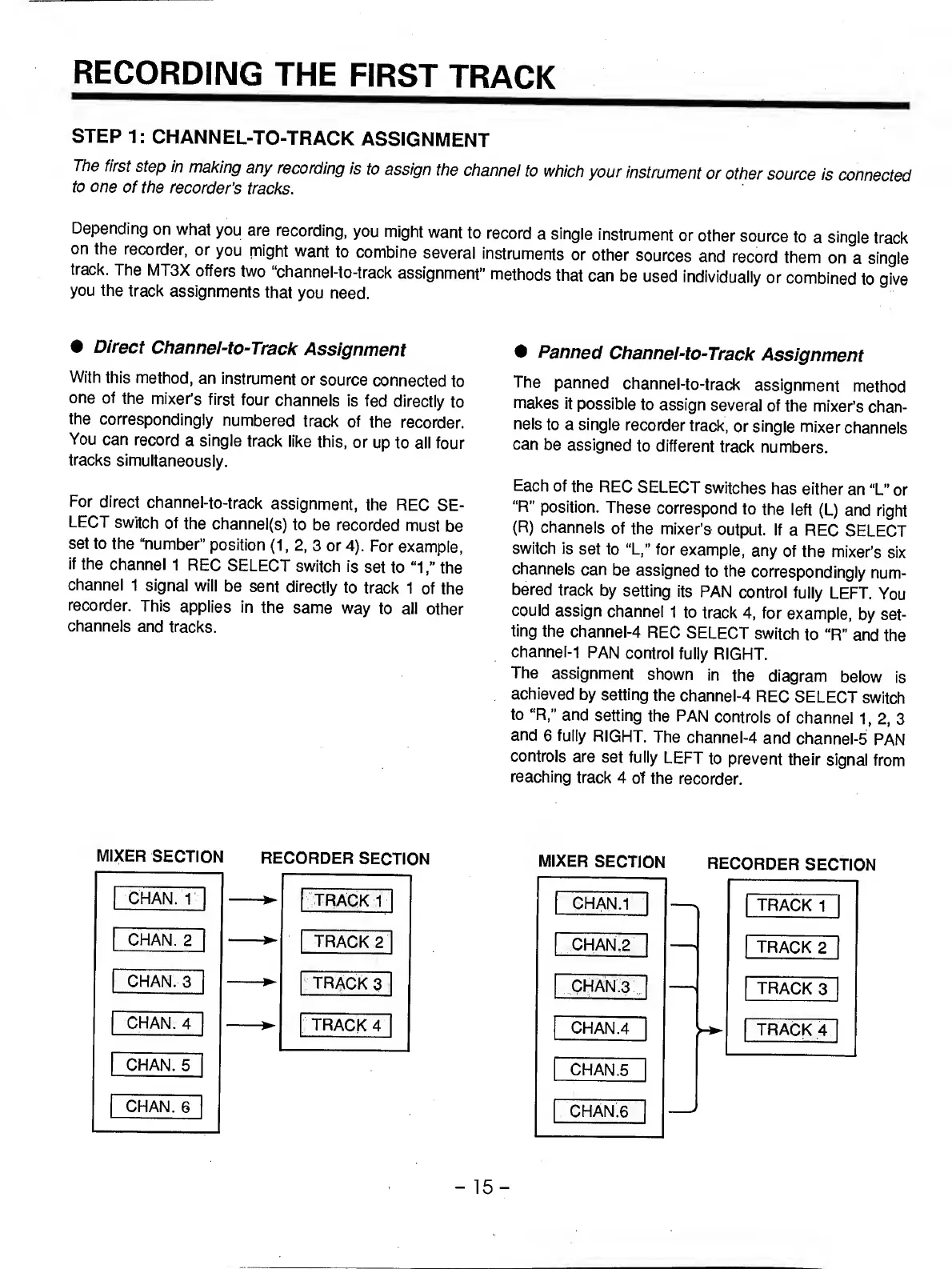
With
this
method,
an
instrument
or
source
connected
to
one
of
the
mixer’s
first
four
channels
is
fed
directly
to
the
correspondingly
numbered
track
of
the
recorder.
You
can
record
a
single
track
like
this,
or
up
to
all
four
tracks
simultaneously.
For
direct
channel-to-track
assignment,
the
REC
SE¬
LECT
switch
of
the
channel(s)
to
be
recorded
must
be
set
to
the
“number"
position
(1,
2.
3
or
4).
For
example,
if
the
channel
1
REC
SELECT
switch
is
set
to
“1the
channel
1
signal
will
be
sent
directly
to
track
1
of
the
recorder.
This
applies
in
the
same
way
to
all
other
channels
and
tracks.
Panned
Channei-to-Track
Assignment
The
panned
channel-to-track
assignment
method
makes
it
possible
to
assign
several
of
the
mixer’s
chan¬
nels
to
a
single
recorder
track,
or
single
mixer
channels
can
be
assigned
to
different
track
numbers.
Each
of
the
REC
SELECT
switches
has
either
an
“L”
or
“R”
position.
These
correspond
to
the
left
(L)
and
right
(R)
channels
of
the
mixer’s
output.
If
a
REC
SELECT
switch
is
set
to
“L,"
for
example,
any
of
the
mixer’s
six
channels
can
be
assigned
to
the
correspondingly
num¬
bered
track
by
setting
its
PAN
control
fully
LEFT.
You
could
assign
channel
1
to
track
4,
for
example,
by
set¬
ting
the
channel-4
REC
SELECT
switch
to
“R”
and
the
channel-1
PAN
control
fully
RIGHT.
The
assignment
shown
in
the
diagram
below
is
achieved
by
setting
the
channel-4
REC
SELECT
switch
to
“R,”
and
setting
the
PAN
controls
of
channel
1,
2,
3
and
6
fully
RIGHT.
The
channel-4
and
channel-5
PAN
controls
are
set
fully
LEFT
to
prevent
their
signal
from
reaching
track
4
of
the
recorder.
MIXER
SECTION
RECORDER
SECTION
MIXER
SECTION
RECORDER
SECTION
-
1
5
-

Related product manuals