EasyManua.ls Logo

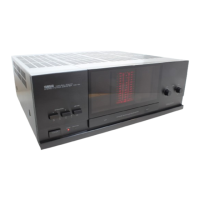
Yamaha MX-50 - Front Panel Controls and Functions; Speaker Selector Switches; Meter and Level Controls; Power Switch and Protection Indicator

Yamaha MX-50
9 pages
Print Icon
To Next Page IconTo Next Page
To Previous Page IconTo Previous Page
Loading...
FRONT
PANEL
CONTROLS
AND
THEIR
FUNCTIONS
|
The
Front
Panel
illustration
is
provided
on
page
32.
|
SPEAKERS
selector
switches:
Allow
you
to
select
one
or,
by
setting
both
switches
to
ON,
both
of
the
speaker
pairs
connected
to
the
-
A
and
B
terminals.
@
METER
switch:
Activates
the
power
peak
meter.
This
display
is
not
illuminated
when
the
METER
switch
is
in
the
OFF
position.
@
LEFT
and
RIGHT
LEVEL
controls:
These
give
you
independent
control
over
the
power
output
levels
to
the
L
and
R
speakers.
This
allows
you
to
preset
speaker
balance
for
optimum
stereo
imaging.
These
controls
can
also
serve
to
protect
speakers
with
power
handling
capacity
lower
than
this
amplifier’s
rated
output.
POWER
switch
and
indicator:
Pressing
this
switch
turns
power
on,
causing
the
POWER
indicator
to
light.
To
turn
the
unit
off,
press
again.
|
@
PROTECTION
indicator:
Lights
for
several
seconds
after
power
is
turned
on,
showing
that
the
internal
protection
circuitry
is
currently
activated.
This
mutes
the
output
signal
to
the
speakers,
preventing
the
loud
noise
otherwise
heard
when
switching
on
the
amplifier.
|
@
Power
peak
meter:
Indicates
the
power
output
on
a
logarithmically
compressed
scale
from
0.06
to
900
watts,
independently
for
the
left
and
right
output
channels.
Readings
are
accurate
for
8
ohm
speakers
only.
en

Other manuals for Yamaha MX-50

Related product manuals