■
PROGRAM INSTALLATION PROCEDURE
[Caution !]
• Check to ensure that the USB memory is connected in the correct direction.
(Incorrect connection will cause damage to the USB [TO DEVICE] terminal.)
• Don’t turn off the power during installation.
• Don’t remove the USB memory during installation.
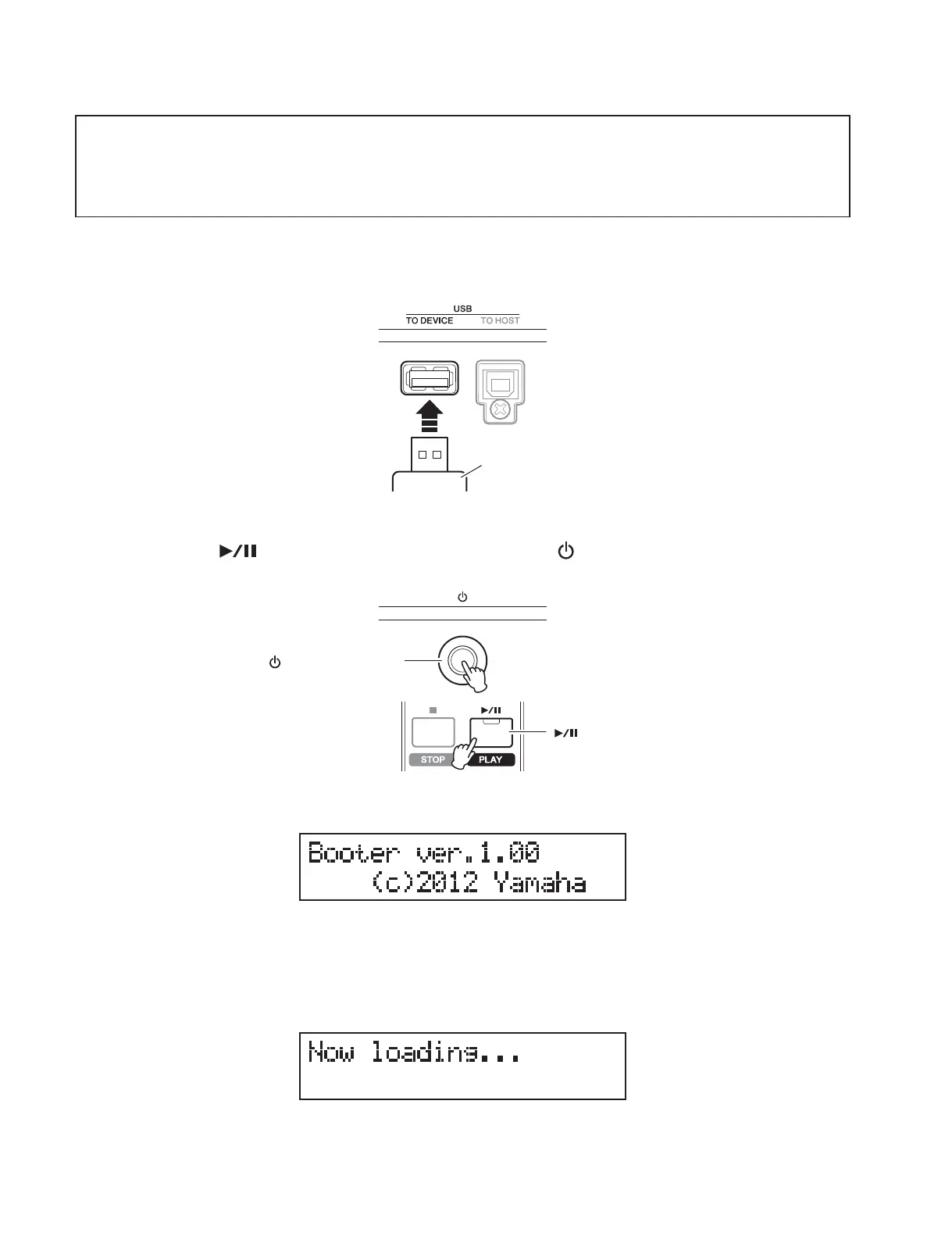
1. Connect the USB memory including the data for rewriting (MX4961SETUP.PRG) to the
USB [ TO DEVICE] terminal of the instrument.
2. While pressing [ ] (Play/Pause) button, turn on the [ ] (Standby/On) switch.
* The version displayed here varies depending on the program in the instrument, i.e., it is not always “1.00”.
Keep pressing until the following message is displayed.
* If “Please insert the media.” is displayed, no USB memory has been inserted or the USB memory cannot be recognized.
Insert the USB memory properly, and the procedure advances.
3. The installer is being read .
<Rear side>
USB memory
<Rear side>
<Front side>
[ ] (Standby/On) switch
[ ] (Play/Pause) button
48
MX61/MX49



 To Next Page