EasyManua.ls Logo

Yamaha pf10 - Features and Functions;Connection

Yamaha pf10
8 pages
Print Icon
To Next Page IconTo Next Page
To Previous Page IconTo Previous Page
Loading...
FEATURES
AND
FUNCTIONS/CONNECTION
Since
the
Pf10
features
a
built-in
amplifier
and
speakers,
you
can
begin
playing
the
instrument
as
soon
as
you
plug
in
the
power
cord
and
turn
on
the
power
switch.
In
order
to
become
familiar
with
the
operation
of
the
Pf10,
follow
the
procedures
outlined
below.
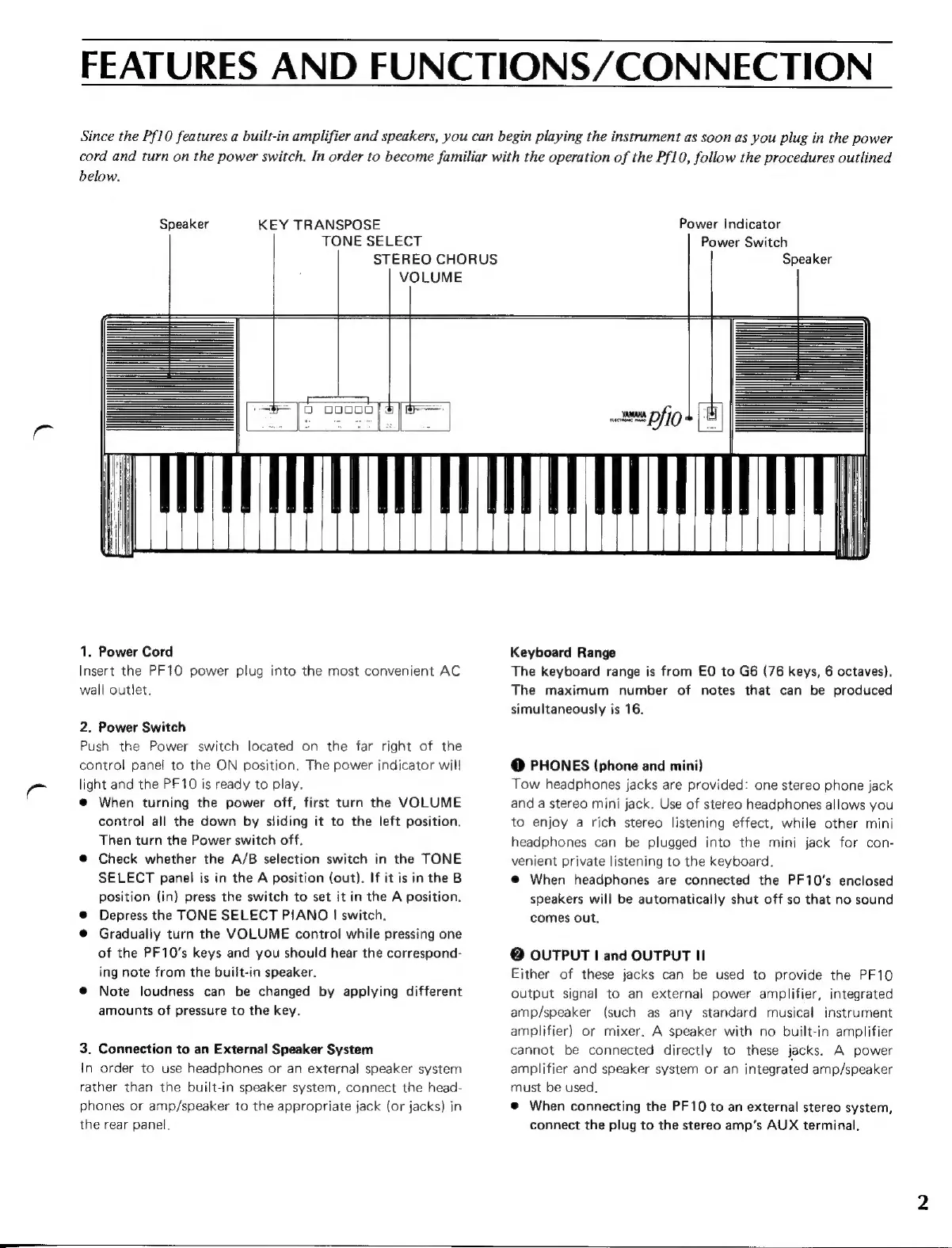
Speaker
KEY
TRANSPOSE
TONE
SELECT
SS
|
|
E
E
00000
|
UHAN,
1.
Power
Cord
Insert
the
PF10
power
plug
into
the
most
convenient
AC
wall
outlet.
2.
Power
Switch
Push
the
Power
switch
located
on
the
far
right
of
the
control
panel
to
the
ON
position.
The
power
indicator
will
light
and
the
PF10
is
ready
to
play.
@
When
turning
the
power
off,
first
turn
the
VOLUME
control
all
the
down
by
sliding
it
to
the
left
position.
Then
turn
the
Power
switch
off.
@
Check
whether
the
A/B
selection
switch
in
the
TONE
SELECT
panel
is
in
the
A
position
(out).
If
it
is
in
the
B
position
(in)
press
the
switch
to
set
it
in
the
A
position.
®
Depress
the
TONE
SELECT
PIANO
|
switch.
@
Gradually
turn
the
VOLUME
control
while
pressing
one
of
the
PF10's
keys
and
you
should
hear
the
correspond-
ing
note
from
the
built-in
speaker.
e
Note
loudness
can
be
changed
by
applying
different
amounts
of
pressure
to
the
key.
3.
Connection
to
an
External
Speaker
System
In
order
to
use
headphones
or
an
external
speaker
system
rather
than
the
built-in
speaker
system,
connect
the
head-
phones
or
amp/speaker
to
the
appropriate
jack
(or
jacks)
in
the
rear
panel.
STEREO
CHORUS
Power
Indicator
Power
Switch
Speaker
Keyboard
Range
The
keyboard
range
is
from
EO
to
G6
(76
keys,
6
octaves),
The
maximum
number
of
notes
that
can
be
produced
simultaneously
is
16.
@
PHONES
(phone
and
mini)
Tow
headphones
jacks
are
provided:
one
stereo
phone
jack
and
a
stereo
mini
jack.
Use
of
stereo
headphones
allows
you
to
enjoy
a
rich
stereo
listening
effect,
while
other
mini
headphones
can
be
plugged
into
the
mini
jack
for
con-
venient
private
listening
to
the
keyboard.
e
When
headphones
are
connected
the
PF10's
enclosed
speakers
will
be
automatically
shut
off
so
that
no
sound
comes
out.
B
OUTPUT
|
and
OUTPUT
Il
Either
of
these
jacks
can
be
used
to
provide
the
PF10
output
signal
to
an
external
power
amplifier,
integrated
amp/speaker
(such
as
any
standard
musical
instrument
amplifier)
or
mixer.
A
speaker
with
no
built-in
amplifier
cannot
be
connected
directly
to
these
jacks.
A
power
amplifier
and
speaker
system
or
an
integrated
amp/speaker
must
be
used.
@
When
connecting
the
PF10
to
an
external
stereo
system,
connect
the
plug
to
the
stereo
amp’s
AUX
terminal.

Related product manuals