EasyManua.ls Logo

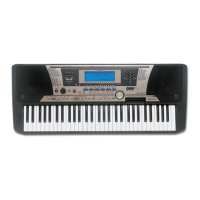
Yamaha PSR-520 - User Manual

Yamaha PSR-520
104 pages
Print Icon
To Next Page IconTo Next Page
Loading...
YAMAHA
®
AUTHORIZED
PRODUCT MANUAL

Table of Contents

Questions and Answers

  • M
    Margaret CoxAug 17, 2025
    What to do if my Yamaha PSR-520 has no sound when played?
    • C
      Cassandra RyanAug 17, 2025
      First, turn the power off, then back on. The default setting 'Local ON' is automatically selected. Also, the Local Control function could be turned OFF, so make sure Local Control is turned ON.
  • K
    Kevin CruzAug 20, 2025
    What to do if the selected voice on my Yamaha Electronic Keyboard does not sound when played?
    • R
      Rebecca EvansAug 20, 2025
      Ensure that the Keyboard Volume, Split Voice Volume, and/or Dual Voice Volume parameters are set at an appropriate level. Alternatively, turn the power OFF and turn the power ON again so that the appropriate default volume setting for the voice is automatically selected.
  • S
    Stephanie SandersAug 22, 2025
    What to do if the sustain pedal is reversed on my Yamaha Electronic Keyboard?
    • J
      Jason WilliamsAug 22, 2025
      Sustain pedal operation will be reversed if you turn ON the power or plug in the pedal while pressing the pedal. For normal operation turn OFF the power then turn it back ON while the pedal is not pressed.
  • L
    leesherryAug 25, 2025
    Why does my Yamaha PSR-520 Electronic Keyboard accompaniment not play properly?
    • D
      daviscoreyAug 26, 2025
      Ensure that the accompaniment tracks you want to hear are not muted and that the Accomp Volume parameter is turned up to a reasonable level. Alternatively, turn the power OFF and turn the power ON again; the appropriate default track setting for the style and the default accompaniment volume are automatically selected.
  • S
    Steven GrahamAug 27, 2025
    What to do if not all notes sound when playing my Yamaha Electronic Keyboard?
    • J
      Jason MatthewsAug 27, 2025
      You are probably exceeding the maximum polyphony of the PSR-520. The PSR-520 can play up to 32 notes at the same time — including split, dual, auto-accompaniment, song memory, and multi pad notes. Notes exceeding this limit will not sound.
  • H
    holly07Aug 30, 2025
    Why won't the Harmony/Echo and/or Dual Voice function turn ON on my Yamaha Electronic Keyboard?
    • M
      Michelle BartlettAug 30, 2025
      Neither of these functions can be turned ON if a percussion kit voice is selected. Make sure a voice between number 01 and 141 is selected. Also, the Harmony/Echo effect cannot be turned ON when the FINGERED FULL mode is in use.
  • L
    Lindsey HuffSep 1, 2025
    What to do if auto accompaniment won’t function properly on my Yamaha Electronic Keyboard?
    • J
      Jared BeanSep 1, 2025
      Auto accompaniment won’t sound right if you’re using SINGLE FINGER type fingering when the SINGLE FINGER mode is not selected. Also, make sure you’re playing in the Auto-Accompaniment section of the keyboard, and that you are playing chords that the PSR-520 can recognize.
  • G
    gillbrittanySep 4, 2025
    What to do if the desired parameter cannot be edited on my Yamaha PSR-520?
    • A
      Ann Lee MDSep 4, 2025
      Make sure that the cursor is located at the parameter to be edited (the parameter should be flashing).
  • C
    Carla FordSep 6, 2025
    How to fix reverb and chorus types that can not be changed by changing the registration memory number on my Yamaha PSR-520?
    • K
      Kevin HallSep 6, 2025
      The ACCOMP FREEZE function is turned ON. Press the [ACCOMP FREEZE] button to turn OFF it.
  • B
    bmooreSep 9, 2025
    Why rhythm doesn’t sound when started on my Yamaha Electronic Keyboard?
    • R
      Rebekah PerezSep 9, 2025
      Some sections of some styles do not use the accompaniment rhythm track.

Summary

Important Features

Panel Controls

Top Panel Controls

Details the controls located on the top surface of the keyboard.

Setting Up

Power Supply

Instructions on using AC power adaptors and batteries for power.

Connections

Details on connecting headphones, pedals, and MIDI devices.

Playing the PSR-520

Selecting & Playing Voices

How to choose and play different instrument voices.

Digital Effects

Changing the DSP Effect

Using Auto Accompaniment

Select the SINGLE or FINGERED Accompaniment Mode

How to select the accompaniment modes for chord input.

Start the Accompaniment

Stop the Accompaniment

One Touch Setting

Registration Memory

Recall the Registered Panel Settings

Song Recording

Recording a Melody Track

Steps for recording melody parts for songs.

Recording Accompaniment With or Without a Melody

Accompaniment and Melody Playback

The Multi Pads

Recording the MULTI PADS

Using Music Cartridges

Cartridge Accompaniment Styles

Cartridge Songs

Cartridge Registration Presets

Practice Features

Overall Functions

MIDI Functions

The MIDI Connectors

Description of the MIDI IN and OUT ports.

Appendix: Troubleshooting

Appendix: Troubleshooting; Data Backup & Initialization

Data Backup

Information on data retained when power is off.

Data Initialization

How to reset the keyboard to factory preset conditions.

MIDI Implementation Chart

Specifications

Yamaha PSR-520 Specifications

General IconGeneral
Voices100
Styles100
DisplayLCD
MIDIYes
EffectsReverb, Chorus
TypeArranger Keyboard
Keyboard61 keys
Power Consumption15W
ConnectionsHeadphones, MIDI In/Out
Power SupplyAC Adapter
Polyphony32 notes

Related product manuals