EasyManua.ls Logo

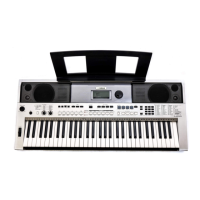
Yamaha PSR-I455 - User Manual

Yamaha PSR-I455
84 pages
Print Icon
To Next Page IconTo Next Page
Loading...
EN
Owner’s Manual
DIGITAL KEYBOARD
Setting UpReferenceAppendix Quick Guide

Table of Contents

Other manuals for Yamaha PSR-I455

Questions and Answers

  • R
    Robert RussellAug 20, 2025
    What to do if the Yamaha Electronic Keyboard volume is too soft or the sound quality is poor?
    • R
      Ricardo ClementsAug 20, 2025
      If the volume is too soft, the sound quality is poor, the Style/Tabla/Song/Arpeggio stops unexpectedly, the recorded data does not play correctly, or the LCD display goes dark with settings reset, the batteries may be low or dead. Replace all six batteries with completely new or completely recharged ones, or use the AC power adapter.
  • E
    Elizabeth NewmanAug 22, 2025
    How to fix no sound on my Yamaha PSR-I455?
    • J
      Jessica GutierrezAug 22, 2025
      If no sound is produced when playing the Yamaha Electronic Keyboard, check if headphones or an audio cable are connected to the PHONES/OUTPUT jack; if so, no sound will come from the instrument's speaker. Also, check the Local Control status (page 49) and ensure it is set to ON.
  • P
    Patricia WhiteAug 25, 2025
    Why is the sustain pedal reversed on my Yamaha Electronic Keyboard?
    • C
      costajustinAug 25, 2025
      If the footswitch on your Yamaha Electronic Keyboard is producing the opposite effect (e.g., pressing cuts off sound), the polarity of the footswitch may be reversed. Ensure the footswitch plug is properly connected to the SUSTAIN jack before turning on the power.
  • J
    Jeffrey SchmidtAug 26, 2025
    Why does the right hand side of my Yamaha Electronic Keyboard make no sound?
    • C
      Courtney MckinneyAug 27, 2025
      If no sound is produced when playing keys in the right hand area, although chords played in the left hand area are recognized on your Yamaha Electronic Keyboard, check if the Dictionary function (page 45) is in use. If it is, this is normal.
  • N
    nsandovalAug 28, 2025
    Why is there no sound except rhythm on my Yamaha Electronic Keyboard?
    • K
      Krystal HintonAug 28, 2025
      If only the Rhythm part of a Style produces sound on your Yamaha Electronic Keyboard, check the ACMP status (page 22) and ensure that ACMP is turned on.
  • S
    Susan GonzalezAug 29, 2025
    Why does my Yamaha Electronic Keyboard make noise when I use my mobile phone?
    • J
      jennakellyAug 30, 2025
      If you are getting noise when using a mobile phone close to the Yamaha Electronic Keyboard, it may be due to interference. Turn off the mobile phone or move it further away from the instrument.
  • J
    Jean RichmondAug 31, 2025
    What to do if my Yamaha PSR-I455 sounds wrong?
    • S
      shelby04Aug 31, 2025
      If your Yamaha Electronic Keyboard produces an unexpected sound that you can't restore, it may be due to the Knobs. Change the Voice, Style, Tabla/Tanpura, or Song, or press the [PORTABLE GRAND] button to reset the panel settings to their original state.
  • S
    Sean AlvaradoSep 2, 2025
    Why are some sounds missing on my Yamaha PSR-I455?
    • P
      parsonscharlesSep 2, 2025
      If some Voices don't sound or are cut off while playing your Yamaha Electronic Keyboard, it's likely that you've exceeded the maximum polyphony of 32 simultaneous notes. If the Main, Dual, and Split Voices are used along with Arpeggio, Style, Tabla/Tanpura, or Song playback, some notes/sounds may be omitted.
  • C
    Colleen MccormickSep 4, 2025
    Why won't my Yamaha PSR-I455 Style/Song start?
    • C
      Cheryl JohnsonSep 4, 2025
      If the Style, Tabla/Tanpura, or Song won't start when pressing [START/STOP] or the Arpeggio won't start when a note is pressed on your Yamaha Electronic Keyboard, check the External Clock status (page 50). Normally, this parameter should be set to OFF.
  • A
    Austin SmithSep 6, 2025
    Why is there no rhythm sound in Styles 194-206 on my Yamaha PSR-I455?
    • J
      Jennifer JohnsonSep 6, 2025
      If Styles 194–206 on your Yamaha Electronic Keyboard produce no rhythm drum sound, this is normal. These styles have no rhythm parts. Turn ACMP on and specify a chord in the left hand area to play other Style parts.

Summary

Safety Precautions and Warnings

Power Supply, AC Adapter, and Instrument Safety

Guidelines for safe use of power adapters, preventing electrical hazards, and handling the instrument.

Battery Safety and Handling

Instructions for safe battery installation, use, charging, and disposal.

Abnormality Detection and Response

Actions to take for instrument malfunctions like unusual smells, smoke, or sound loss.

Cautions for Safe Operation

AC Power Adaptor and Connection Safety

Advice on using AC adaptors, accessible outlets, and safe component connections.

Location and Handling Cautions

Precautions for instrument placement, physical force, and volume levels to prevent injury.

Maintenance, Noise, and Environmental Guidelines

Tips for instrument care, avoiding noise interference, and operating within temperature limits.

Panel Controls and Terminals (Front)

Front Panel Controls Overview

Identification of main controls on the front panel like volume, pitch bend, and live controls.

Voice Control Section

Controls for managing instrument voices including Split, Dual, Harmony, and Arpeggio.

Playback Control Buttons

Buttons for controlling Demo, Lesson, Recording, Metronome, and Tempo functions.

Panel Controls and Terminals (Rear)

Rear Panel Terminals

Details on rear panel connections including USB, Sustain, Phones/Output, and Power.

Track Control Buttons

Buttons used to toggle individual song tracks on or off during playback.

Power Requirements and Battery Options

Using the AC Power Adaptor

Instructions for connecting and safely operating the instrument with an AC power adaptor.

Installing and Using Batteries

Guide to installing batteries and selecting the correct battery type.

Checking Power Status and Connections

Basic Operations Guide

Turning the Power On;Off

Steps for powering the instrument on, off, and managing the master volume.

Try Playing a Variety of Instrument Voices

Playing a Split Voice

Using the Metronome for Practice

Adding Harmony to Your Performance

Creating Arpeggios

Creating Original Sounds with Knobs

Playing Styles with Auto Accompaniment

Selecting and Playing Styles

Steps to choose an auto-accompaniment style and start playback.

Song Playback Controls

Using the Song Lesson Feature

Three Types of Song Lesson Modes

Explanation of Listen, Timing, and Waiting modes for learning songs.

Practicing with Song Lesson

How to select a song, turn off parts, and start the lesson playback.

Making Practice Perfect with Repeat & Learn

Using Repeat & Learn Function

Utilizing the Repeat & Learn feature to practice difficult song sections.

Managing Recorded Songs

Backup Parameters and Initialization

Backup Parameters Overview

Data maintained when power is off, including user songs and settings.

Initialization Procedures

How to restore factory default settings via Backup Clear or Flash Clear.

Handy Performance Features

Pitch Controls and Panel Settings

Keyboard Sensitivity and EQ Settings

Voice Settings and Editing

Arpeggio Settings and Synchronization

Styles and Tabla;Tanpura Patterns

Style Variations: Sections Overview

Understanding and using Intro, Main, Auto Fill, and Ending sections within styles.

Style Playback Controls

Tabla;Tanpura, Tempo, and Volume Adjustments

Style Chord Recognition and Playback

Understanding Chords for Style Playback

Using the Chord Dictionary

Song Playback Adjustments

Understanding and Using the Functions

Basic Procedure in the Function Display

Step-by-step guide to navigating and changing instrument functions.

Function List Overview

Reference to detailed parameters available within the instrument's functions.

USB Flash Memory Operations

Precautions for USB Device Connection

Important safety and handling guidelines for USB devices.

Using USB Flash Memory for Data Storage

Overview of saving and loading data like user songs and settings.

Connecting a USB Flash Memory

Connecting the USB Flash Memory Device

Steps to connect a USB flash memory device to the instrument.

Formatting a USB Flash Memory

Formatting USB Flash Memory

Guide to preparing a USB flash memory for use with the instrument.

Saving User Data to USB Flash Memory

Saving User Data to USB Flash Memory

How to save user songs, styles, and registration settings to a USB drive.

Saving User Songs as SMF

Saving a User Song as SMF to USB Flash Memory

Converting and saving user songs in Standard MIDI File (SMF) format.

Loading User Data from USB Flash Memory

Loading User Data from USB Flash Memory

Restoring user songs, styles, and settings from a USB drive to the instrument.

Loading a Style File from USB Flash Memory

Loading a Style File from USB Flash Memory

Importing style files from USB to use with the instrument.

Deleting Files from USB Flash Memory

Deleting a User File from USB Flash Memory

Removing user files (.usr) from the connected USB flash memory.

Deleting a SMF File from USB Flash Memory

Removing Standard MIDI Files (.smf) from the USB flash memory.

Troubleshooting Common Issues

Voice List Reference

Effect Type List

Instrument Specifications

Yamaha PSR-I455 Specifications

General IconGeneral
DisplayCustom LCD
Amplifiers2.5W + 2.5W
Speakers12 cm x 2
One Touch Setting (OTS)Yes
Reverb9 types
Chorus4 types
Master EQ6 types
Harmony26 types
Featured VoicesIndian Voices
Styles206 styles
Featured StylesIndian Styles
Songs30
FunctionsDual, Split, Metronome, Transpose, Tuning
Recording5 Songs
ConnectivityUSB to Host
Power SupplyPA-150 or equivalent
ConnectorsDC IN 12V, Headphones/Output, Sustain Pedal
Keyboard Type61-key Touch Response Keyboard

Related product manuals