Playing a Variety of Instrument Voices
PSR-E363, PSR-EW300, YPT-360 Owner’s Manual
17
Reference
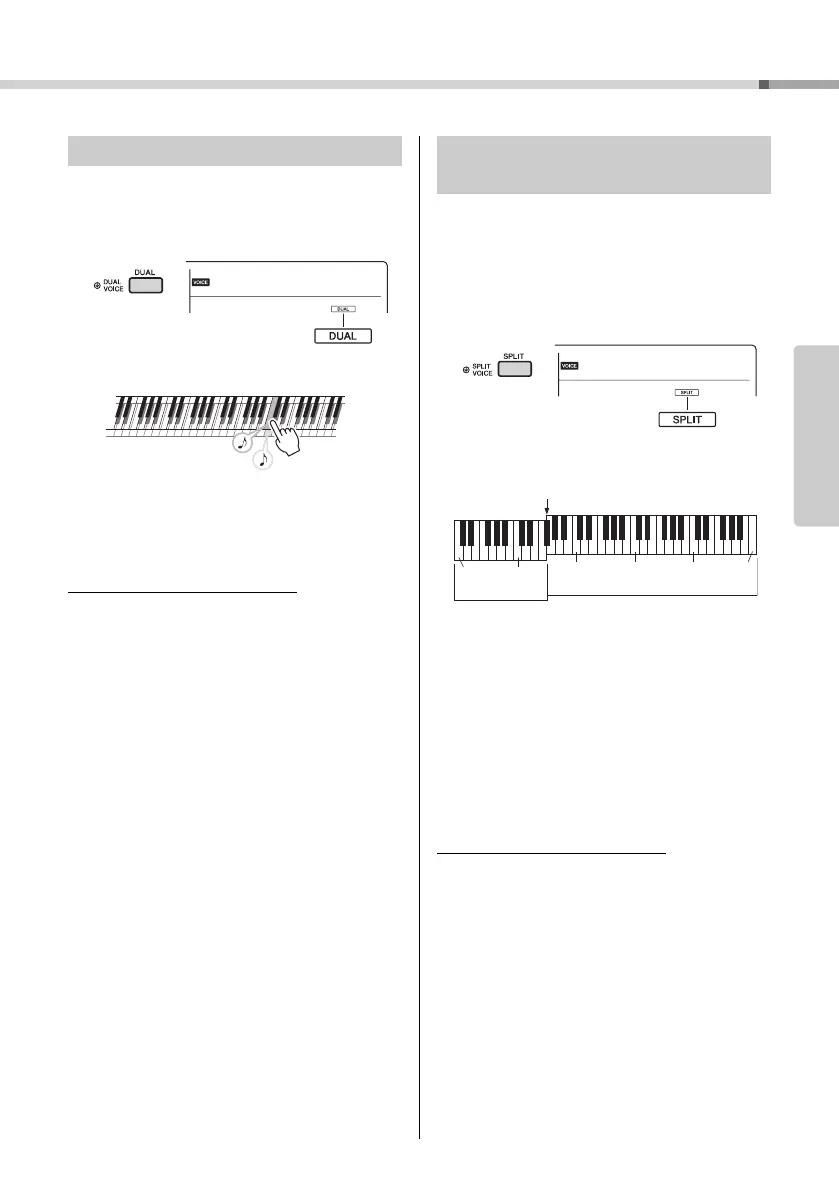
In addition to the Main Voice, you can layer a differ-
ent Voice over the entire keyboard as a “Dual Voice.”
1
Press the [DUAL] button to turn Dual on.
2
Press the [DUAL] button again to exit
from Dual.
To select a different Dual Voice:
Although turning on Dual will select a Dual Voice suit-
able for the current Main Voice, you can easily select
a different Dual Voice by pressing and holding the
[DUAL] button to call up “D.Voice” (Function 013; page
46), then using the number buttons [0]–[9], [+], [-].
By dividing the keyboard into the two separate areas,
you can play a different Voice between the Left hand
and Right hand areas.
1
Press the [SPLIT] button to turn on Split.
The keyboard is divided into the Left hand and
Right hand areas.
You can play a “Split Voice” on the Left hand area
of the keyboard while playing a Main Voice and
Dual Voice on the Right hand area of the key-
board.
The highest key for the Left hand area is referred
to as the “Split Point” (Function 007;
page 45
)
which can be changed from the default F#2 key.
2
Press the [SPLIT] button again to exit
from Split.
To select a different Split Voice:
Press and hold the [SPLIT] button to call up “S.Voice”
(Function 017; page 46), then use the number but-
tons [0]–[9], [+], [-].
Layering a Dual Voice
Appears when Dual
is on
Two Voices will
sound at the same
time.
Playing a Split Voice in the Left
Hand area
GrandPno
001
Split Voice
Main Voice and
Dual Voice
Split Point ... default setting: 054 (F#2)
036
(C1)
048
(C2)
060
(C3)
072
(C4)
084
(C5)
096
(C6)



 To Next Page