5-13
5
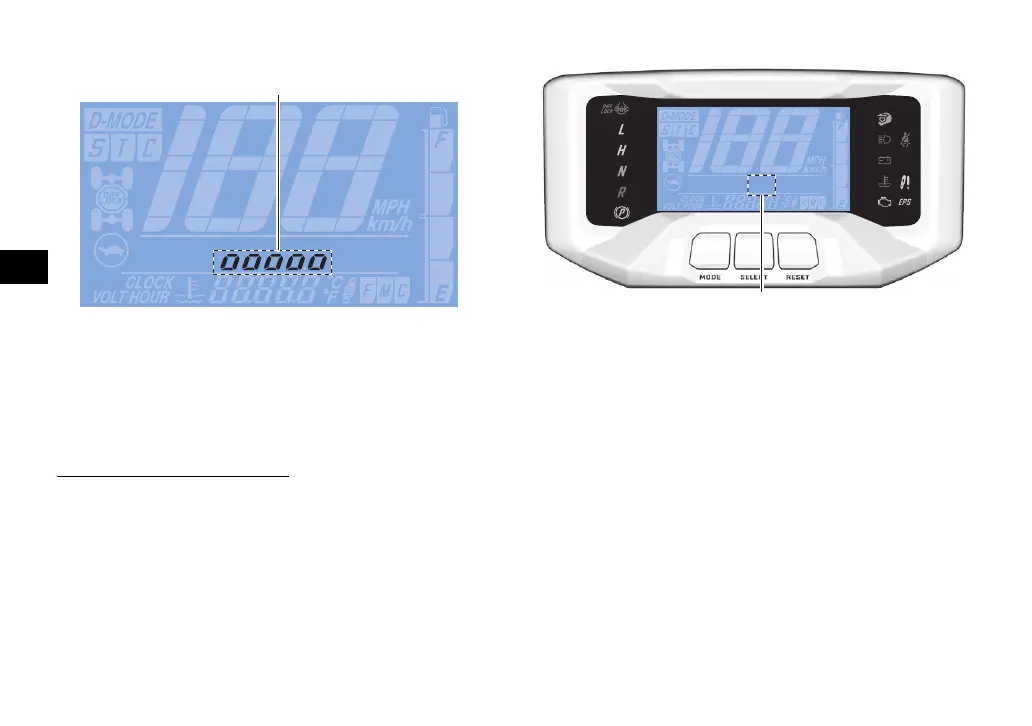
Brightness control mode
This mode allows you to adjust the brightness
of the multi-function meter unit when the ve-
hicle is stopped.
To adjust the brightness
1. Push the “SELECT” button until the
brightness level is displayed.
2. Use the “RESET” button to set the bright-
ness level.
3. Push the “SELECT” button to confirm the
selected brightness level and exit the
brightness control mode.
Error code display
This model is equipped with a self-diagnostic
device for various electrical circuits.
If a problem is detected in any of those cir-
cuits, the warning lights will come on or flash,
and the display will indicate an error code.
If the display indicates an error code, note the
code number and have a Yamaha dealer
check the vehicle.
1. Brightness level display
1. Error code display
UB4M13E0.book Page 13 Thursday, June 24, 2021 2:40 PM








 To Next Page