USBUPDATE
UpdateSuccess
VERIFYING...
Please...
Sx-x:xx%
PowerOff!
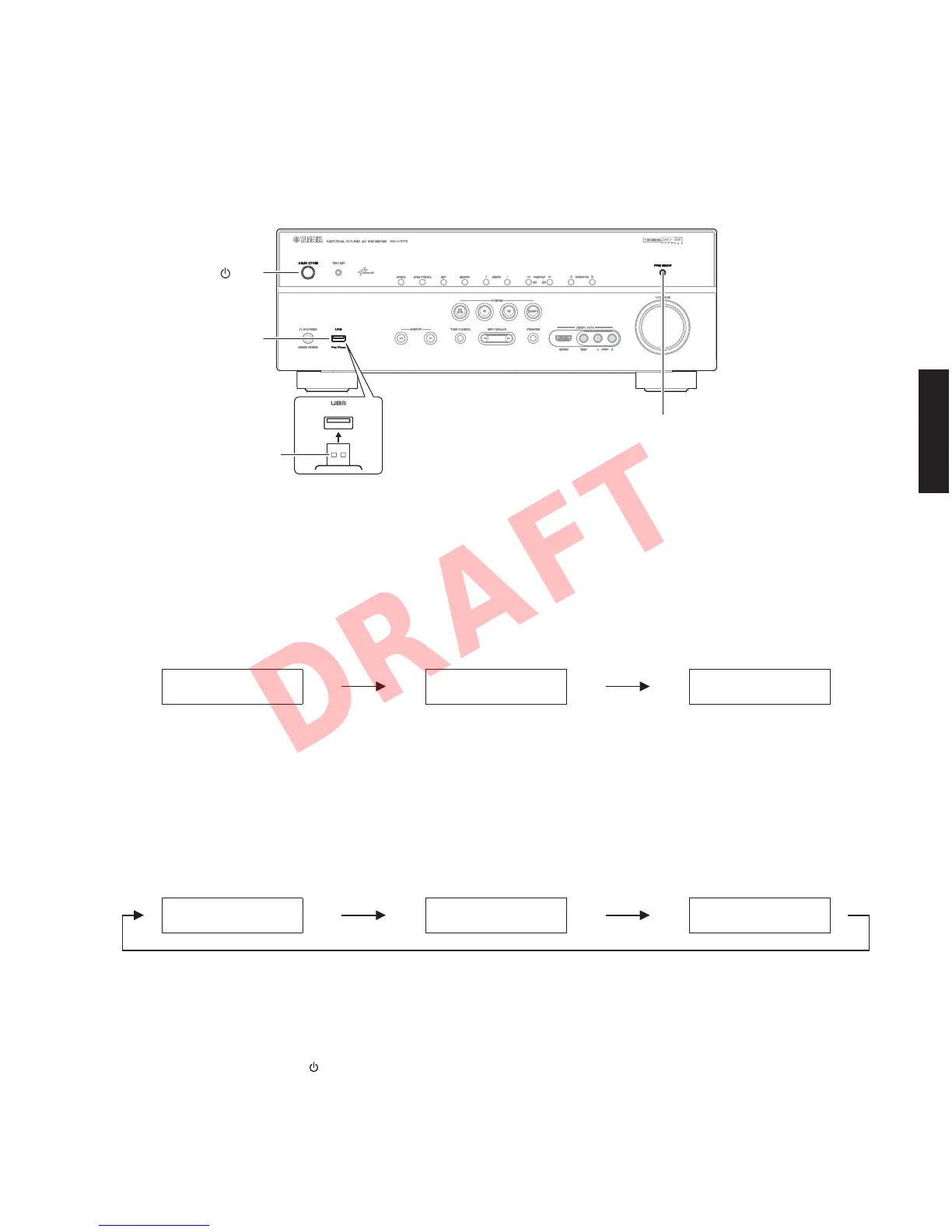
Fig. 1
Fig. 2
Fig. 2
● Operation Procedures
1. Insert the USB storage device to the USB port. (Fig. 1)
2. While pressing the “PURE DIRECT” key, connect the power cable to the AC outlet. (Fig. 1)
3. The USB UPDATE mode is activated and “USB UPDATE” is displayed. Writing of the firmware starts automatically.
(Fig. 2)
Writing is started.
Writing is completed.
Writing being executed.
4. When writing of the firmware is completed, “Update Success”, “Please...” and “Power Off!” are displayed
repeatedly. (Fig. 3)
5. Press the “MAIN ZONE
” key to turn off the power. (Fig. 1)
6. Remove the USB storage device from the USB port. (Fig. 1)
7. Start up the self-diagnostic function and check that the firmware version and checksum are the same as written
ones. (See “Confirmation of firmware version and checksum”)
USB port
"MAIN ZONE " key
USB storage device
"PURE DIRECT" key
25
RX-V671/HTR-6064/RX-A710
RX-V671/HTR-6064/
RX-A710













 To Next Page