34
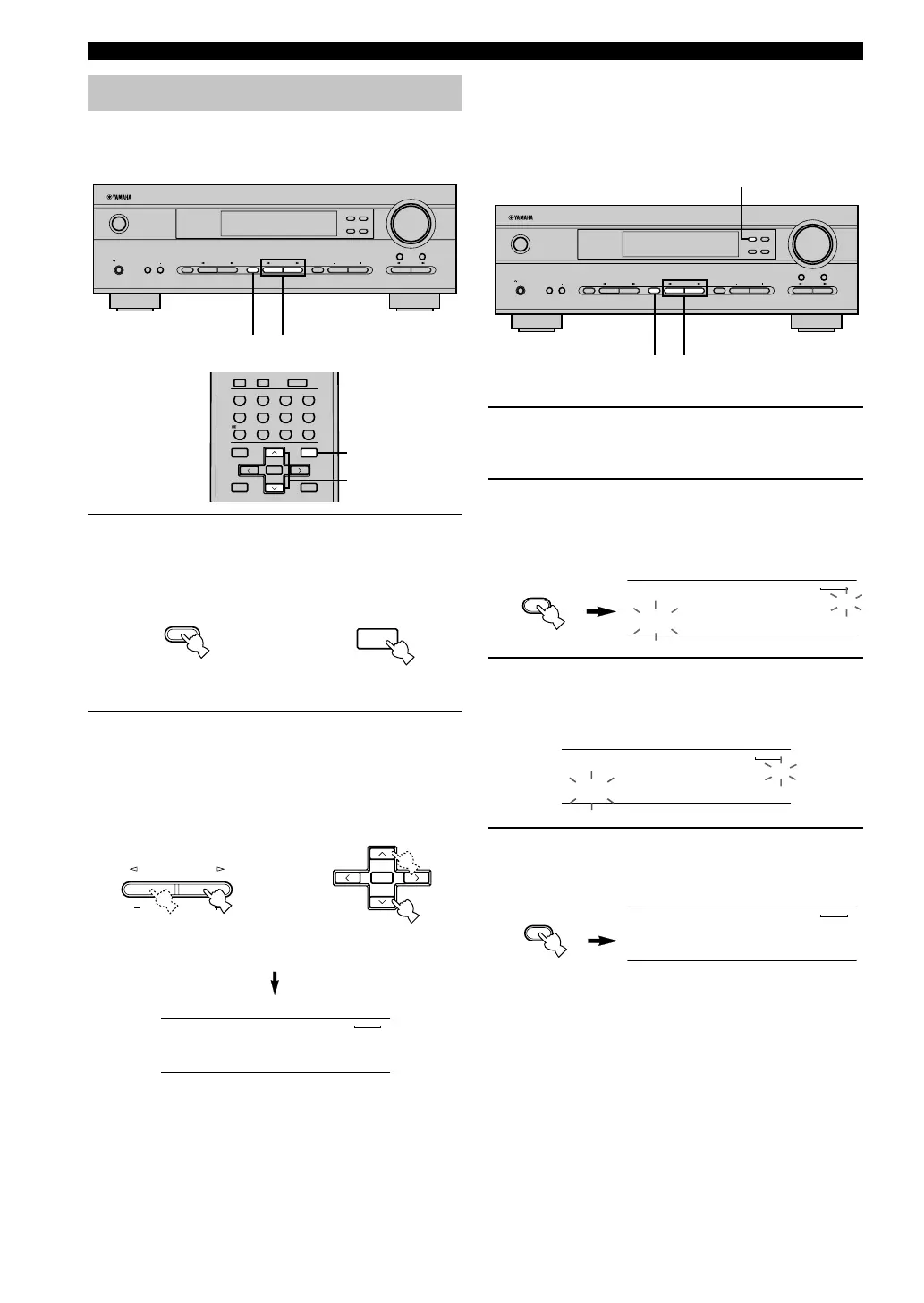
■ Exchanging preset stations
You can exchange the assignment of two preset stations.
The example below describes the procedure for
exchanging preset station “E1” with “A5”.
1 Select preset station “E1” by using the
A/B/C/D/E and PRESET/TUNING l / h.
See “Selecting a preset station” at left.
2 Press and hold PRESET/TUNING (EDIT) for
at least 3 seconds.
“E1” and the “MEMORY” indicator flash on the
front panel display.
3 Select preset station “A5” by using the
A/B/C/D/E and PRESET/TUNING l / h.
“A5” and the “MEMORY” indicator flash on the
front panel display.
4 Press PRESET/TUNING (EDIT) again.
The stations stored at the two preset assignments are
exchanged.
Selecting a preset station
You can recall any desired station simply by selecting the
preset station number under which it was stored.
1 Press A/B/C/D/E (A/B/C/D/E on the remote
control) to select the preset station group.
The preset group letter appears on the front panel
display and changes each time you press A/B/C/D/E.
2 Press PRESET/TUNING l / h (PRESET u /
d on the remote control) to select a preset
station number (1 to 8).
The preset group and number appear on the front
panel display along with the station band and
frequency, and the “TUNED” indicator lights up.
Shows the exchange of stations has been
completed.
Front panel
Remote control
or
Front panel
Remote control
or
TUNING
V-AUXVCR
D-TV/CBL
DVD
MD/CD-R
TUNER
TUNED
C3:AM 1440 kHz
VOLUME
STANDBY
/ON
AUTO/MAN`L MONO MAN`L/AUTO FM
TUNING MODE MEMORY
EDIT
PRESET/TUNING FM/AM
SILENT
PHONES
SPEAKERS
AON
BOFF
EFFECT
PRESET/TUNING
SET MENU
A/B/C/D/E
NEXT
PROGRAM
STEREO
BASS/TREBLE
CONTROL
INPUT
6CH INPUTINPUT MODE
21
ENTER
+10
09
STEREO
6.1/5.1
NIGHT
/DTS
8765
MOVIE2MOVIE1TV THTRMUSIC
432
1
ENTERTAINMENT
ROCKJAZZHALL
MUTE
INPUTMUTE
SET MENU
SELECT
PRESET/CH
A/B/C/D/E
LEVEL
MENU
TEST
RETURN
DISPLAY
TITLE
+
–
2
1
A/B/C/D/E
NEXT
SET MENU
A/B/C/D/E
MENU
PRESET/TUNING
SET MENU
SELECT
+
–
PRESET/CH
VOLUME
STANDBY
/ON
AUTO/MAN`L MONO MAN`L/AUTO FM
TUNING MODE MEMORY
EDIT
PRESET/TUNING FM/AM
SILENT
PHONES
SPEAKERS
AON
BOFF
EFFECT
PRESET/TUNING
SET MENU
A/B/C/D/E
NEXT
PROGRAM
STEREO
BASS/TREBLE
CONTROL
INPUT
6CH INPUTINPUT MODE
2,4
1,31,3
V-AUXVCR
D-TV/CBL
DVD
MD/CD-R
TUNER
MEMORYTUNED
E1:FM 87.5 MHz
V-AUXVCR
D-TV/CBL
DVD
MD/CD-R
TUNER
MEMORYTUNED
A5:FM 90.6 MHz
V-AUXVCR
D-TV/CBL
DVD
MD/CD-R
TUNER
MEMORY
EDIT E1-A5
08V340R_32-39_EN(3.2.25).P65 03.2.25, 7:59 PM34


 To Next Page