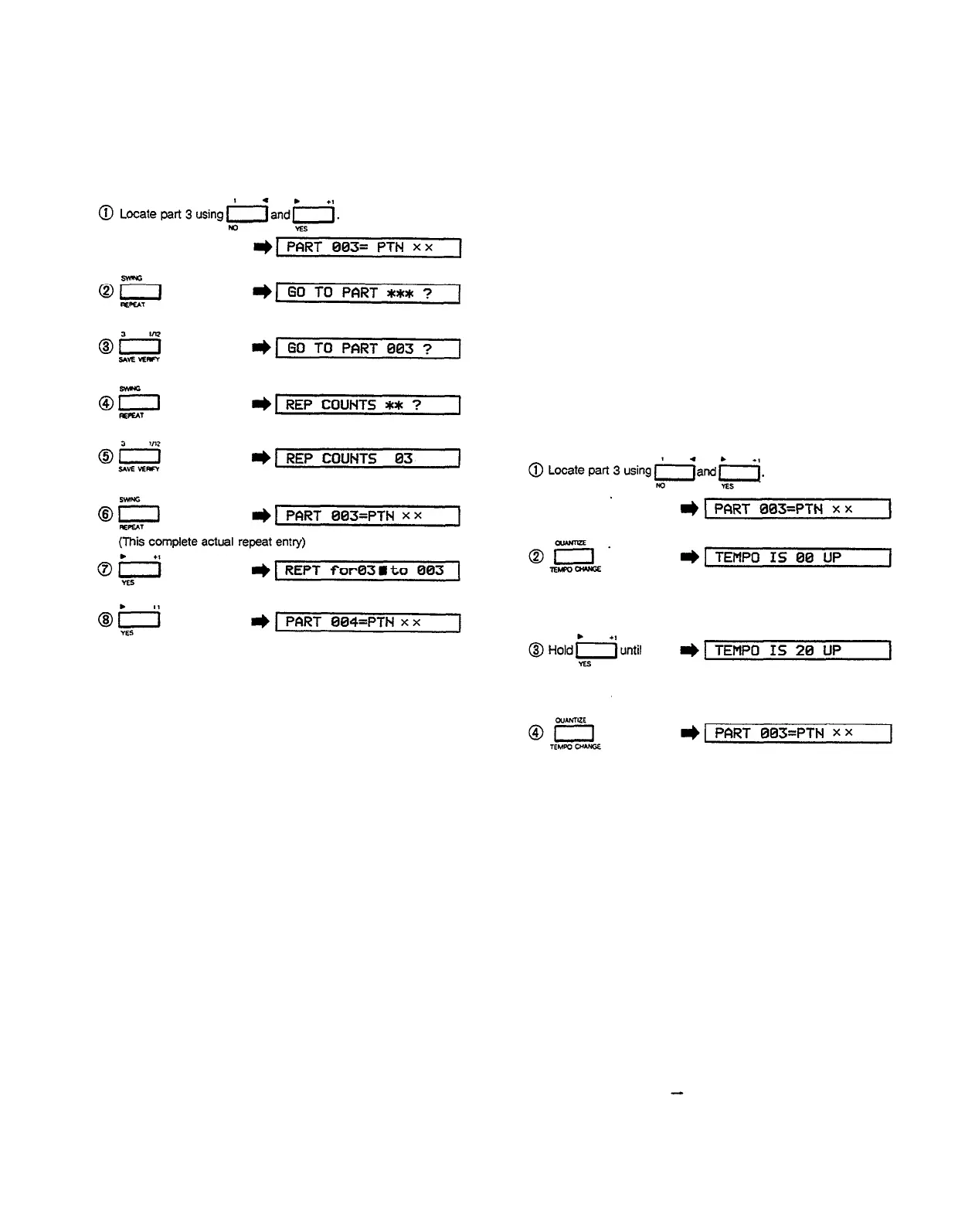
Entering Repeats (EX: repeat part 3, 3 times)
A number of repeats can be programmed in one song,
and repeats can be “nested"—i.e. repeats can be
programmed within repeats—to create complex
progressions.
Tempo
The operation of the TEMPO function in the song mode
is identical to the TEMPO function in the pattern
mode–see “Tempo” in the “PATTERN OPERATIONS”
section.
Programming Tempo Changes
This function makes it possible to program tempo
changes to occur at any point during a song. Tempo
changes are entered as an increase or decrease in
tempo relative to the current tempo-determined by the
TEMPO control, the TEMPO function, or a previous
TEMPO CHANGE function. For example, if the current
tempo is 100 and a tempo change of “20 UP” is
encountered, the new tempo will be 120. If a tempo
change of “40 DOWN” is then encountered, the tempo
will drop to 80.
19
The TEMPO CHANGE function is used in the edit mode.
Locate the part immediately before the desired tempo
change using the -1/NO and +1/YES buttons, then
press the TEMPO CHANGE button. The LCD panel will
respond with “TEMPO IS 00 UP”. The –1/NO and
+1/YES buttons are then used to set the desired tempo
change. Pressing either the –1/NO or +1/YES button
once, quickly, decrements or increments the tempo
change by one, respectively. Holding the –1/NO or
+1/YES button down causes continuous incrementing or
decrementing in the specified direction. Once the desired
tempo change has been set, press the TEMPO CHANGE
button again to return to the normal edit mode.
Programming Tempo Changes
(EX: Increase tempo by 20 after part 3)
Note that if you now increment through the parts, a
“TEMPO IS XX UP” or “TEMPO IS XX DOWN” message
will appear immediately after the part at which the
tempo change function was called (“XX” is the selected
tempo change value). Tempo changes can be deleted in
the same way as parts, by locating the tempo message
and using the delete function (see “The Delete
Function”, above). A number of tempo changes can be
programmed in one song.
Accelerando or ritardando effects can be produced by
placing a number of small tempo changes between
successive parts. To save programming time, tempo
changes can be used in conjunction with repeats. For
example, to produce a ritardando effect the tempo
change and repeat functions could be combined as
follows:
“PART 001 = PTN 01” “TEMPO IS 02 DOWN" - "REPT
for 09 to 001”


 To Next Page