EasyManua.ls Logo

Yamaha RXA670 - User Manual

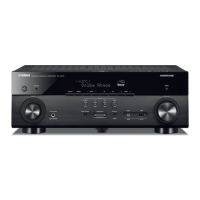
Yamaha RXA670
140 pages
Print Icon
To Next Page IconTo Next Page
Loading...
Owner's Manual
This unit is a product for enjoying video and music at home.
This manual explains preparations and operations for everyday users of the unit.
Read the supplied booklet “Quick Start Guide” before using the unit.
EN

Table of Contents

Questions and Answers

  • C
    Cheryl WeeksAug 17, 2025
    Why is there no sound coming from my Yamaha RXA670?
    • J
      jesse38Aug 17, 2025
      There might be several reasons why your Yamaha Receiver isn't producing sound. Ensure the correct input source is selected. The unit might not be able to reproduce the input signal, so check 'Signal Info' in the 'Option' menu. Verify that audio output to Zone A (or Zone B) is enabled by sliding the Zone switch to the correct zone. Finally, check the cable connecting the unit and playback device; if defective, replace it.
  • J
    Jordan MyersAug 20, 2025
    What to do if Yamaha Receiver remote control not working?
    • L
      Lori ParkerAug 20, 2025
      If your Yamaha Receiver isn't responding to the remote control, first ensure you're within the operating range. Then, replace the batteries with new ones. Check if direct sunlight or strong lighting is interfering with the unit's remote control sensor; if so, adjust the lighting or reposition the unit. Also, verify that the remote control IDs of the unit and the remote are identical. Lastly, ensure the remote control is set to the Zone A operation mode.
  • T
    Timothy BlairAug 23, 2025
    Why does my Yamaha Receiver keep turning off?
    • S
      Samuel BennettAug 23, 2025
      Your Yamaha Receiver might be entering standby mode automatically due to several reasons. The sleep timer may have activated; if so, turn the unit back on. The auto-standby function could be enabled; to disable it, set “Auto Power Standby” in the “Setup” menu to “Off”. The speaker impedance setting might be incorrect; set it to match your speakers. Finally, a short circuit could have activated the protection circuitry; twist the bare wires of each speaker cable firmly and reconnect them to the unit and speakers.
  • S
    Sarah BennettAug 28, 2025
    What to do if Yamaha RXA670 is not responding?
    • T
      Tiffany HallAug 28, 2025
      If your Yamaha Receiver is unresponsive, the internal microcomputer may be frozen due to an external electric shock (like lightning) or a drop in the power supply voltage. Hold down the power button on the front panel for more than 15 seconds to reboot the unit. If the problem continues, disconnect the power cable from the AC wall outlet and plug it back in.
  • T
    tracyhansonAug 31, 2025
    Why does my Yamaha RXA670 Receiver turn off immediately?
    • K
      khoffmanAug 31, 2025
      The unit was turned on while a speaker cable was shorted. Twist the bare wires of each speaker cable firmly and reconnect to the unit and speakers.
  • M
    Michael CollierSep 3, 2025
    Why don't the colored keys work on my Yamaha RXA670 Receiver remote?
    • T
      Troy JohnsonSep 3, 2025
      The colored keys on your Yamaha Receiver remote may not be working because the connected HDMI device doesn't support their operation. Use a device that supports the operation of the RED/GREEN/YELLOW/BLUE keys. Alternatively, the settings of these keys may have been changed; set the “Remote Color Key” settings in the “Setup” menu to “Default”.
  • J
    Jacqueline JohnsonSep 5, 2025
    How to fix Yamaha Receiver that won't turn on?
    • C
      Chelsea YoungSep 5, 2025
      The power may not turn on because the protection circuitry has been activated three times consecutively. When this happens, the standby indicator on the unit blinks when you try to turn on the power. As a safety precaution, the capability to turn on the power is disabled. Contact your nearest Yamaha dealer or service center to request repair.
  • R
    Richard ChapmanSep 8, 2025
    What to do if Yamaha RXA670 Receiver won't turn off?
    • A
      Amy RamirezSep 8, 2025
      If your Yamaha Receiver won't turn off, the internal microcomputer may have frozen due to an external electric shock or a drop in power supply voltage. Try holding down the power button on the front panel for more than 15 seconds to reboot the unit. If the problem persists, disconnect the power cable from the AC wall outlet and plug it back in.
  • W
    Wendy JacksonSep 12, 2025
    Why can't I turn up the volume on my Yamaha RXA670 Receiver?
    • B
      Brittney WilliamsSep 12, 2025
      If you cannot increase the volume on your Yamaha Receiver, the maximum volume may be set. Adjust the maximum volume using “Max Volume” in the “Setup” menu. Alternatively, a device connected to the output jacks of the unit may not be turned on; ensure all connected devices are powered on.
  • A
    Allison GoldenSep 13, 2025
    Why can't I select the input source on my Yamaha RXA670 Receiver?
    • N
      Nicholas ThompsonSep 13, 2025
      If you cannot select the desired input source on your Yamaha Receiver, the function which skips some input sources may be enabled. Set “Input Skip” of the desired input source in the “Setup” menu to “Off”.

Yamaha RXA670 Specifications

General IconGeneral
Channels7.2
Amplifier Output DetailsDiscrete amplifier design
HDMI Pass-ThroughYes
Input Impedance47 kΩ
4K Ultra HD Pass-throughYes
Phono InputYes
USB InputYes
HDMI Inputs6
HDMI Outputs1
Audio Formats SupportedDolby Atmos, Dolby TrueHD, Dolby Digital Plus, DTS:X, DTS-HD Master Audio
Wireless ConnectivityWi-Fi, Bluetooth
Input Sensitivity200 mV
Signal-To-Noise Ratio100 dB
Additional FeaturesYPAO
Surround Sound EffectsCINEMA DSP 3D, Virtual CINEMA DSP

Related product manuals