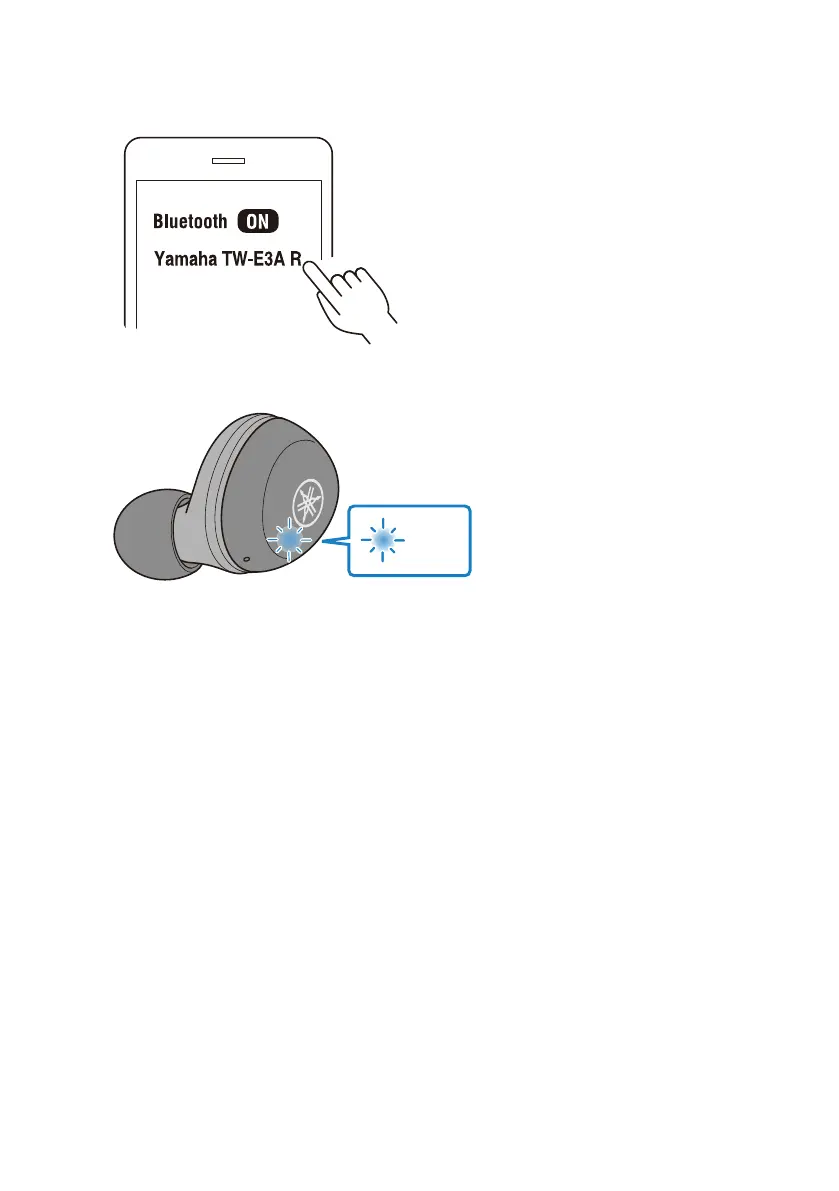
3 Select this product from this list on your Bluetooth device.
If successfully connected, you will hear the “Pairing Successful” audio message.
The indicator on the earphone will light up as shown below.
Next, you will see a message to register (pair) the other earphone. Follow the instructions to
register (pair).
The other earphone may be listed as “Headset,” depending on the Bluetooth device.
NOTE
(
Pairing standby mode will automatically end after about two minutes. To register again, start from step 1.
(
Up to 3 devices can be registered with this product. From the 4th device on, older registrations will be deleted (the oldest is deleted
first).
(
If a passkey is required when connecting, input “0000”.
(
You can also set the earphones in registration (pairing) mode by disconnecting the earphones with the connected Bluetooth
device.
Related links
(
“Registering (pairing) a different Bluetooth device”(p.20)
(
“Connecting to a Bluetooth device”(p.23)
(
“Disconnecting from a Bluetooth device”(p.24)
(
“About the app for earphones/headphones”(p.32)
19
Connections > Registering a Bluetooth device (pairing)



 To Next Page