23 En
FM/AM tuning
TUNING
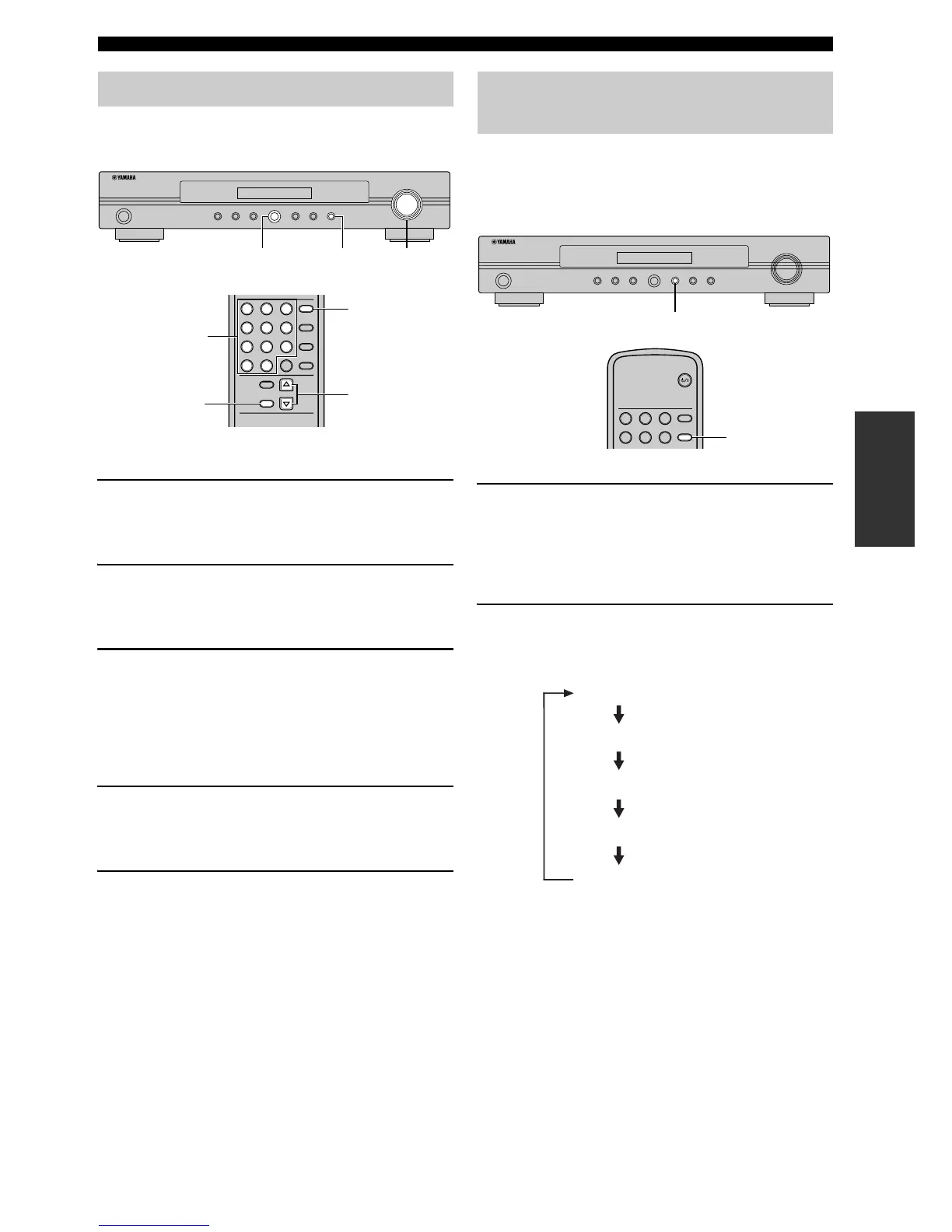
You can tune into any desired station simply by selecting
the preset station group and under which it was stored.
■ Browsing the preset station list
1 Press BAND on the front panel (or remote
control) repeatedly to select the reception
band (FM/AM).
2 Press TUNING MODE on the front panel (or
remote control) repeatedly to select “Preset
tune”.
3 Rotate PRESET/TUNING (or press
TUNING k / n repeatedly) to select the
desired preset station number.
■ Selecting the desired preset station
directly
1 Press BAND on the remote control
repeatedly to select the reception band (FM/
AM).
2 Press the numeric buttons to enter the
desired preset station number.
y
To enter numbers less than 10 (i.e. 1 to 9) by using the numeric
buttons on the remote control, press the desired number and
then ENTER or press 0 and then enter the desired number.
Use this feature to display the five types of the Radio Data
System information: PROGRAM SERVICE, CLOCK
TIME, PROGRAM TYPE, RADIO TEXT, and TRAFFIC
ANNOUNCE.
1 Tune into the desired Radio Data System
broadcasting station.
You can use PTY SEEK mode to tune into the desired
Radio Data System broadcasting station from the
preset ones.
2 Press INFO/TEXT on the front panel (or
remote control) repeatedly to select the
desired Radio Data System display mode.
Tuning into the preset stations
STANDBY
/ON
DIMMER AUTO SCAN MEMORY BAND INFO/TEXT FUNCTION SELECT
DAB/FM/AM FM MODE TUNING MODE
PRESET/TUNING
FUNCTION
ENTER CLEAR
8
5
2
0
7
4
1
9
6
3
MEMORY
AUTO SCA N
INFO/TEXT
DAB/FM/AM
BAND
SELECT
FM MODE
TUNING MODE
TUNING
BAND
PRESET/
TUNING
Numeric
buttons
TUNING
MODE
BAND
TUNING k / n
TUNING
MODE
Displaying the Radio Data System
information
STANDBY
/ON
DIMMER AUTO SCAN MEMORY BAND INFO/TEXT FUNCTION SELECT
DAB/FM/AM FM MODE TUNING MODE
PRESET/TUNING
5
2
4
1
6
3
INFO/TEXT
DAB/FM/AM
POWER
BAND
INFO/TEXT
INFO/TEXT
PROGRAM SERVICE
CLOCK TIME
PROGRAM TYPE
RADIO TEXT
TRAFFIC ANNOUNCE
(Default setting)


 To Next Page