Controls and functions
6 En
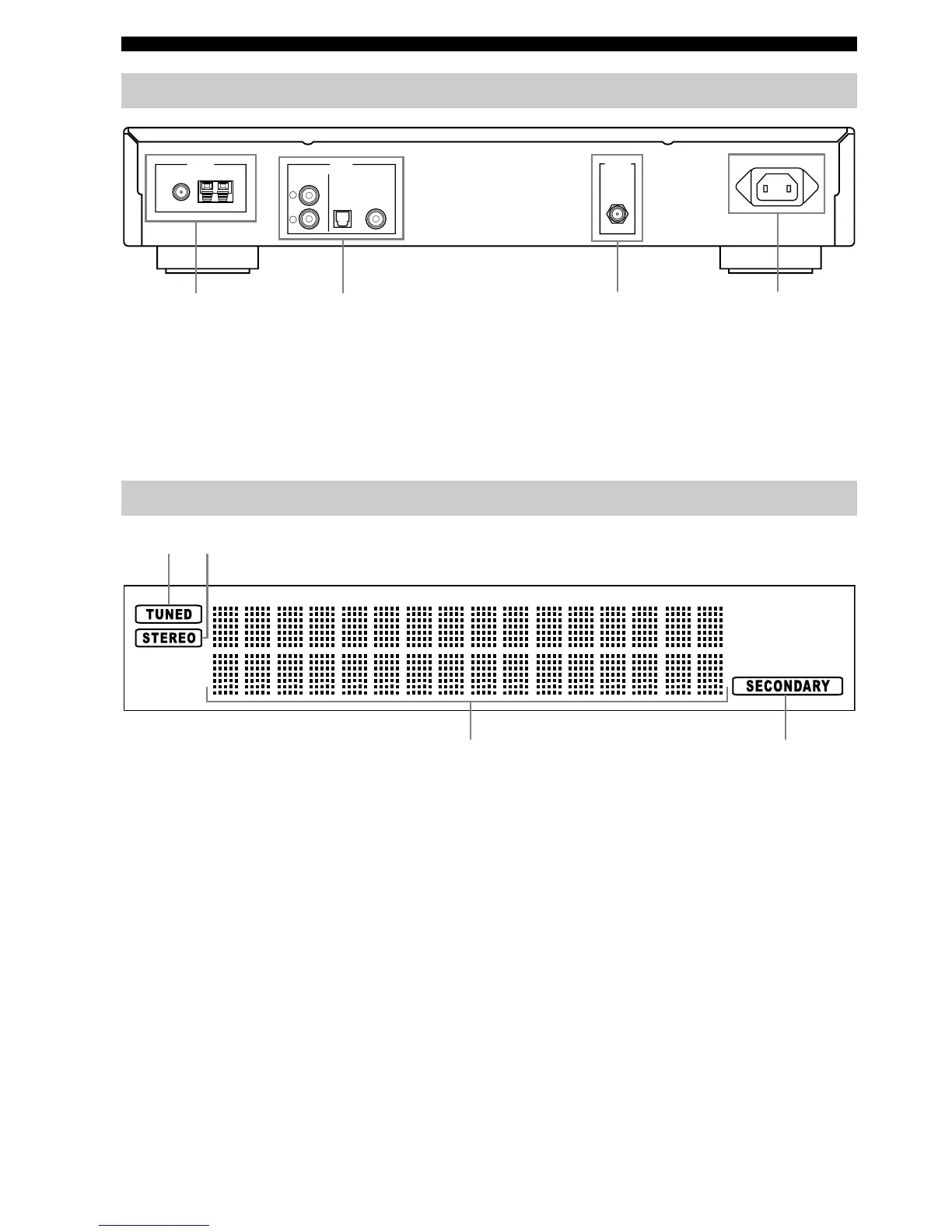
1 FM/AM ANTENNA terminals
See page 8 for connection information.
2 OUTPUT jacks
See page 7 for connection information.
3 DAB ANTENNA terminal
See page 8 for connection information.
4 AC IN
See page 9 for connection information.
1 TUNED indicator
Lights up when this unit is tuned into a station.
2 STEREO indicator
Lights up when this unit is in the stereo playback.
3 Multi-information display
Shows tuning status messages and DAB or Radio Data
System information.
4 SECONDARY indicator
• Lights up when this unit is in the DAB tuning mode
and receiving a secondary service.
• Flashes for 5 seconds when this unit is tuned into the
DAB service which has a secondary service.
■ Adjusting the brightness of the front
panel display
Press DIMMER on the front panel repeatedly to change
the brightness of the front panel display.
Rear panel
COAXIALOPTICAL
DIGITAL (DAB)ANALOGFM GND AM
OUTPUT
DAB
ANTENNA AC INANTENNA
R
L
12 43
Front panel display
12
3
4


 To Next Page