20
Auto start operation instruction
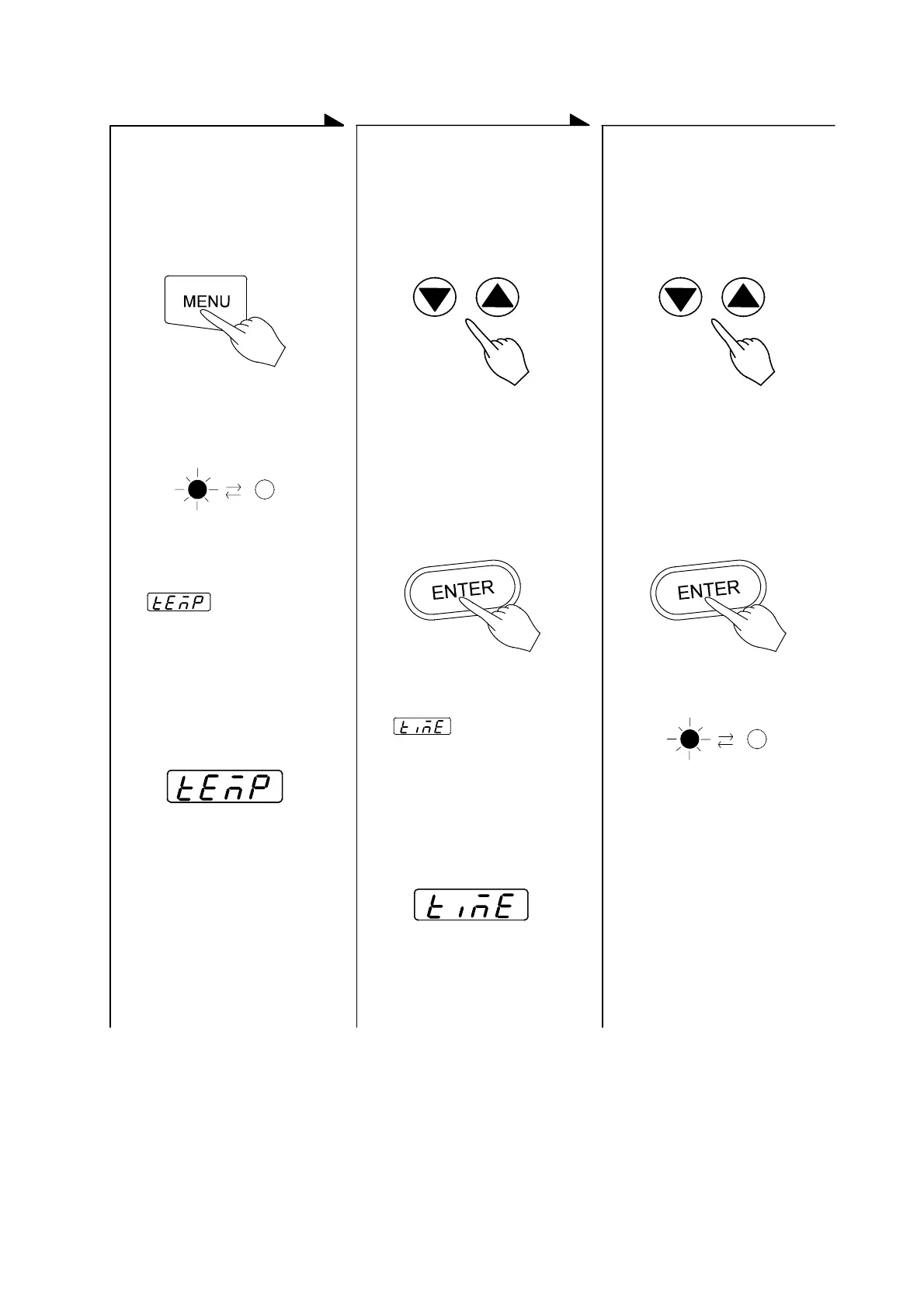
Selection of operation menu Input of set temperature Inputting the desired set
time
z Select Auto START mode
by pushing the MENU key.
z Push either the ▲key or
the ▼key to display the
desired temperature on the
main display and push the
ENTER key
z Push either the ▲key or
the ▼key to blink start
time (or the hour) on the
main display, and press
the ENTER key
Push the MENU key
Press either the ▲key or the
▼key several times.
Press either the ▲key or the
▼key several times.
↓
(Note) Then, the desired set
temperature will appear on the
main display.
(Note) Then, the desired set
temperature will appear on the
main display.
The operation menu lamp of
an AUTO START blinks.
↓ ↓
↓
Press the ENTER key. Press the ENTER key.
↓ ↓
z will appear on
the sub display (omission
of temperature) and the
desired temperature can
be input.
STANDBY lamp blinks.
z will appear on
the sub display (showing
time) and the operation
start time can be input.
(running start time・hours)
Sub display
Sub display
z The STANDBY lamp of
the operation monitor
blinks.
z The operation will be in
standby condition.
z After reaching the set time
(or hour), the oven will
start to run the auto start
operation to the renewed
temperature.


 To Next Page