23
Programmed operation method
Selection of operation menu Input of set temperature Input of time
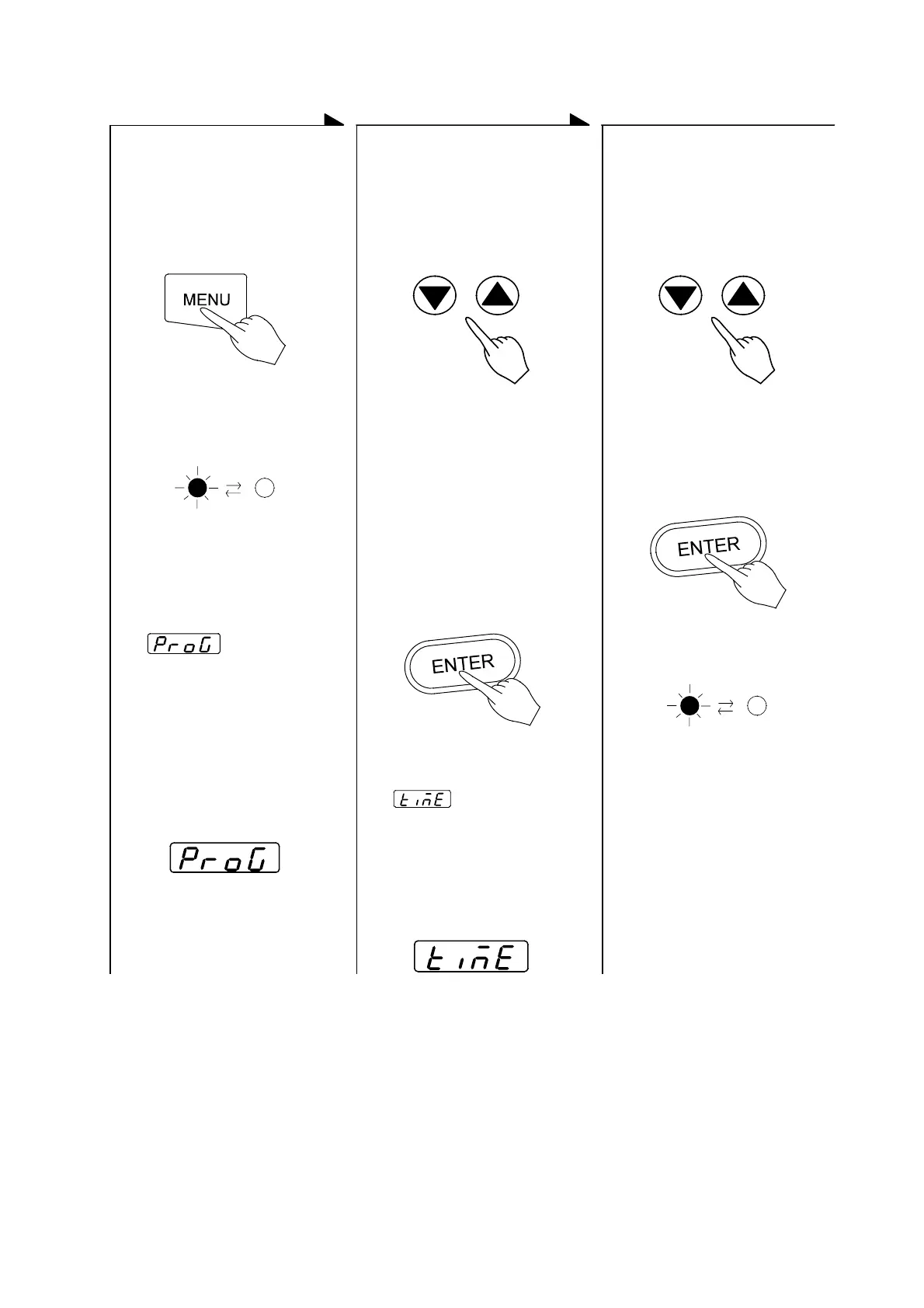
z Press the MENU key and
select the programmed
operation.
z Push either the ▲key or
the ▼key to indicate an
desired program number
on the main display, and
press the ENTER key
z Push either the ▲key or
the ▼key to blink your
desired operation start
time (or hour) on the main
display, and press the
ENTER key
Push the MENU key
Press either the ▲key or the
▼key several times.
Press either the ▲key or the
▼key several times.
↓
The program number will
appear on the main display.
The desired set time will
appear on the main display.
↓
The operation menu lamp of
the PROGRAM blinks.
NOTE:
if no programs have been set, -
is blinking.
See the Operating Instructions for
Programmable Controller to set a
new program.
↓ ↓
Press the ENTER key.
↓
Press the ENTER key.
↓
z will appear on
the sub display and the
execution program number
can be input.
z will appear on
the sub display and the
operation stop time can be
input. (running stop time or
hours)
z The standby lamp on the
operation monitor blinks.
(Operation is in STANDBY
MODE)
z The operation will start
after the set time is up.
Sub display
Sub display


 To Next Page