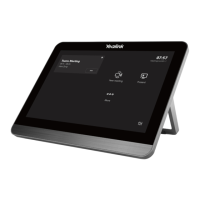
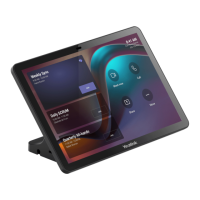
The Yealink MTouchPlus-EXT is an extension touch panel designed to enhance the control and interaction experience within a conference room environment, particularly when paired with a Yealink MTouch Plus system. It serves as a secondary or extended control interface, allowing users to manage various aspects of their meeting experience from a convenient location.
Function Description
The primary function of the MTouchPlus-EXT is to provide an additional point of control for Yealink's MTouch Plus-based conferencing solutions. It mirrors the functionality of the main MTouch Plus, offering access to room controls, camera management, status information, and device settings. This extension panel is particularly useful in larger conference rooms or spaces where a single control point might not be sufficient, enabling participants in different areas of the room to easily interact with the system.
When integrated into a Yealink conferencing setup, the MTouchPlus-EXT allows users to:
- Access Room Controls: This includes managing various environmental aspects of the conference room, such as lighting, blinds, or other integrated smart room features, if supported by the overall system.
- Control Cameras: Users can adjust camera angles, zoom in or out, and switch between different camera presets directly from the MTouchPlus-EXT. This is crucial for ensuring all participants are visible and the focus is on the active speaker or content.
- View System Status: The panel displays real-time information about the system's operational status, including network connectivity, device health, and ongoing meeting details.
- Manage Device Settings: Basic device configurations and preferences can be accessed and adjusted, providing flexibility in tailoring the user experience.
- Initiate and Join Meetings: Depending on the integration with the conferencing platform, users can potentially start new meetings or join scheduled ones with a few taps on the screen.
- Share Content: While the MTouchPlus-EXT primarily acts as a control interface, it facilitates content sharing by providing the necessary controls to initiate and manage presentations or screen shares from connected devices.
The MTouchPlus-EXT operates by connecting to the same local area network (LAN) as the main MTouch Plus unit. Once connected and paired, it effectively becomes an extension of the main control panel, offering redundant or distributed control capabilities. This ensures that meeting participants have convenient access to system controls, regardless of their seating position in the room.
Usage Features
The MTouchPlus-EXT is designed for flexible deployment and ease of use, offering several features that enhance its utility in various conference room settings:
- Flexible Installation Options: The device supports multiple installation methods to suit different room layouts and aesthetic preferences. It can be placed on a table, either freestanding or fixed, or mounted on a wall.
- Table Installation: For table placement, the MTouchPlus-EXT can simply rest on its stand. For a more secure setup, it can be fixed to the table using screws, preventing accidental displacement. The design also accommodates cable management, allowing the power and network cables to be routed discreetly through an outlet hole in the table.
- Wall Installation: Wall mounting is an option for spaces where table space is limited or a cleaner, more integrated look is desired. The recommended height for wall installation is between 1m and 1.5m from the ground, ensuring comfortable access for most users. Similar to table installation, provisions are made for wiring through the wall to maintain a tidy appearance.
- Power over Ethernet (PoE) Support: The MTouchPlus-EXT can be powered using PoE, which simplifies installation by allowing both power and data to be transmitted over a single Ethernet cable. This reduces cable clutter and the need for separate power outlets near the device. Users have two primary deployment methods for powering the device:
- Using an included PoE power supply: A dedicated PoE adapter can be used to provide power to the MTouchPlus-EXT. The network cable connects the MTouchPlus-EXT's network port to the PoE port of this adapter, and another network cable connects the adapter's Ethernet IN interface to the LAN.
- Direct connection to a PoE switch: For environments with existing PoE infrastructure, the MTouchPlus-EXT can be directly connected to a PoE switch on the same LAN, further streamlining the cabling.
- Seamless Pairing with MTouch Plus: The pairing process is straightforward, involving entering the IP address of the main MTouch Plus and a displayed PIN code on the MTouchPlus-EXT. Once paired, the extension panel automatically mirrors the screen and functionality of the main unit, providing an intuitive and consistent user experience. The system is designed to ensure that both the MTouchPlus-EXT and MTouch Plus are on the same network segment for successful communication.
- Intuitive User Interface: As an extension of the MTouch Plus, the MTouchPlus-EXT inherits its user-friendly interface, making it easy for anyone to navigate and control meeting functions without extensive training. The interface provides clear access to room controls, camera management, system status, and device settings.
- Enhanced Room Coverage: By providing an additional control point, the MTouchPlus-EXT ensures that participants across a larger conference room can easily access and manage meeting functionalities, improving overall meeting efficiency and participant engagement. This is particularly beneficial in U-shaped tables or very long conference tables where reaching a single central control panel might be inconvenient.
Maintenance Features
While the manual primarily focuses on installation and initial setup, the design of the MTouchPlus-EXT implies several maintenance-friendly aspects:
- Durable Construction: The components and materials used, such as SUS304 for screws and polyamide for mounting accessories, suggest a robust build designed for longevity in a typical office environment.
- Simplified Troubleshooting: The clear pairing process and network connectivity requirements (same LAN, IP address visibility) make it relatively easy to diagnose connection issues. The ability to view system status on the panel itself provides immediate feedback on operational health.
- Modular Design (Implied): The separation of the main MTouch Plus and the MTouchPlus-EXT as distinct units allows for modular deployment and potential replacement of individual components if necessary, without affecting the entire system.
- Standardized Connectivity: The use of standard CAT5e UTP cables and RJ45 connectors for network and power (PoE) simplifies cabling and allows for easy replacement of cables if they become damaged.
- Firmware Updates (Implied): As part of the Yealink ecosystem, it is highly probable that the MTouchPlus-EXT benefits from firmware updates, which can introduce new features, improve performance, and address security vulnerabilities, ensuring the device remains current and functional over time. These updates would typically be managed through the main MTouch Plus system or a centralized device management platform.
- Easy Cleaning: The smooth surfaces of the touch panel are generally easy to wipe clean, which is important for maintaining hygiene in shared meeting spaces.
In summary, the Yealink MTouchPlus-EXT is a versatile and user-friendly extension touch panel that significantly enhances the control capabilities of Yealink MTouch Plus-based conferencing systems. Its flexible installation, PoE support, and seamless integration contribute to a more efficient and accessible meeting experience, while its robust design and straightforward setup minimize maintenance efforts.

 Need help?
 General

 To Next Page