2700 Oregon Road • Northwood, OH 43619 | 1645 West Chester Pike • West Chester, PA 19382 • 1.888.808.6111 | www.telesystem.us
Available features may vary. Provided feature set is based on the original order and
the system administrator’s requests for each deployment. Please contact your system
administrator or Telesystem directly to discuss any additions to the system.
Make a call
Lift the handset then enter the phone number, extension, or code you wish to dial.
Tap Send to initiate the call or wait for it to go through.
Most deployments should be sure to dial 1 before an out of area phone number.
Answer a call
Lift the handset then begin speaking to the caller.
Alternately, the Answer soft key, Speaker button, or Headset button may be pressed
to answer an incoming call.
End a call
Hang up the handset or tap the End Call soft key.
Speaker
Press the speaker button to use speaker audio mode.
Headset
Press the headset button to use headset mode audio (must have a headset
connected).
Volume
Press the volume buttons to adjust volume for your ringer when idle or
audio mode while on a live call.
Mute
Press the mute button to mute your audio while on a call. Press again to
disengage.
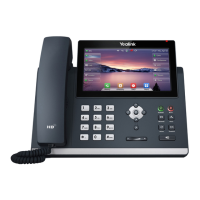
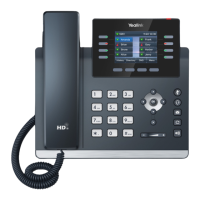
Programmable Top Keys: One line key plus up to 28 other
feature buttons may be programmed on the touchscreen.



 To Next Page