EasyManua.ls Logo

Yealink T48s - User Manual

Yealink T48s
17 pages
Print Icon
To Next Page IconTo Next Page
Loading...
Claranet | Hosted Voice V2 Yealink T48S User Guide | All Rights Reserved © 2010 Claranet
Contents
Claranet Hosted Voice v2 ........................................................................................................................ 1
................................................................................................................................................................... 1
Yealink W60P ................................................................................................ Error! Bookmark not defined.
Phone Installation ........................................................................................ Error! Bookmark not defined.
Provisioning.................................................................................................. Error! Bookmark not defined.
Getting to know your phone .................................................................. Error! Bookmark not defined.
Handset Description ......................................................................... Error! Bookmark not defined.
Phone Display (Views) ..................................................................... Error! Bookmark not defined.
Icon Instructions ............................................................................... Error! Bookmark not defined.
Checking System Status .................................................................. Error! Bookmark not defined.
Handset Registration ........................................................................ Error! Bookmark not defined.
Shortcuts .......................................................................................... Error! Bookmark not defined.
Basic Operations .................................................................................. Error! Bookmark not defined.
Turning Handset On/Off ................................................................... Error! Bookmark not defined.
Basic Call Features ............................................................................... Error! Bookmark not defined.
Placing Calls .................................................................................... Error! Bookmark not defined.
Answering Calls ............................................................................... Error! Bookmark not defined.
Ending Calls ..................................................................................... Error! Bookmark not defined.
Call Hold and Resume ..................................................................... Error! Bookmark not defined.
General information ..................................................................................... Error! Bookmark not defined.
Claranet Hosted Voice v2
Yealink T48S
User Guide
July 2018

Other manuals for Yealink T48s

Question and Answer IconNeed help?

Do you have a question about the Yealink T48s and is the answer not in the manual?

Summary

Phone Installation Guide

Attaching Stand or Wall Mount

Instructions for attaching the phone stand or optional wall mount bracket for device placement.

Network and Power Connections

Guidance on connecting the phone to the network and power sources (AC or PoE).

Provisioning the Phone

Automatic Provisioning Process

Details on how the phone automatically provisions the Hosted Voice service after connection.

Basic Call Features

Placing Calls

Instructions on how to initiate calls using the handset, headset, or speakerphone.

Answering Calls

Steps to answer incoming calls using different modes: handset, speakerphone, or headset.

Transferring Calls

Methods for transferring calls: blind, semi-attended, and attended transfers.

Voicemail Access

Overview

The Yealink SIP-T48S is an IP phone designed for business communication, offering a comprehensive suite of features for efficient call management and enhanced productivity. It integrates seamlessly with Claranet Hosted Voice v2 services, providing a reliable and user-friendly experience.

Function Description

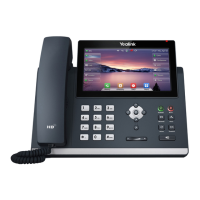
The primary function of the Yealink SIP-T48S is to facilitate voice communication over an IP network. It supports various call features, including placing, answering, transferring, and ending calls, as well as conference calling. The phone is pre-loaded with information for automatic provisioning with the Hosted Voice service, simplifying setup. It features a touch-sensitive LCD screen that displays call information, messages, soft keys, time, and date, along with various icons indicating phone status and features. The keypad allows for dialing numbers, entering text, and navigating menus. The phone supports both AC power and Power over Ethernet (PoE) for flexible deployment. It can be used with a handset, headset, or in speakerphone mode.

Usage Features

The Yealink SIP-T48S offers a range of usage features to enhance the calling experience:

  • Call Management: Users can easily place calls using the handset, speakerphone, or headset. The phone supports dialing numbers directly, or selecting contacts from call history, local directory, or a remote phone book. Answering calls is straightforward, whether using the handset, hands-free speakerphone, or headset. Calls can be transferred in three ways: blind transfer (direct transfer without consulting), semi-attended transfer (transfer when the target phone is ringing), and attended transfer (transfer after prior consulting). Ending calls is also simple, by hanging up the handset, pressing the Cancel soft key, or using the speakerphone button.
  • Conference Calls: The phone supports conference calling, allowing users to join multiple parties in a single conversation. During a conference call, options are available to place the conference on hold, split the conference into individual calls, place a new call, mute the conference, or drop the conference call.
  • Do Not Disturb (DND): The DND feature allows users to reject incoming calls automatically. When DND is enabled, an icon appears on the idle screen, and missed call notifications are displayed.
  • Call History: The phone maintains a detailed call history, categorized into All, Placed, Received, Missed, and Forwarded call lists. Users can easily view call records and place calls directly from the history list.
  • Contact Directory: The phone includes a contact directory for storing local contacts and accessing corporate directories. Users can add new contacts, search for existing contacts, and dial numbers directly from the directory.
  • Voicemail: The phone provides voicemail functionality. When a new voicemail is received, a warning tone is played, the power indicator LED flashes red, and a prompt message along with an icon appears on the LCD screen. Users can dial out to the voicemail access code to listen to messages.
  • Input Modes: The keypad supports various input modes, including multi-lingual lowercase and uppercase letters, alphanumeric input, and numeric input, providing flexibility for text entry.
  • Volume Control: A dedicated volume key allows adjustment of the handset, headset, speakerphone, and ringer volumes.
  • Mute Function: A mute key toggles the mute feature, allowing users to silence their microphone during a call.
  • Hold Function: A hold key places a call on hold or resumes a held call.
  • Redial Function: A redial key allows users to redial a previously dialed number quickly.
  • Navigation: Arrow keys are provided for positioning the cursor within text, enabling or disabling fields, turning pages, scrolling through values, and accessing History and Directory. An "OK" key confirms actions or answers incoming calls.
  • Headset Mode: A dedicated headset key toggles and indicates the headset mode, facilitating hands-free communication.
  • Speakerphone Mode: A speakerphone key toggles the hands-free speakerphone mode.
  • Message Key: A message key provides quick access to voice messages.
  • DSS Key: The DSS (Direct Station Select) key provides quick access to the line key screen, allowing users to configure desired line keys.
  • Wallpaper Customization: The phone allows for customization of the wallpaper displayed on the screen.

Maintenance Features

The Yealink SIP-T48S is designed with ease of maintenance in mind, with clear guidelines for care and troubleshooting:

  • Cleaning: The handset and base should be cleaned with a damp (not wet) cloth or an anti-static wipe. It is important to avoid household polish, which can damage the product, and dry cloths, which can cause static shock.
  • Environmental Considerations: To ensure optimal performance and longevity, the phone should not be exposed to direct sunlight, placed on surfaces that generate fibers (like carpets), or in locations that prevent proper airflow. It should not be submerged in water or used in damp/humid conditions. Exposure to fire, explosive, or other hazardous conditions should also be avoided.
  • Firmware Updates: The phone automatically performs firmware updates upon connection to the network, ensuring it runs the latest software for optimal functionality and security. Users are advised to allow the phone sufficient time to complete these updates.
  • Provisioning Status Indicators: The phone provides visual cues to indicate successful or failed provisioning. A specific symbol next to the line key indicates correct provisioning, while a different symbol indicates a failure, prompting users to contact their service provider if issues arise.
  • Troubleshooting Guidance: The user guide provides clear instructions for initial setup and basic usage. In case of problems, users are advised to contact their Service Provider for assistance, ensuring expert support for complex issues.
  • Product Disposal: The product includes a symbol indicating it is classified as Electrical or Electronic Equipment, and should not be disposed of with household or commercial waste. This aligns with the Waste of Electrical and Electronic Equipment (WEEE) Directive (2002/96/EC) to promote recycling and minimize environmental impact. Business users are advised to check their purchase contract terms for disposal.
  • Guarantee: The phone comes with a 12-month guarantee from the date of purchase, covering defects due to faulty materials or inferior workmanship. This guarantee provides for repair or replacement, subject to conditions such as proof of purchase and return of the equipment as instructed. It does not cover faults caused by accidents, misuse, fair wear and tear, neglect, tampering, or unauthorized repairs.

Yealink T48s Specifications

General IconGeneral
Full duplexYes
Lines quantity- lines
Phonebook capacity- entries
Number of VoIP accounts-
Voice codecsAGC, AJB, CNG, G.711alaw, G.711ulaw, G.722, G.723.1, G.726, G.729A, G.729B, PLC, SILK, VAD, iLBC
Compatible productsSkype for Business
Dual-Tone Multi-Frequency (DTMF) modesIn-band, Out-of band, SIP info
MountingDesk/Wall
Handset typeWired handset
Product typeIP Phone
Product colorBlack
Volume controlDigital
USB 2.0 ports quantity1
Ethernet LAN (RJ-45) ports2
AC adapter input voltage100 - 240 V
AC adapter output current2 A
AC adapter output voltage5 V
Power consumption (typical)4.9 W
Power consumption (Power over Ethernet (PoE))7.5 W
Front cameraNo
Security algorithmsHTTPS, MD5, SRTP, TLS
Networking standardsIEEE 802.1Q, IEEE 802.1p, IEEE 802.1x, IEEE 802.3af
Ethernet LAN interface typeGigabit Ethernet
Supported network protocolsSIP v1 (RFC2543), v2 (RFC3261), LLDP-MED VLAN, IPv4/IPv6, UDP/TCP/DNS-SRV (RFC 3263)
Cables includedLAN (RJ-45)
Number of handles included1 pc(s)
Display diagonal7 \
Touchscreen typeCapacitive
Display resolution800 x 480 pixels
Graphical user interface (GUI) languageMulti
Storage temperature (T-T)-10 - 50 °C
Operating relative humidity (H-H)10 - 95 %
Master (outer) case width660 mm
Master (outer) case length338 mm
Master (outer) case weight9000 g
Master (outer) case net weight8200 g
Quantity per master (outer) case5 pc(s)
Weight and Dimensions IconWeight and Dimensions
Depth226 mm
Width266 mm
Height185 mm
Package depth324 mm
Package width263 mm
Package height128 mm

Related product manuals