Installation Guide | 2 - Hardware Overview | 3
Table 1. (continued)
No. Feature Description
• BRI:
# Orange: blinking: The BRI line is disconnected.
# Orange: static: The BRI line is connected or in
use.
• FXO:
# Red: static: The PSTN line is idle.
# Red: blinking slowly: No PSTN line is connected
to the FXO port.
# Red: blinking rapidly: The PSTN line is busy.
# 1-8 port (RJ11 ports) • FXS port (green light): For the connection of analog
phones or fax machines.
• BRI port (orange light): For the connection of ISDN BRI
lines.
• FXO port (red light): For the connection of PSTN lines or
FXS ports of traditional PBX.
# Reset button Press the button to restore to factory defaults.
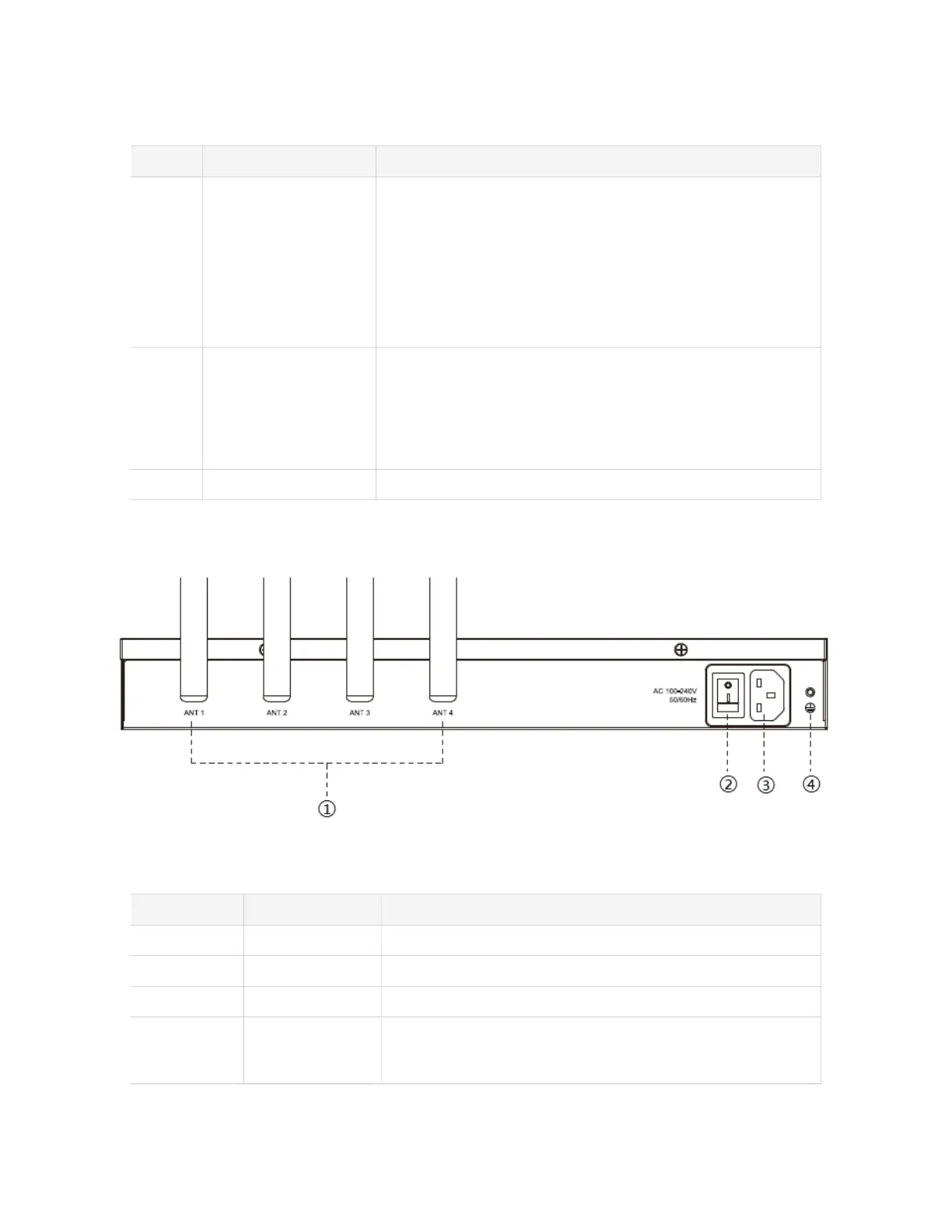
Rear panel
Table 2.
No. Feature Description
# Antenna Socket Rotate the antenna into the Antenna Socket.
# Power Switch Press this button to switch on/off the device.
# Power Inlet Connect the supplied power supply to the port.
# Protective Earth Connect to the ground to reduce the risk of electrocution to the
user or protect the PBX from bad effects of external noise in
case of a lightning strike.











 To Next Page