Hardware Overview
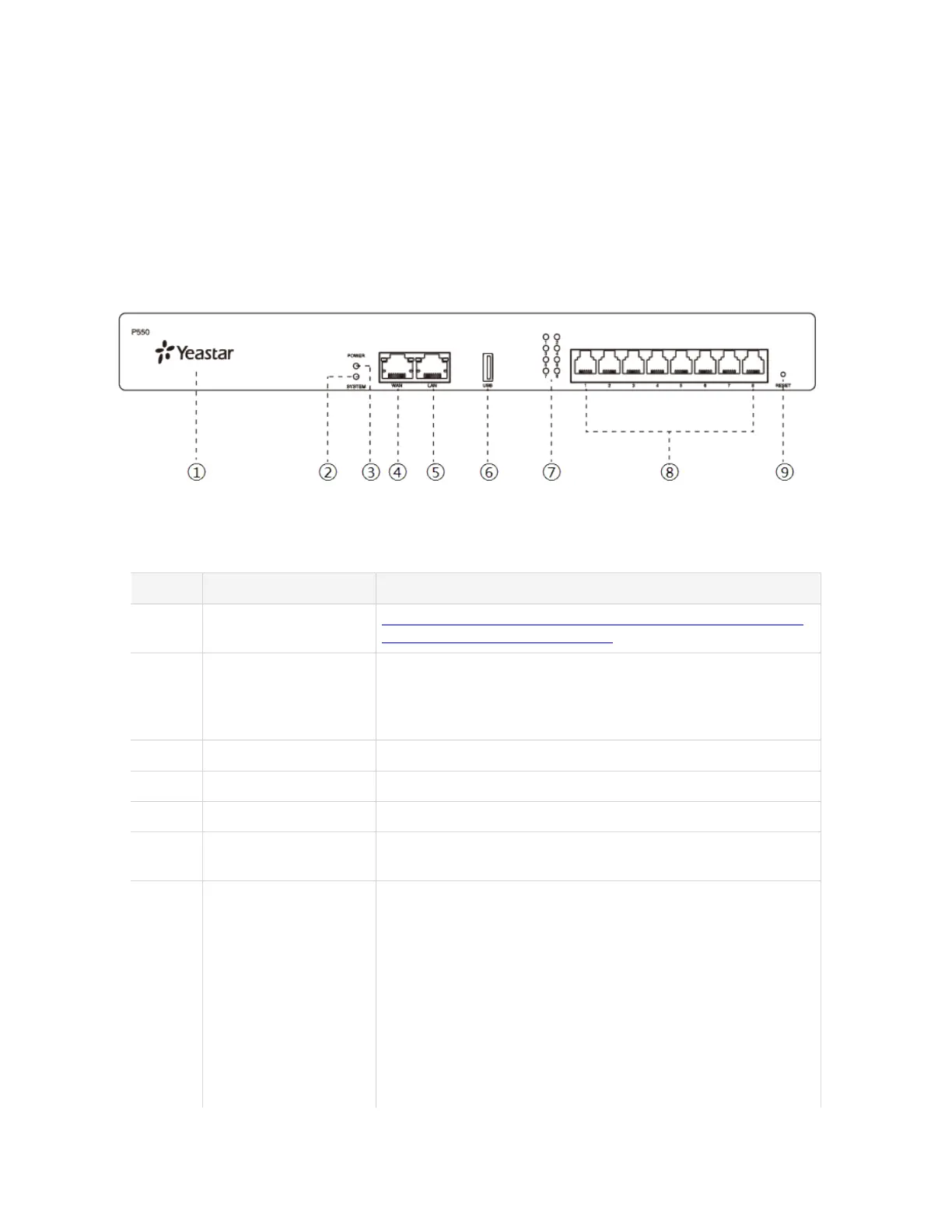
Yeastar P550 Overview
Front panel
Table 1.
No. Feature Description
# NFC Tag Tap NFC-capable mobile phone's back against Yeastar logo to
quickly configure network settings.
# System Indicator Indicate the system status.
• Blinking: The system is working properly.
• Static/Off: The system goes wrong.
# Power Indicator Indicate the power status.
# WAN Status Indicator Indicate the WAN status.
# LAN Status Indicator Indicate the LAN status.
# USB Slot Insert a USB flash drive to store voicemails, logs, or recording
files.
# 1-8 LED (RJ11 port
status)
Indicate the ports' status.
• FXS:
# Green: static: The analog phone or fax machine
is idle.
# Green: blinking: The analog phone or fax
machine is busy.
• GSM/3G/4G LTE:
# Red: static: The GSM/3G/4G LTE trunk is idle.
# Red: blinking slowly: No SIM card.
# Red: blinking rapidly: The GSM/3G/4G LTE
trunk is in use.











 To Next Page