19
2.8 Basic interface
2.8.1 Android application interface
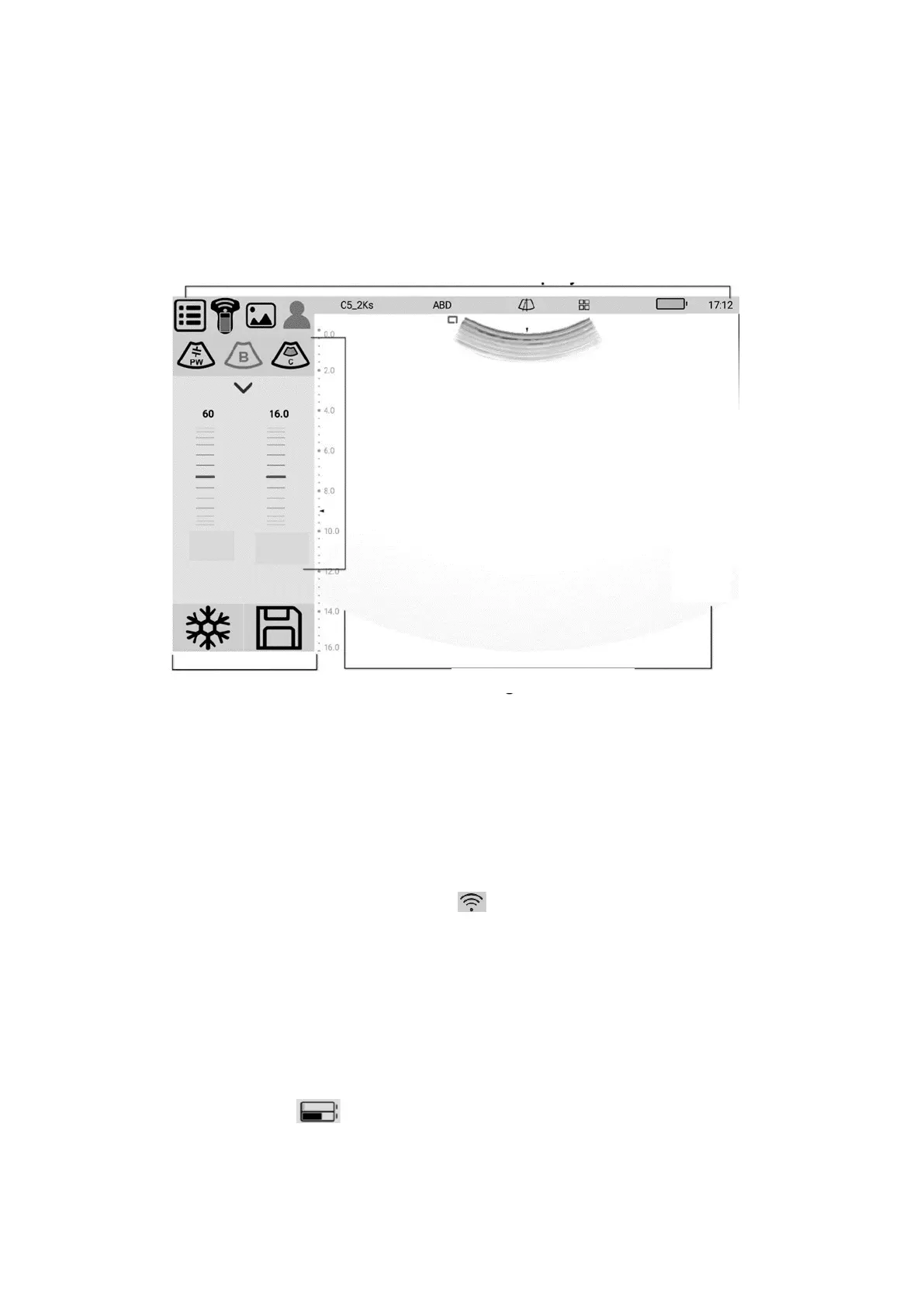
The interface layout diagram for the Android application is as follows:
2.8.1 Interface layout diagram
Status and information display area
The status and information display area includes system menu, WiFi/USB connection
sign, patient information management, probe type, inspection type, puncture line, battery
charge and system time.
➢ System menu
Contains pre-set, version information, operation manual.
➢ WiFi/USB connection sign
Displays the current probe connection.When connected to a WIFI, the flag indicates
signal strength,and you can also click to pop up the probe selection dialog box
➢ Probe type
Displays the currently used probe model or the default probe model.
➢ Inspection type
Displays the type of examination currently in use, such as abdomen, heart, etc., click to
select the check mode.
➢ Guide line
The system support 2 guide lines, when you toggle it on, you can adjust the position and
angle of the guide line.
➢ Battery charge
Probe battery power (upper): after the probe is connected, the current probe is displayed.
Device battery power (below): the display device opens the application and displays the
current power of the display device (mobile phone / tablet).


 To Next Page