
 Need help?
Do you have a question about the Youkey Q7 and is the answer not in the manual?
Important disclaimers regarding manual content, product modification, and quality assurance.
Details the standard warranty, free customer service, and charges after warranty expiration.
Warns against modifying the equipment, components, software, or cables.
Lists product name, model, registrant, addresses, and contact information.
Provides company name, address, and contact number for after-sales service.
Classifies safety based on shock, liquid protection, and defines DANGER/WARNING/CAUTION symbols.
Warns against using scanner in combustible gas or flammable liquid environments due to explosion risk.
Lists crucial warnings for probe handling, power cables, sterilization, and transducer status.
States equipment must be operated by qualified personnel using correct techniques.
Advises against prolonged scanning of vulnerable patients and following the ALARA principle.
Covers incompatible materials, sterile gloves, coupling agents, and probe temperature.
Explains the meaning of warning signs and the need to read instructions carefully.
Specifies operating temperature, humidity, and atmospheric pressure for the probe.
Defines target users, clinical applications, and contraindications for the system.
Lists imaging modes, software versions, and IT environment requirements.
Details battery specs, charging input, and operating/storage environmental conditions.
Provides net weight and dimensions for various probe types.
Outlines the main system components and configurable probe models.
Lists the standard components included in the system package.
Details types, uses, frequencies, and ranges of optional transducers.
Explains device symbols for Type BF, serial number, date, IPX4, and CE mark.
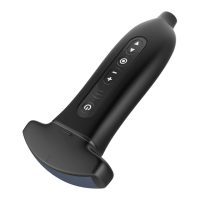
Identifies and describes the function of key system components: Transducer, Main Device, Control Panel, USB-C.
Details the functions of control panel buttons for power, gain, depth, and mode changes.
Describes the layout and elements of the Android interface, including status display and function keys.
Explains menu structure, parameter adjustment, and image display areas in the Android app.
Details shortcut keys and thumbnail management features.
Presents the Windows interface layout, including information and status areas.
Details elements like manufacturer ID, patient info, freezing mark, and probe type in the Windows interface.
Explains image parameters, menu operations, and softkey controls in the Windows application.
Describes thumbnail handling, page turning, export, and function menu options.
Covers password recovery, user roles (Admin, Manager), and password setting.
Explains the power indicator light status and features.
Details the meaning of battery level indicators based on visual cues.
Explains system power needs, charging, and battery self-discharge.
Provides instructions and warnings for turning the probe on and pre-checks.
Details turning off the probe and cleaning coupling agent importance.
Explains the procedure for changing the detachable transducer.
Covers Wi-Fi and USB connection for Windows and Android devices.
Lists imaging modes (B, M, Color, Power, PW) and basic parameter adjustment.
Details adjustable parameters via control panel and softkey for B mode.
Explains adjusting Gain, Depth, and Focus for optimal image quality.
Covers frequency, persistence, and dynamic range adjustments for image enhancement.
Explains enhancing contours and merging frames for clearer images.
Covers image flipping, acoustical power, and gray map adjustments.
Lists parameters for M mode, including Gain, Depth, and Frequency.
Details adjustments for Gain, Depth, and Frequency in M mode.
Explains adjusting scan speed and dynamic range for detailed M mode observations.
Covers using color maps, gray maps, and time marks for enhanced M mode imaging.
Explains M Soften for noise reduction and M line adjustment.
Warns that Color Doppler is for reference only and not for long-term fetal scans.
Lists adjustable parameters for Color mode, noting shared settings with B mode.
Explains adjusting velocity, steer, and wall filter for optimal color flow imaging.
Covers adjusting frequency, persistence, and priority for color mode imaging.
Describes Power Doppler mode and lists adjustable parameters like Gain and Depth.
Details adjusting Gain and using color maps for perfusion information in Power mode.
Explains adjusting dynamic range and steer for directional information in Power mode.
Warns about PW mode timing inconsistency and lists adjustable parameters.
Lists parameters for PW mode, adjustable via control panel and softkey.
Covers setting auto calculation and adjusting dynamic range for spectrum display.
Details adjusting audio, scan speed, and acoustical power in PW mode.
Explains adjusting gain, gray map, and baseline for spectrum clarity.
Covers adjusting quick angle, angle, and SV for sampling volume gate.
Warns about data loss and clearing of measurement data when changing modes.
Introduces conventional and applied special measuring packages.
Details measurements for 2D images like Distance, Angle, Area, and Volume.
Lists M mode measurements such as Distance, Time, Gradient, and Heart rate.
Outlines PW mode measurements like D speed, PS/ED, and D trace.
Lists specialized measurement packages for different applications.
Explains freezing images and the system's support for movie playback and editing.
Details how to play back and save cineloop images.
Covers adding comments and using body marks for image explanation.
Describes probe types (Linear, Convex, Cavity) and their composition.
Emphasizes using probe covers for infection prevention, with usage and safety instructions.
Outlines procedures for checking up and maintaining probe covers.
Details regular checks, service life, and warnings against using beyond lifespan.
Provides instructions for cleaning probes after use with specific solutions and warnings.
Explains the process of cleaning and disinfecting the probe, with safety warnings for non-immersion devices.
Lists precautions for disinfection and provides step-by-step cleaning instructions.
Describes using 75% medical grade alcohol for general disinfection and noting disinfectant solution guidelines.
Lists market-popular medical grade disinfection and cleaning products.
Details items to check after cleaning/disinfection, including lens surface, shell, and residue.
Explains how to enter and exit the puncture mode via the softkey area.
Guides on calibrating puncture leads using the biopsy guide and transducer under water.
Discusses the general safety of ultrasound and potential biological effects at high intensity.
Advises careful use to obtain clinical information and keep exposure as low as reasonably achievable.
Explains MI (Mechanical Index) for bioeffects and TI (Thermal Index) for tissue temperature rise.
Instructs operators to monitor TI and MI values for effective diagnostic information at lowest output.
Details how to set TI display items and power levels via the preset parameter page.
Explains acoustic power adjustment, default settings, and user responsibility.
Mentions maximum output limits based on FDA standards and AP value adjustment.
Describes direct, indirect, and receiver controls for acoustic output.
Explains the method for determining acoustic output parameters using attenuation.
Lists FDA track 3 maximum sound output limits for different applications.
Explains sources of uncertainty in displayed MI/TI values due to measurement and system variability.
Lists uncertainties for Ispta, Isppa, frequency, power, and pressure.
Provides a list of reference documents related to ultrasound safety and standards.
Presents measured surface temperatures and rises for transducers.
States compliance with EMC standards and general requirements for medical equipment.
Lists cable specifications and warns against using inappropriate accessories.
Details EMC guides, RF emission, and interference avoidance.
Discusses suitability for home/direct connection and interference avoidance.
Covers guidance on electrostatic discharge, pulse, surge, voltage variations, and magnetic fields.
Details conduction disturbance rejection and radiated immunity test levels and environments.
Provides recommended distances from RF communication equipment to avoid interference.
Lists Gain and Maximal acoustic output for B mode.
Details Depth parameters for M, C, Power, and PW modes across different probes.
Shows substance content in components using O/X symbols as per SJ/T11363-2006.
Defines symbols used in acoustic output tables, such as attenuation, beam area, and intensity.
Continues defining symbols related to acoustic output, including MI, TI, and intensity measures.
 General
| Category | Medical Equipment |
|---|---|
| Measurement Range | 32.0°C - 42.9°C (89.6°F - 109.2°F) |
| Display | LCD |
| Product Name | Youkey Q7 |
| Type | Infrared Thermometer |
| Accuracy | ±0.2°C (±0.4°F) |

 To Next Page