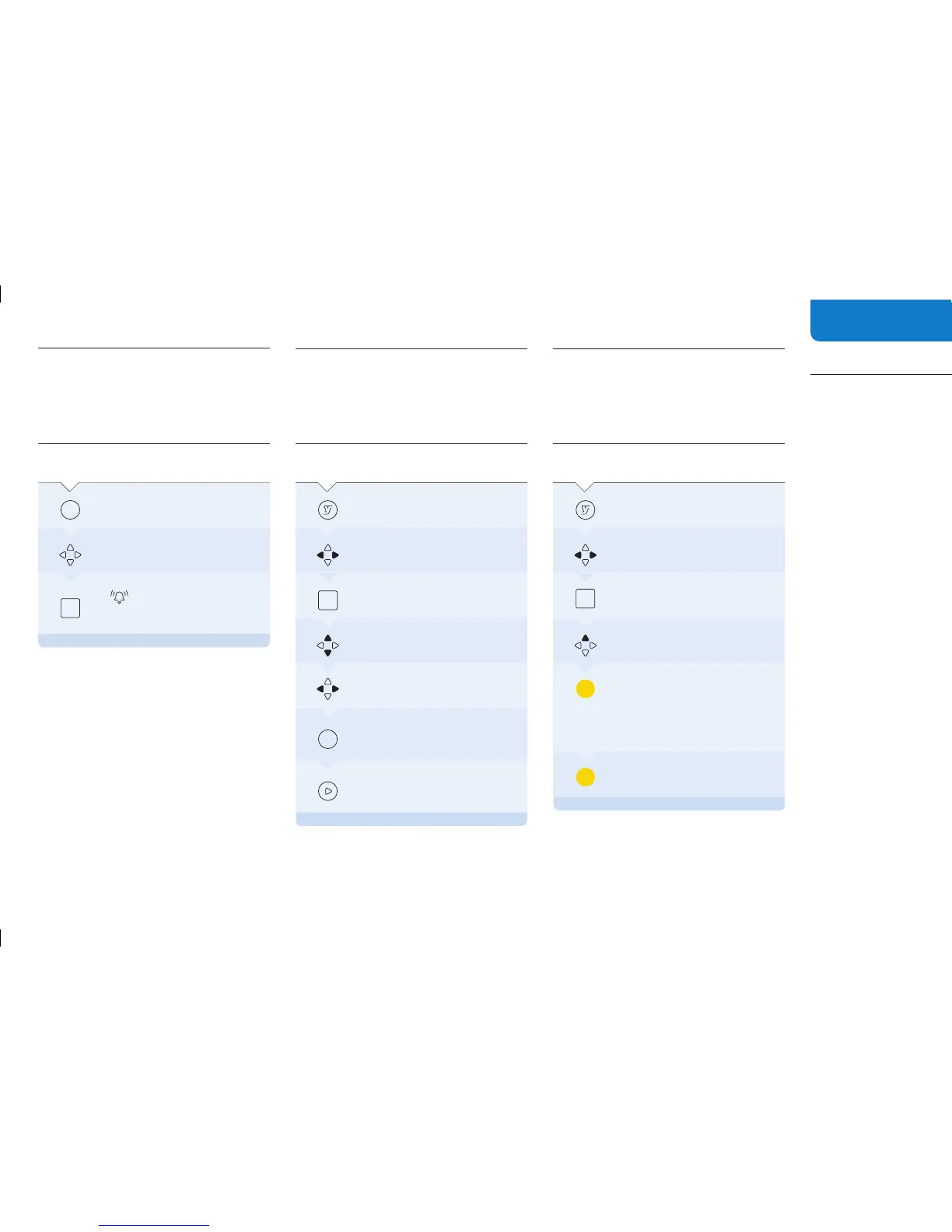
Set a reminder
You can set a reminder in the YouView Guide to
alert you when your favourite shows are about
to start.
ON YOUR
REMOTE
PRESS:
Guide
To access the YouView Guide
Find the show you want to
set
a reminder for
When a reminder has been set,
will appear. When the show
is
about to start, a reminder will
appear
on your TV screen
OK
Find your recordings
Everything you’ve recorded will be stored in the
same place.
ON YOUR
REMOTE
PRESS:
To access the main menu
Scroll across to MyView
OK
Scroll up or down to find a show
To move between pages
For more information on the shows
you’ve
recorded
Info
To watch
Protect your favourite
recordings
There may be shows and films you want to keep
and watch over again.
ON YOUR
REMOTE
PRESS:
To access the main menu
Scroll across to MyView
OK
Jump up to list of shows
To lock a show. This protects it from
Auto-Delete,
which automatically
deletes
your recordings, starting
with
the oldest first, when there is
no
more space to record new
programmes
To unlock a show that was locked
13


 To Next Page